
Routing in Express.js is the process of mapping incoming HTTP requests (defined by method and URL) to specific handler functions. It enables developers to configure endpoints for various paths and operations, such as rendering views, processing form data, or performing CRUD actions on resources.
Syntax:
app.METHOD(PATH, HANDLER);In the above syntax:
- app: Represents an instance of an Express application.
- METHOD: Represents an HTTP method like GET, POST, PUT, DELETE.
- PATH: Defines the endpoint (route) where the request will be handled.
- HANDLER: A function that executes when the route is accessed.
How Routing Work in ExpressJS?
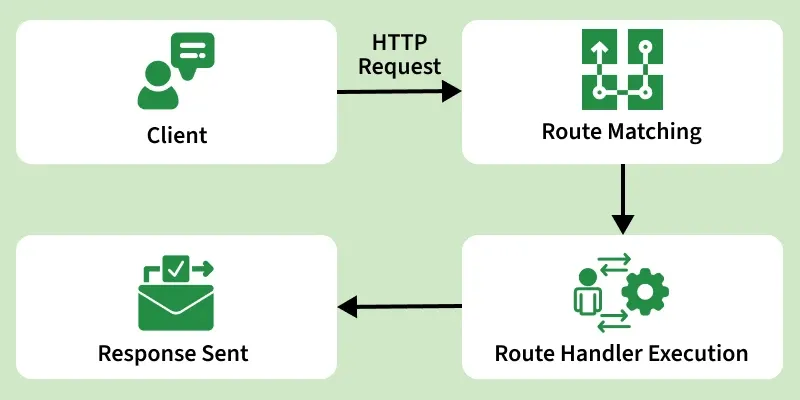
Routing in Express.js follows a simple flow to handle client requests:
- HTTP Request: Shows the incoming request with method and path (e.g., GET /users).
- Route Matching: Lists all defined routes and shows which route matches the request (green check) and which don’t (red cross).
- Handler Execution: Indicates that the matching route’s handler function is executed (req, res).
- Sending Response: Shows how the server sends a response back to the client using methods like res.send(), res.json(), or res.render().
Now let's understand this with the help of example:
const express = require('express');
const app = express();

app.get('/', (req, res) => {
    res.send('Welcome to Express Routing!');
});

app.listen(3000, () => {
    console.log('Server is running on port 3000');
});
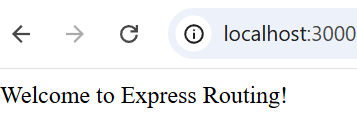
Output
In this example
- express is imported and an app instance is created.
- app.get('/', ...) defines a route for GET requests to the root URL / and sends a response “Welcome to Express Routing!”.
- app.listen(3000, ...) starts the server on port 3000 and logs a message when it’s running.
Types of Routes
Here are the different types of routes
Basic Routes in ExpressJS
Basic routing involves defining a URL and specifying an HTTP method (GET, POST, PUT, DELETE, etc.).
app.get('/home', (req, res) => {
    res.send('Welcome to the Home Page!');
});

app.post('/submit', (req, res) => {
    res.send('Form Submitted Successfully!');
});
- /home handles GET requests.
- /submit handles POST requests.
Route Parameters in ExpressJS
Route parameters allow capturing dynamic values from URLs, making routes flexible and reusable.
app.get('/users/:userId', (req, res) => {
    res.send(`User ID: ${req.params.userId}`);
});
- :userId is a route parameter.
- req.params.userId extracts the value.
Optional and Multiple Route Parameters
Express allows defining optional parameters and multiple parameters in a single route.
app.get('/products/:productId?', (req, res) => {
    res.send(`Product ID: ${req.params.productId || 'No product selected'}`);
});
- /products/123 → Product ID: 123
- /products/ → No product selected
Multiple Route Parameters
app.get('/posts/:category/:postId', (req, res) => {
    res.send(`Category: ${req.params.category}, Post ID: ${req.params.postId}`);
});
- /posts/tech/456 → Category: tech, Post ID: 456
Query Parameters in ExpressJS
Query parameters are used for filtering or modifying requests. They appear after the ? symbol in URLs.
app.get('/search', (req, res) => {
    res.send(`Search results for: ${req.query.q}`);
});
req.query.q extracts q from the URL.
Route Handlers in ExpressJS
Route handlers define how Express responds to requests.
app.get('/example', (req, res, next) => {
    console.log('First handler executed');
    next();
}, (req, res) => {
    res.send('Response from second handler');
});
The next() function passes control to the next handler.
Route Chaining in ExpressJS
Chaining allows defining multiple handlers for a route using .route().
app.route('/user')
    .get((req, res) => res.send('Get User'))
    .post((req, res) => res.send('Create User'))
    .put((req, res) => res.send('Update User'))
    .delete((req, res) => res.send('Delete User'));
/user supports multiple HTTP methods using .route().
Implementing Routing in Express
To implement routing in an ExpressJS application, follow these steps:
Step 1: Initialize the Node.js Application
Open your terminal, navigate to your project directory, and initialize the application:
npm init -yStep 2: Install ExpressJS
Install ExpressJS as a dependency:
npm install expressStep 3: Create the Server File
Create a file named server.js and add the following code:
const express = require('express');
const app = express();
const PORT = 4000;
app.get('/', (req, res) => {
    res.send('<h1>Welcome to the Home Page!</h1>');
});
app.get('/about', (req, res) => {
    res.send('<h1>About Us</h1><p>This is the About page.</p>');
});

app.get('/contact', (req, res) => {
    res.send('<h1>Contact Us</h1><p>Feel free to reach out!</p>');
});
app.listen(PORT, () => {
    console.log(`Server is listening at http://localhost:${PORT}`);
});
Step 4: Start the Server
In the terminal, run the server
node server.jsOutput
In this example
- Import and initialize the Express app using const app = express().
- Set up routes for /, /about, and /contact, each sending HTML content.
- Start the server to listen on port 4000 with app.listen(PORT).
- Print a message in the terminal confirming the server is running at http://localhost:4000.