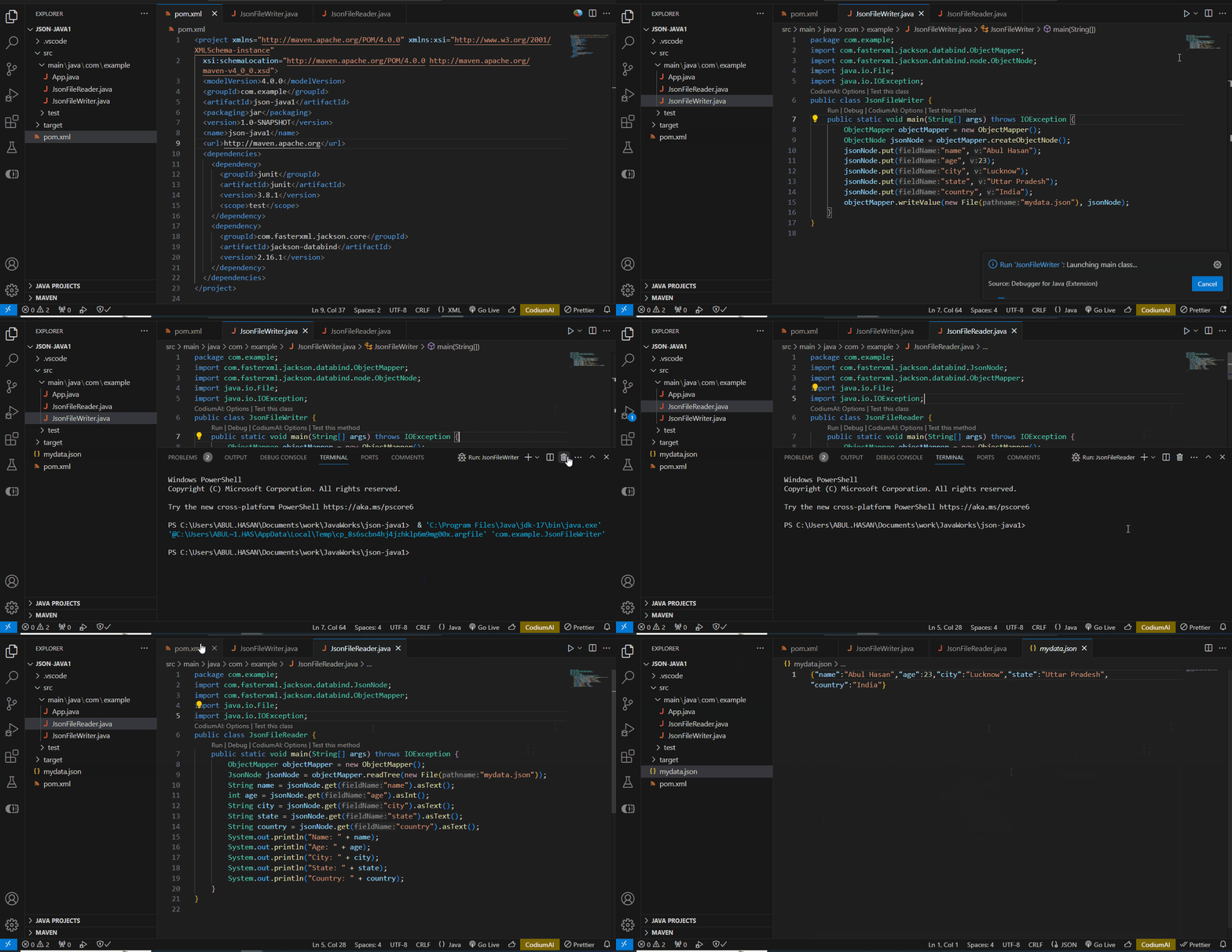
JSON (JavaScript Object Notation) is simple but powerful.. It helps the server and the client to share information. Applications like Java use special tools, or libraries, that read JSON. In Java, some libraries make it easy to read and write JSON files. One popular library is Jackson.
Prerequisites
- Add the Jackson library to the project.
- Include it manually or via Maven/Gradle.
Steps to Read and Write JSON files
Now, let's create a simple Java project using Visual Studio Code and Maven.
Step 1: Create a Java Maven Project
Open the command prompt and run the following commands to initialize a new Maven project.
mvn archetype:generate
-DgroupId=com.example
-DartifactId=json-java1
-DarchetypeArtifactId=maven-archetype-quickstart
-DinteractiveMode=false
This command will generate a basic Maven project structure. Below we can see the Maven project builds successfully.

Step 2: Add Jackson Dependency
Open the pom.xml file in the project folder then add the Jackson dependency into it.
<dependencies>
    <dependency>
      <groupId>junit</groupId>
      <artifactId>junit</artifactId>
      <version>3.8.1</version>
      <scope>test</scope>
    </dependency>
    <dependency>
      <groupId>com.fasterxml.jackson.core</groupId>
      <artifactId>jackson-databind</artifactId>
      <version>2.16.1</version>
    </dependency>
  </dependencies>
Save the pom.xml file.
Step 3: Create Java Files
In the src/main/java/com/example folder, create two Java files: JsonFileReader.java and JsonFileWriter.java.
JsonFileWriter.java:
package com.example;
import com.fasterxml.jackson.databind.ObjectMapper;
import com.fasterxml.jackson.databind.node.ObjectNode;
import java.io.File;
import java.io.IOException;
public class JsonFileWriter {
    public static void main(String[] args) throws IOException {
        ObjectMapper objectMapper = new ObjectMapper();
        ObjectNode jsonNode = objectMapper.createObjectNode();
        jsonNode.put("name", "Abul Hasan");
        jsonNode.put("age", 23);
        jsonNode.put("city", "Lucknow");
        jsonNode.put("state", "Uttar Pradesh");
        jsonNode.put("country", "India");
        objectMapper.writeValue(new File("mydata.json"), jsonNode);
    }
}
Explanation of the above Program:
- We declare that the class is part of the com.example package.
- After that, we import classes we need to handle JSON with the Jackson library.
- Jackson's ObjectMapper provides us functionality in writing JSON. ObjectNode is used a JSON object.
- Then we created a public JsonFileWriter class with a main method, and it throws an IOException. This shows that input/output exceptions could happen.
- Then an ObjectMapper instance is created. It coverting Java objects into JSON.
- Then an empty ObjectNode is created next. It helps structure of the JSON object.
- Then some Key-value pairs added to the JSON object. The put method adds them in. Put can add Strings, numbers, and other types.
- At the last, ObjectMapper's writeValue method is used. It writes the JSON object to a file called "mydata.json". This can sometimes cause an IOException, so it's declared in the main method's throws clause.
JsonFileReader.java:
package com.example;
import com.fasterxml.jackson.databind.JsonNode;
import com.fasterxml.jackson.databind.ObjectMapper;
import java.io.File;
import java.io.IOException;
public class JsonFileReader {
    public static void main(String[] args) throws IOException {
        ObjectMapper objectMapper = new ObjectMapper();
        JsonNode jsonNode = objectMapper.readTree(new File("mydata.json"));
        String name = jsonNode.get("name").asText();
        int age = jsonNode.get("age").asInt();
        String city = jsonNode.get("city").asText();
        String state = jsonNode.get("state").asText();
        String country = jsonNode.get("country").asText();
        System.out.println("Name: " + name);
        System.out.println("Age: " + age);
        System.out.println("City: " + city);
        System.out.println("State: " + state);
        System.out.println("Country: " + country);
    }
}
Explanation of the above Program:
- We declare that the class is part of the com.example package.
- After that, we import classes we need to handle JSON with the Jackson library.
- Jackson's ObjectMapper provides us functionality in reading JSON. ObjectNode is used a JSON object.
- Then we created a public JsonFileReader class with a main method, and it throws an IOException. This shows that input/output exceptions could happen.
- Then an ObjectMapper instance is created. It coverting Java objects into JSON.
- Then readTree method is used to read the contents of the JSON file "mydata.json" and converts it into a JsonNode object.
- The get method is used to extract values from the JsonNode. The .asText() and .asInt() methods are used to convert the values to the appropriate Java types.
- And at last, the extracted values are printed to the console.
Step 4: Run the Program
To run the project, use below maven commands.
mvn compile
mvn exec:java -Dexec.mainClass="com.example.JsonFileWriter"
mvn exec:java -Dexec.mainClass="com.example.JsonFileReader"
Note: The project can be direct run from run icon of the visual studio code or any of the IDE.
Output demo: