
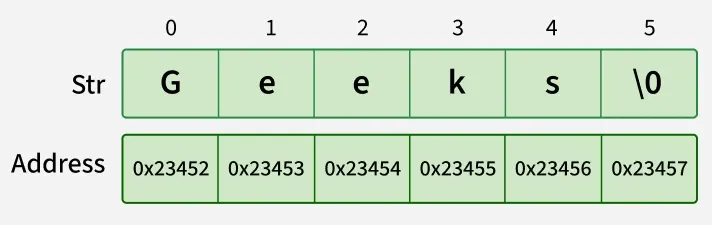
A String in Java is an object used to store a sequence of characters enclosed in double quotes. It uses UTF-16 encoding and provides methods for handling text data.
- Each character in a string is stored using 16-bit Unicode (UTF-16) encoding.
- Strings are immutable, meaning their value cannot be changed after creation.
- Java provides a rich API for manipulation, comparison, and concatenation of strings.
Example:
String name = "Geeks";
String num = "1234";
public class Geeks {

    // Main Function
    public static void main(String args[])
    {

        // creating Java string using a new keyword
        String str = new String("Geeks");

        System.out.println(str);
    }
}
Output
Geeks
Ways of Creating a Java String
There are two ways to create a string in Java:
1. String literal (Static Memory)
To make Java more memory efficient (because no new objects are created if it exists already in the string constant pool).
Example:
String str = “GeeksforGeeks”;
2. Using new keyword (Heap Memory)
Using the new keyword creates a new object in heap memory, even if the same string already exists in the pool.
- One object is created in the heap memory
- The string literal is stored in the string pool (if not already present)
- The reference variable points to the heap object, not the pool
Example:
String str = new String (“GeeksforGeeks”);
Interfaces and Classes in Strings in Java
CharSequence Interface
The CharSequence interface represents a sequence of characters in Java. It provides common methods such as length(), charAt(), subSequence(), and toString() for working with character data.
Classes that implement CharSequence include:
- String: An immutable class whose contents cannot be modified after creation; any change results in a new String object.
- StringBuffer: A mutable and thread-safe class used for string manipulation in multithreaded environments.
- StringBuilder: A mutable and non-thread-safe class that provides faster string manipulation in single-threaded applications.
- StringTokenizer: A utility class used to break a string into smaller tokens based on specified delimiters.
Immutable String in Java
In Java, string objects are immutable. Immutable simply means unmodifiable or unchangeable. Once a string object is created its data or state can't be changed but a new string object is created.
import java.io.*;

class Geeks
{
    public static void main(String[] args)
    {
        String s = "Sachin";

        // concat() method appends the string at the end
        s.concat(" Tendulkar");

        // This will print Sachin because strings are immutable objects
        System.out.println(s);
    }
}
Output
Sachin
Here, Sachin is not changed but a new object is created with “Sachin Tendulkar”. That is why a string is known as immutable.
As we can see in the given figure that two objects are created but s reference variable still refers to "Sachin" and not to "Sachin Tendulkar". But if we explicitly assign it to the reference variable, it will refer to the "Sachin Tendulkar" object.
Example: Java program to assign the reference explicitly in String using String.concat() method.
import java.io.*;

class Geeks
{
    public static void main(String[] args)
    {
        String name = "Sachin";
        name = name.concat(" Tendulkar");
        System.out.println(name);
    }
}
Output
Sachin Tendulkar
How Strings are Stored in Java Memory
String literal
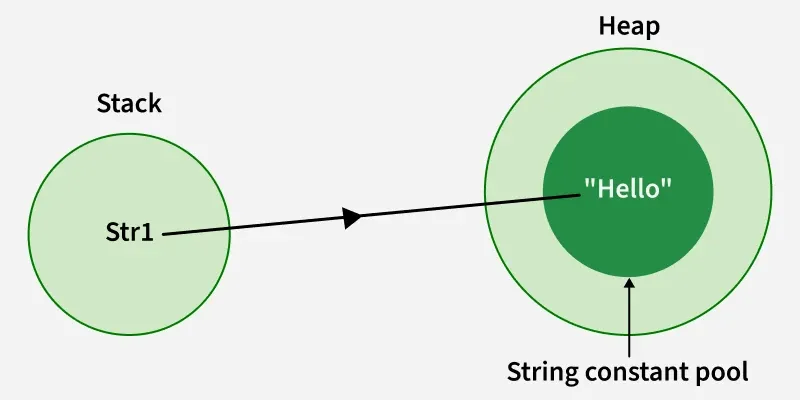
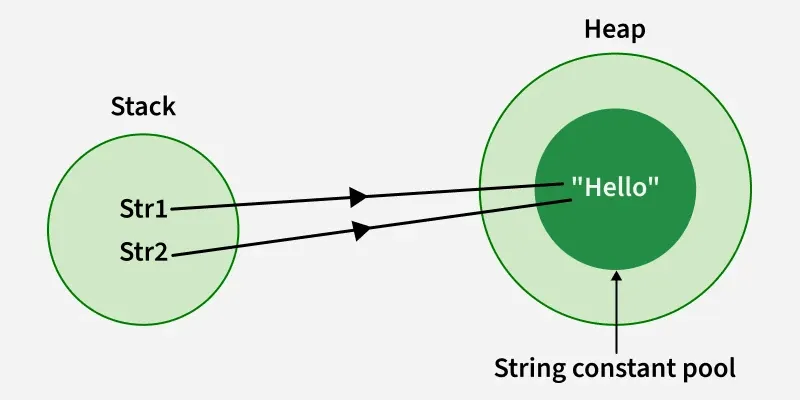
Whenever a String Object is created as a literal, the object will be created in the String constant pool. This allows JVM to optimize the initialization of String literal. The string constant pool is present in the heap.
Example 1: Using String literals to assigning char sequence value.
String str1 = "Hello";
Example 2: When we initialize the same char sequence using string literals.
String str1 = "Hello";
String str2 = "Hello";
Using new Keyword
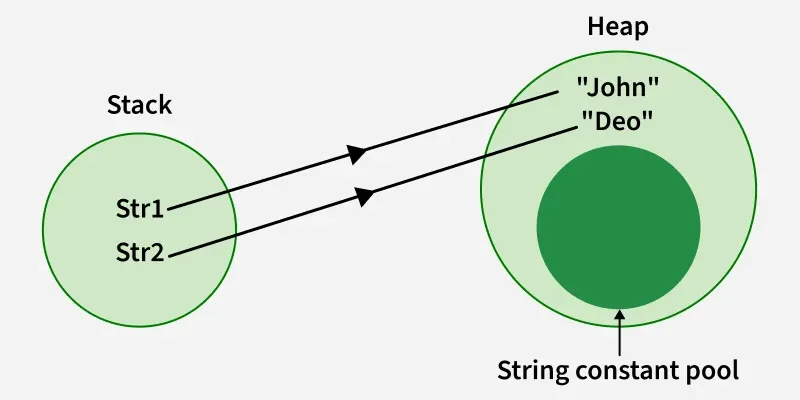
Strings can also be created using the new keyword, which allocates a new object in heap memory. However, the string literal inside it is still stored in the String Constant Pool (if not already present).
Example 1: Using new keyword to assign a char sequence to a String object.
String str1 = new String("John"); String str2 = new String("Deo");
The intern() method returns a reference from the string constant pool. If the string is not already present in the pool, it is added. Otherwise, the existing reference from the pool is returned.
Example 2: Using .intern() to add a string object in string constant pool.
// this will add the string to string constant pool.
String internedString = demoString.intern();
It is preferred to use String literals as it allows JVM to optimize memory allocation.
If we notice if we use new keyword or string literals both store the values in the string but the difference is if we use the string literals or intern() the string object it will store the values in the string constant pool which is present inside the heap as shown in the image.
String Pool Migration from PermGen to the Normal Heap
Before Java 7, the String Constant Pool was stored in PermGen space, which had limited memory. From Java 7 onwards, it was moved to the heap to overcome these limitations and improve memory management.
- PermGen space had limited size, causing issues with many string objects
- Moving the pool to heap provided more memory and flexibility
- Using new always creates a new object in heap, even if the same string exists in the pool
For example:
String demoString = new String("Bhubaneswar");
Let us have a look at the concept with a Java program and visualize the actual JVM memory structure:
Below is the implementation of the above approach:
class Geeks
 {
    public static void main(String args[])
    {

      	// Declaring Strings using String literals
        String s1 = "TAT";
        String s2 = "TAT";

        // Declaring Strings using new keyword
        String s3 = new String("TAT");
        String s4 = new String("TAT");

        // Printing all the Strings
        System.out.println(s1);
        System.out.println(s2);
        System.out.println(s3);
        System.out.println(s4);
    }
 }
Output
TAT
TAT
TAT
TAT
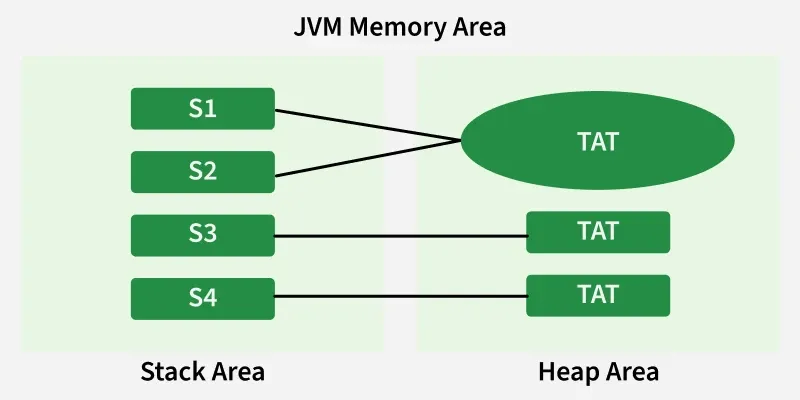
Note: All objects in Java are stored in a heap. The reference variable is to the object stored in the stack area or they can be contained in other objects which puts them in the heap area also.
Example 1:
class Geeks
{
    public static void main(String args[]) {

      	// Creating Byte ASCII Array
        byte ascii[] = { 71, 70, 71 };

      	// Creating String using byte array
        String firstString = new String(ascii);
        System.out.println(firstString);

      	// Creating String using byte array with  Start index to End Index
        String secondString = new String(ascii, 1, 2);
        System.out.println(secondString);
    }
}
Output
GFG
FG
Example 2:
class Geeks
{
    public static void main(String args[]) {

      	// Character Array
        char characters[] = { 'G', 'f', 'g' };

      	// Creating new String using Character Array
        String firstString = new String(characters);

      	// Creating new String using another String
        String secondString = new String(firstString);

        System.out.println(firstString);
        System.out.println(secondString);
    }
}
Output
Gfg
Gfg