
The HTML autofocus attribute automatically places the cursor inside an input field when the webpage loads. It helps users start typing immediately without clicking the field.
- Automatically focuses on an input element when the page loads.
- Improves user experience and form accessibility.
- Commonly used with form fields like text, email, and search.
Syntax:
<input type="text" autofocus>Note: It is a Boolean Attribute means it doesn't need any value.
Run this code, without using the autofocus attribute.
<!DOCTYPE html>

<html>
<head>
<title>
   HTML input autofocus Attribute
        </title>
</head>
<body style="text-align:center">
<h1 style="color: green;">
   GeeksforGeeks
        </h1>
<h2> HTML input autofocus Attribute</h2>
    Name:
        <input autofocus="" type="text"/>
<br/>
<br/>
<!-- Assign id to the Button. -->
<button id="GFG">
   Submit
        </button>
<br/>
</body>
</html>
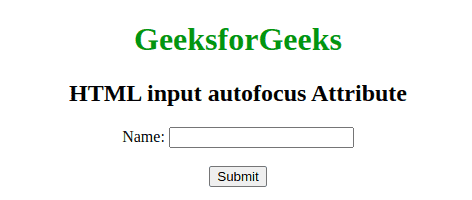
Output:
Supported Browsers
The browser supported by HTML <input>autofocus Attribute are listed below:
- Google Chrome
- Internet Explorer
- Firefox
- Opera
- Safari
Uses of the autofocus Attribute
- autofocus is a simple, effective way to improve the user experience by directing the user's attention to a specific form element immediately upon page load.
- Only one element should have the autofocus attribute on a page to avoid unexpected behavior.
- It enhances usability, especially in forms and interactive elements, but should be used with care, especially with accessibility considerations in mind.