
The autocomplete attribute is used to enable or disable automatic suggestions in input fields based on previously entered values. It helps users fill forms faster and more easily.
- Allows browsers to remember and suggest previously entered input values.
- Can be set to on or off depending on whether autocomplete is needed.
- Improves user experience by reducing typing effort in forms.
Syntax:
<input autocomplete="on|off">Attribute Values:
- on: It has a default value. It specifies that autocomplete is enabled.
- off: It specifies that the autocomplete is disabled.
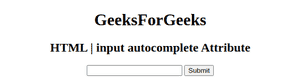
Example: Illustrates the use of autocomplete attribute in <input> element.
<!DOCTYPE html>
<html>

<head>
    <title>
        HTML | input autocomplete Attribute
    </title>
</head>

<body style="text-align:center;">

    <h1>GeeksForGeeks</h1>
    <h2>
        HTML | input autocomplete Attribute
    </h2>
    <form id="myGeeks">
        <input type="text"
               id="text_id"
               name="geeks"
               autocomplete="on">

        <input type="submit">
    </form>
    <br>
</body>

</html>
Output:
Supported Browsers
The browser supported by HTML <input> autocomplete Attribute are listed below:
- Google Chrome
- Internet Explorer
- Firefox
- Opera
- Safari