
The globalAlpha property is used to set or return the current alpha or transparency value of the drawing. The value must be a number between 0.0 to 1.0.
Here, 0.0 denotes fully transparent and 1.0 denotes no transparency. By default it is 1.0.
Syntax:
html 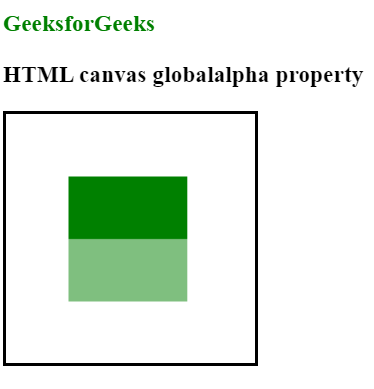 Browsers supported:
context.globalAlpha=numberProperty values:
- number: It is the value between 0.0 to 1.0.
<!DOCTYPE html>
<html>

<body>
    <h3 style="color:green">GeeksforGeeks</h3>
    <h3>HTML canvas globalalpha property</h3>
    <canvas id="myCanvas"
            width="200"
            height="200"
            style="border:2px solid ;">
  </canvas>

    <script>
        var can = document.getElementById("myCanvas");
        var gfg = can.getContext("2d");
        gfg.fillStyle = "green";
        gfg.fillRect(50, 50, 95, 50);

        //Turn transparency on
        gfg.globalAlpha = 0.5;
        gfg.fillStyle = "green";
        gfg.fillRect(50, 100, 95, 50);
    </script>

</body>

</html>
- Chrome
- Internet Explorer 9.0
- Safari
- Firefox
- Opera