
The clearRect() method is used to clear the specified pixels within a given rectangle. Syntax:
context.clearRect( x, y, width, height )
Parameters:
- x: It stores the x-coordinate of the top-left corner of the rectangle.
- y: It stores the y-coordinate of the top-left corner of the rectangle.
- width: It stores the width in pixel.
- height: It stores the height in pixel.
Example-1:
<!DOCTYPE html>
<html>

<head>
    <title>
        HTML canvas clearRect() Method
    </title>
</head>

<body>
    <canvas id="GFG"
            width="500"
            height="300">
  </canvas>

    <script>
        var x = document.getElementById("GFG");
        var context = x.getContext("2d");
        context.fillRect(50, 50, 350, 200);
        context.clearRect(100, 100, 250, 100);
        context.stroke();
    </script>
</body>

</html>
Output: 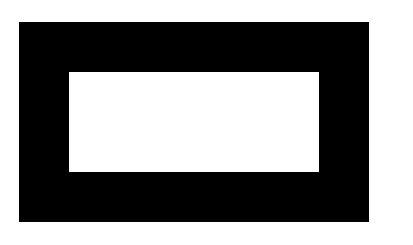 Example-2:
<!DOCTYPE html>
<html>

<head>
    <title>
        HTML canvas clearRect() Method
    </title>
</head>

<body>
    <canvas id="GFG"
            width="500"
            height="300">
  </canvas>

    <script>
        var x = document.getElementById("GFG");
        var context = x.getContext("2d");
        context.fillStyle = "green";
        context.fillRect(50, 50, 350, 200);
        context.clearRect(130, 60, 250, 100);
        context.stroke();
    </script>

</body>

</html>
Output:  Supported Browsers:
- Google Chrome
- Internet Explorer 9.0
- Firefox
- Safari
- Opera