
Nested functions are formulas where one function is placed inside another function. Nested functions help perform multiple calculations in a single formula, making data processing faster and more efficient in Microsoft Excel.
In nested functions:
- Inner Function: Executes first
- Outer Function: Uses the result of the inner function
This is similar to nested loops in programming, where one operation happens inside another.
Practical Example of Nested Functions
Imagine you have employee salaries in Column A, and you want to:
- Sort the salaries in ascending order
- Then calculate the total sum of those salaries
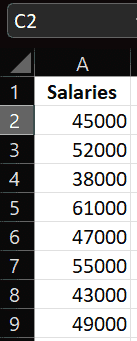
Step 1: Sort the Salaries
Formula:
=SORT(A2:A9)
This returns salaries arranged from smallest to largest.
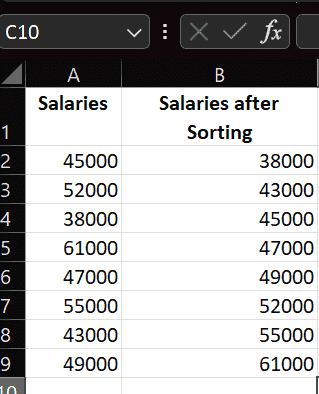
Step 2: Use Nested Function to Calculate Sum
Instead of sorting separately, we can nest the functions:
=SUM(SORT(A2:A9))
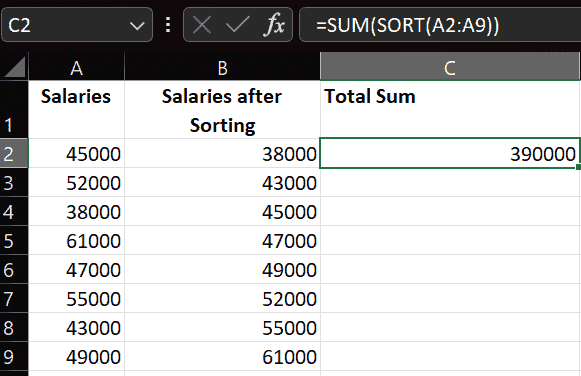
Note: Sorting does not change the SUM result because addition gives the same total regardless of number order. This example is used to demonstrate how nested functions work together in a single formula.
Explanation of the Nested Formula:
1. Inner Function → SORT:
- Runs first, Sorts salary values from lowest to highest
2. Outer Function → SUM:
- Runs after SORT completes, Adds all sorted salary values