
Excel works with four primary data types: Numbers, Text, Dates & Times, and Boolean values. Understanding these data types is essential because they determine how data is stored, processed, and analysed using formulas and functions.
Best Practices When Working with Data Types:
- Always verify imported data types
- Use proper cell formatting before entering data
- Avoid mixing numbers and text in calculation columns
- Validate data using Data Validation tools
Data Types in Excel
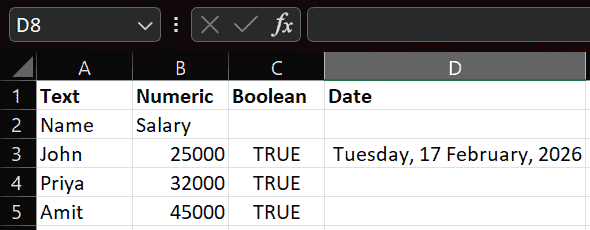
1. Text (String) Data Type
The Text data type refers to any non-numeric information. This includes names, addresses, descriptions, or any character-based information.
Examples:
- Names: John Doe
- Employee IDs: EID12345
- Job Roles: Software Engineer
- Product Descriptions: Wireless Mouse
Default Alignment: Text data is left-aligned by default in cells.
Business Usage:
- Customer information storage
- Product catalog management
- Invoice and reference numbers
2. Numeric Data Type
The Numeric data type is used for values that can participate in mathematical calculations.
Examples:
- Salaries: 23000
- Product Prices: 500
- Quantities: 100
- Percentages: 25%
- Currency: ₹15,000
- Decimal Values: 45.75
Default Alignment: Numeric data is right-aligned by default.
Usage:
- Revenue calculation
- Sales performance tracking
- Financial reporting
- Inventory quantity management
3. Boolean Data Type
The Boolean data type represents logical values, either TRUE or FALSE. These are usually generated from logical formulas.
Examples:
- TRUE: Condition met
- FALSE: Condition not met
Common Usage in Formulas:
- IF
- AND
- OR
Usage:
- Checking if targets are achieved
- Validating conditions in datasets
- Decision-based automation logic
4. Date and Time Data Type
Date and Time data types allow tracking of time-based events and calculations.
Examples:
- Date: 01/01/2025
- Time: 10:30 AM
- Date & Time: 01/01/2025 10:30 AM
Formatting Options:
- Short Date
- Long Date
- Time Only
- Custom Date Formats
Usage:
- Sales trend tracking by date
- Attendance monitoring
- Project deadline tracking
- Financial period reporting