
API authentication is the process of verifying the identity of users or systems before allowing access to an API and its resources.
- Verifies the identity of users or systems before granting API access.
- Helps protect APIs and sensitive data from unauthorized access.
- Works with authorization to control user access and permissions.
Understanding API Authentication & Authorization
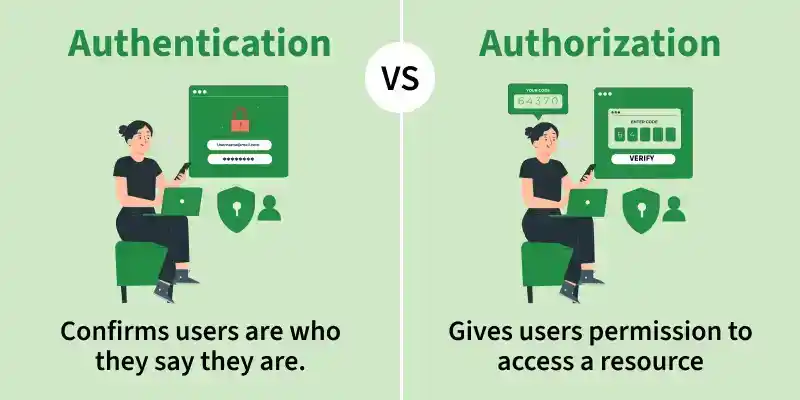
API Authentication
API Authentication is the process of verifying the identity of a user or system trying to access an API. It ensures that only authorized clients can interact with the API and its data.
- It protects APIs from unauthorized access.
- It ensures secure data exchange between the client and server.
- It is often used with HTTPS for encrypted communication.
Example: Logging into a banking application using your credentials.
API Authorization
API Authorization is the process of determining what an authenticated user or system is allowed to do. After identity is verified (authentication), authorization defines access levels and permissions.
- Authorization works after authentication.
- It controls access to resources and actions.
- It is based on roles, permissions, or policies.
Example: Accessing your transactions but not another person's account.
The Importance of Secure API Authentication
Inadequate API security can result in severe cybersecurity threats, such as:
- Data breaches due to unauthorized access.
- Man-in-the-middle attacks, where attackers intercept API requests.
- API key exposure and credential theft can result in unauthorized access to data.
- API misuse, impacting system performance and security.
API Authentication Process
API Authentication Process defines how a client proves its identity to an API before accessing any resources. It ensures secure and controlled communication between client and server.
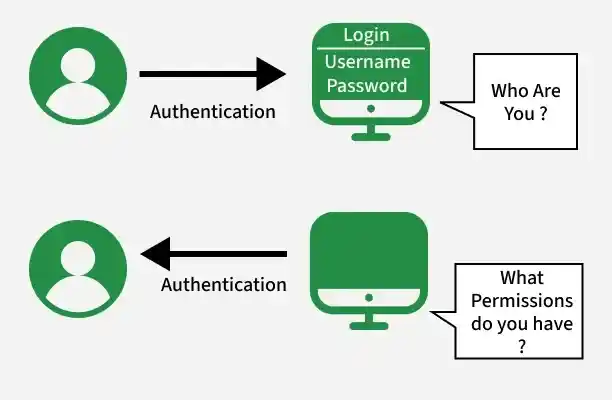
- Client Request Initiation: The client (browser, mobile app, or tools like Postman) sends a request to the API.
- Sending Credentials: The client includes authentication data such as an API key, token, or username and password.
- Server Receives Request: The API server receives the request and extracts the credentials.
- Credential Validation: The server verifies the validity, expiry, and source of the credentials.
- Authentication Result: The server returns success (authenticated) or failure (401 Unauthorized).
- Access Control: After authentication, the server checks permissions to allow or deny actions.
Common API Authentication Methods
API Authentication methods are techniques used to verify the identity of clients accessing an API. Each method offers a different level of security and is chosen based on the application’s needs.
- API Key Authentication: Uses a unique key sent with each request and is simple and easy to implement but less secure if exposed.
- Basic Authentication: Uses username and password (Base64 encoded) sent in headers and is not secure without HTTPS.
- Bearer Token Authentication: Uses an access token in the Authorization header and is more secure and widely used.
- OAuth 2.0: Uses access tokens with defined scopes and allows secure third-party access without sharing user credentials.
- JWT (JSON Web Token): Uses a self-contained token with encoded data and is secure, stateless, and widely used.
- Multi-Factor Authentication (MFA): Uses two or more verification methods, such as passwords, OTPs, or biometric verification, to provide an additional layer of API security.
Best Practices for Secure API Authentication
API security helps protect sensitive data and prevent unauthorized access. Implementing secure authentication methods such as OAuth 2.0, JWTs, API keys, and mTLS improves API security and access control.
1. API Key Management
- Never store API keys in source code, which is readily found in version control systems.
- Securely store API keys by storing them in environment variables, secrets management, or vault services.
- Rotate API keys regularly to minimize security exposure in the event that they are leaked or compromised.
- Limit API keys to trusted IP addresses, domains, or services to minimize unauthorized access.
2. Choosing the Right Authentication Method
The most suitable authentication mechanism depends on the API type and security requirements:
- Public APIs: Implement OAuth 2.0 for secure third-party access with token-based authentication.
- Internal APIs: Implement API Key Authentication or JWT (JSON Web Tokens) for lightweight and highly scalable authentication.
- High-security apps: Implement Mutual TLS (mTLS), where both client and server verify each other using digital certificates for secure encrypted communication.
3. Implementing Role-Based Access Control (RBAC)
- Use RBAC (Role-Based Access Control) to limit access based on user roles.
- Use least privilege access—Users have access only to the resources required for their role.
- Use a mix of RBAC with attribute-based access control (ABAC) for attribute-based fine-grained authorization.
4. Handling Authentication Errors Properly
- Return HTTP 401 Unauthorized for missing or invalid authentication credentials.
- Return HTTP 403 Forbidden for unauthorized access of a resource.
- Enforce rate limiting and IP blocking to thwart brute-force attacks and API misuse.
- Employ secure logging and monitoring controls to identify suspicious authentication failures.
Addressing Authentication Challenges
API authentication involves several challenges that impact security, scalability, and user experience.
- Choosing between stateful and stateless authentication based on application needs.
- Integrating Single Sign-On (SSO) across multiple services securely.
- Managing secure tokens, sessions, and their expiration effectively.
- Selecting the right authentication method based on security and scalability requirements.
- Balancing security with user experience and system performance.
Stateful Vs Stateless API Authentication
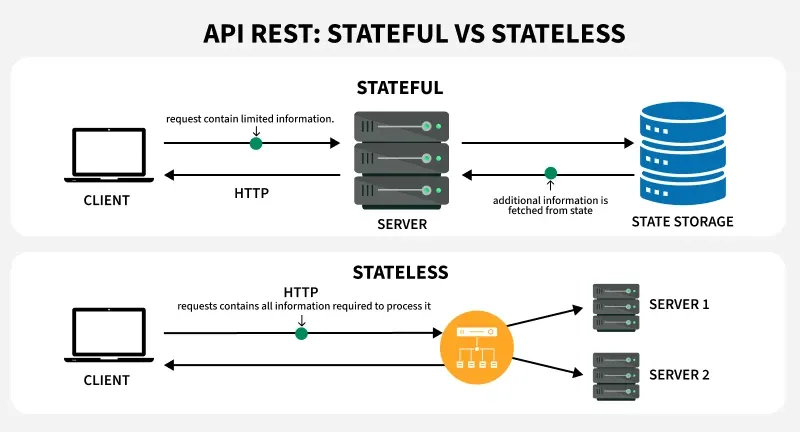
Stateful and Stateless API Authentication define how authentication data (session or token) is managed between client and server. It directly impacts security, scalability, and performance.
Stateful Authentication
- Server stores user session data after login
- Client sends a session ID with each request
- Server verifies session from storage
Example: User logs in -> server creates session -> client sends session ID in cookies
Stateless Authentication
- Server does NOT store session data
- The client sends a token (e.g., JWT) with every request.
- Server validates the token each time
Example: User logs in -> receives token -> sends token in every API request
| Feature | Stateful Authentication | Stateless Authentication |
|---|---|---|
| Storage | Stores session data on the server | No session storage; uses tokens (JWT, OAuth 2.0) |
| Scalability | Less scalable; requires server-side session tracking | Highly scalable; independent of server sessions |
| Performance | Higher server load due to session management | Faster as no session tracking is needed |
| Security | More secure but can be vulnerable to session hijacking | Secure if tokens are encrypted and expire timely |
| Use Case | Best for web applications, enterprise systems | Ideal for REST APIs, microservices, cloud applications |
| Examples | Session-based login in banking apps | JWT-based API authentication in a microservices architecture |
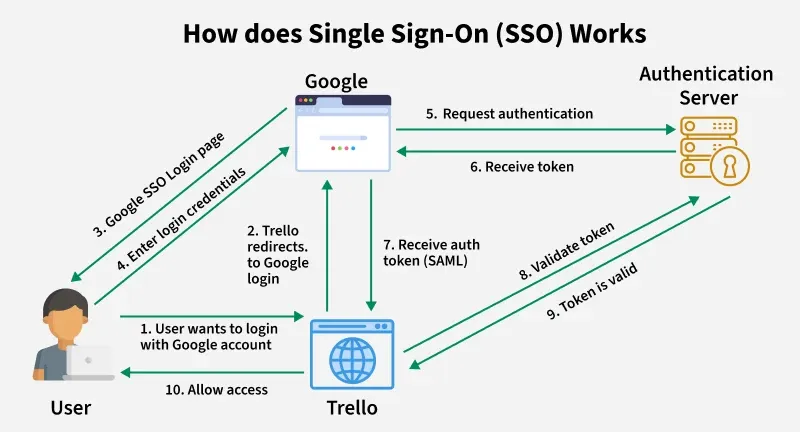
Single Sign-On (SSO)
- SSO allows users to log in only once and access multiple services without having to re-enter their credentials.
- Google SSO, Facebook Login, and Microsoft SSO improve security and convenience by reducing the need for multiple passwords.
- Benefits: Reduces password fatigue, minimizes phishing risks, and streamlines enterprise access management.
The Role of Authentication Providers
Authentication providers offer secure and scalable identity verification solutions for businesses.
- Auth0: Offers OAuth 2.0, OpenID Connect (OIDC), and JWT-based authentication for web and mobile applications.
- Okta: Provides enterprise-oriented authentication with support for MFA, SAML, and SSO.
- Firebase Authentication: Best suited for mobile and web applications with support for email/password authentication, OAuth, and federated identity providers.