
Role-Based Access Control (RBAC) is an authorization method where access to resources, pages, or features in an application is determined by the role assigned to a user.
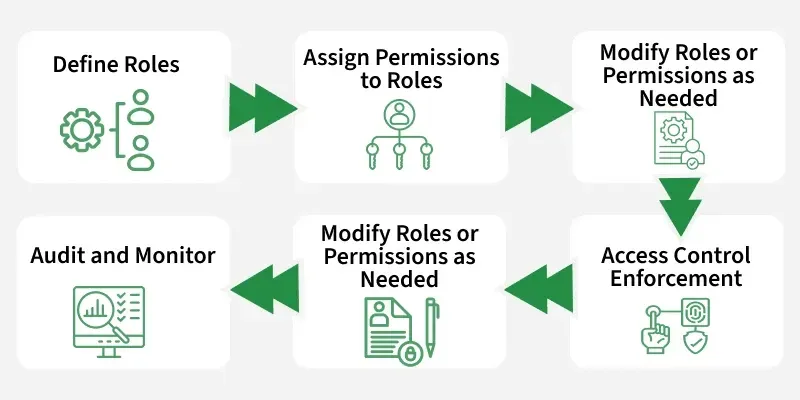
- Each role (e.g., Admin, Editor, User) has a set of permissions.
- Instead of assigning permissions directly to users, they inherit them through their role.
- This makes access management easier, scalable, and more secure.
Example of RBAC in a Web App
- Admin : Can manage users, update settings, delete posts.
- Editor : Can create and edit posts but not manage users.
- User : Can only view content.
Defining Roles in Next.js
Before enforcing permissions, we need a clear way to define roles. Keeping them in a centralized file avoids errors and makes the system scalable.
// utils/roles.js
export const roles = {
  ADMIN: "admin",
  EDITOR: "editor",
  USER: "user",
};
Protecting Pages & Components
RBAC can be applied at two levels:
Page-Level Protection
- Entire pages (e.g.,
/admin) are restricted to certain roles. - Unauthorized users are shown an error or redirected.
// pages/admin.js
import { roles } from "../utils/roles";

export default function AdminPage({ user }) {
  if (user.role !== roles.ADMIN) {
    return <h1>Access Denied</h1>;
  }
  return <h1>Welcome Admin</h1>;
}
Component Protection
- Specific UI features (like buttons, menus, dashboard sections) are shown/hidden based on role.
- This improves security (no unauthorized actions) and UX (users don’t see options they can’t use).
function DeleteButton({ user }) {
  if (user.role !== "admin" && user.role !== "editor") {
    return null; // hide button
  }
  return <button>Delete Post</button>;
}
This improves both security (no unauthorized access) and UX (users don’t see what they can’t use).
Middleware-Based RBAC
Middleware runs before a request reaches a page, making it perfect for RBAC.
- Blocks unauthorized users before rendering.
- Prevents sensitive pages from even loading.
- Ensures faster redirects.
// middleware.js
import { NextResponse } from "next/server";

export function middleware(req) {
  const role = req.cookies.get("role")?.value;

  const adminRoutes = ["/admin", "/dashboard"];

  if (adminRoutes.includes(req.nextUrl.pathname) && role !== "admin") {
    return NextResponse.redirect(new URL("/unauthorized", req.url));
  }

  return NextResponse.next();
}
Middleware blocks access before rendering. This prevents sensitive pages from even loading.
RBAC with Authentication
Authentication systems (JWT, NextAuth, Clerk) allow us to store roles securely and enforce RBAC across sessions.
RBAC with JWT(JSON Web Tokens)
- User roles are embedded inside the JWT token.
- Every API call or page request can check the role from the token.
import jwt from "jsonwebtoken";

export function signToken(user) {
  return jwt.sign({ id: user.id, role: user.role }, process.env.JWT_SECRET);
}

export function verifyToken(token) {
  return jwt.verify(token, process.env.JWT_SECRET);
}
Roles are embedded in tokens, making APIs and frontend checks easier.
RBAC with NextAuth
- NextAuth.js is a popular authentication library for Next.js.
- It allows role management inside session and JWT callbacks.
// [...nextauth].js
callbacks: {
  async session({ session, token }) {
    session.user.role = token.role;
    return session;
  },
  async jwt({ token, user }) {
    if (user) token.role = user.role;
    return token;
  },
},
RBAC with Clerk
Clerk provides authentication + role management out-of-the-box.
import { useUser } from "@clerk/nextjs";

function AdminPanel() {
  const { user } = useUser();

  if (user.publicMetadata.role !== "admin") {
    return <p>Access Denied</p>;
  }
  return <p>Welcome Admin</p>;
}
Advantages of Role-based Access Control
- Granular control : Protects both pages and individual components.
- Stronger security : Blocks unauthorized users before rendering.
- Scalable & maintainable : Manage permissions via roles, not users.
- Better UX : Users only see features they’re allowed to use.
- Consistency : Works across frontend, middleware, and backend APIs.
- Flexible : Integrates with JWT, NextAuth, Clerk, Firebase Auth, etc.
- Enterprise-ready : Supports complex role hierarchies (like Cisco’s Root & Super Views).
Disadvantages of Role-based Access Control
- Complexity in large apps : Managing many roles and permissions can get complicated.
- Maintenance overhead : Updating roles or permissions requires careful testing.
- Middleware/API duplication : Must enforce checks at multiple levels (frontend + backend + middleware).
- Role explosion : Too many roles with minor differences can make management messy.
- Potential misconfiguration : Mistakes in role assignment can accidentally grant/restrict access.