
Residual Networks (ResNet) is a deep learning architecture designed to enable efficient training of very deep neural networks. It introduces skip (shortcut) connections, which allow the model to learn residual mappings instead of direct transformations.
- Helps prevent vanishing gradient problems in very deep models
- Allows information to flow directly across layers using skip connections
- Enables building networks with hundreds or even thousands of layers
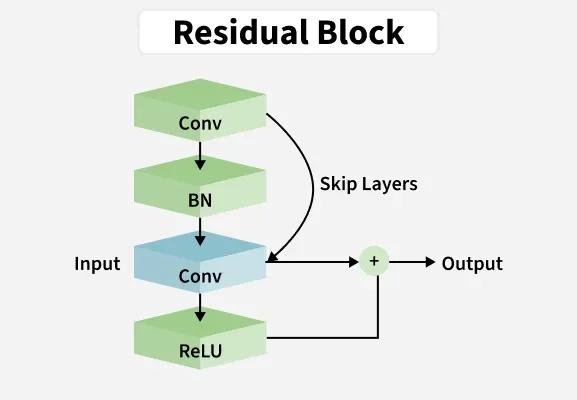
Challenges in Deep Neural Networks
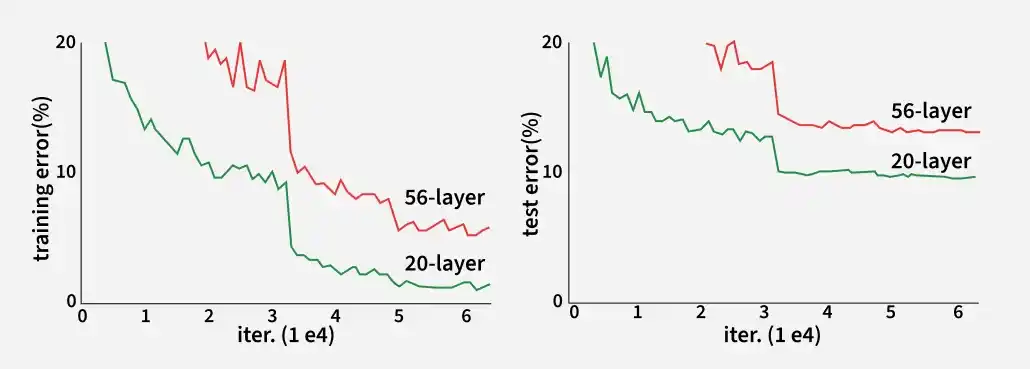
Deep Neural Networks are powerful models, but training them becomes difficult as network depth increases. Two major issues are:
1. Vanishing/Exploding Gradient Problem: As the number of layers increases, gradients can become extremely small (vanishing) or very large (exploding) during backpropagation, making training unstable.
2. Degradation Problem: Increasing network depth does not always improve performance and can even degrade it.
- Performance Plateau: Training error stops decreasing after a certain depth
- Accuracy Degradation: Validation error increases, leading to poor generalization
Key Features
- Residual Connections: Enable very deep networks by allowing gradients to flow through identity shortcuts, reducing the vanishing gradient problem.
- Identity Mapping: Simplifies training by learning residual functions instead of full mappings.
- Depth: Supports extremely deep architectures for improved image recognition performance.
- Fewer Parameters: Achieves high accuracy with fewer parameters hence improving computational efficiency.
The following graph compares training and test errors of 20-layer and 56-layer networks, highlighting the limitations of deeper networks without residual connections.
- Training error: The 56-layer network learns slowly and shows fluctuations, while the 20-layer network converges more smoothly
- Test error: The deeper network has higher error (degradation problem), whereas the shallower network generalizes better
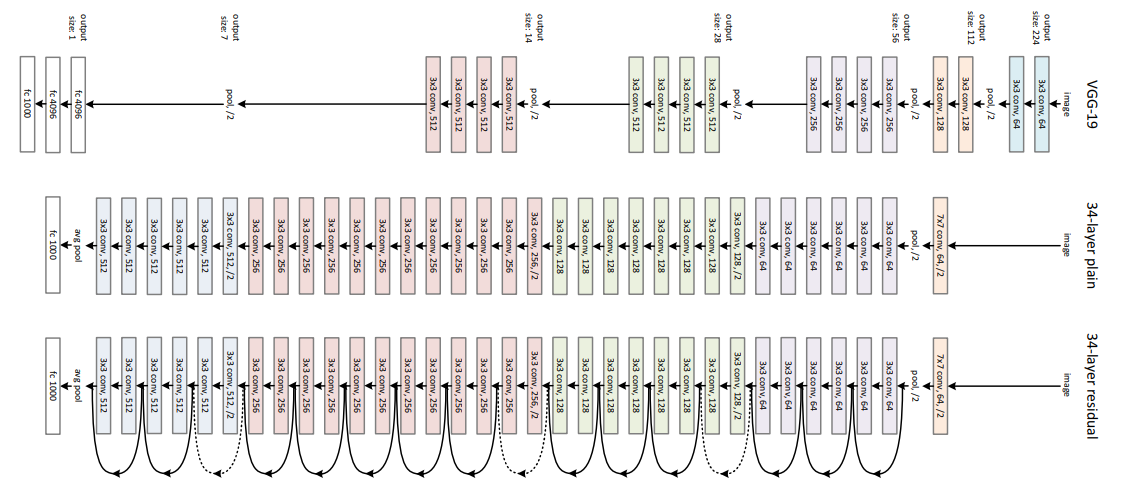
ResNet-34
ResNet-34 is a deep residual network built on a 34-layer plain network inspired by VGG-19, with shortcut connections forming 16 residual blocks. The architecture is organized into stages as follows:
- First stage: 3 residual blocks, each with 2 convolution layers of 64 filters and identity skip connections
- Second stage: 4 residual blocks, each with 2 convolution layers of 128 filters; uses 1×1 projection or padding for dimension matching
- Third stage: 6 residual blocks, each with 2 convolution layers of 256 filters
- Fourth stage: 3 residual blocks, each with 2 convolution layers of 512 filters
- Output layer: Feature maps are passed through Global Average Pooling followed by a fully connected layer with softmax for classification
Working
Conventional networks try to learn the full mapping
H(x) = F(x) + x
where:
x : input to the blockH(x) : desired mappingF(x) : residual function to be learned
Learning the simpler residual
1. Residual Block: A residual block is the core unit of ResNet and consists of
- One or more convolutional layers
- A skip connection that bypasses these layers
- Addition of input to the convolution output
This design ensures smooth flow of information and gradients across layers.
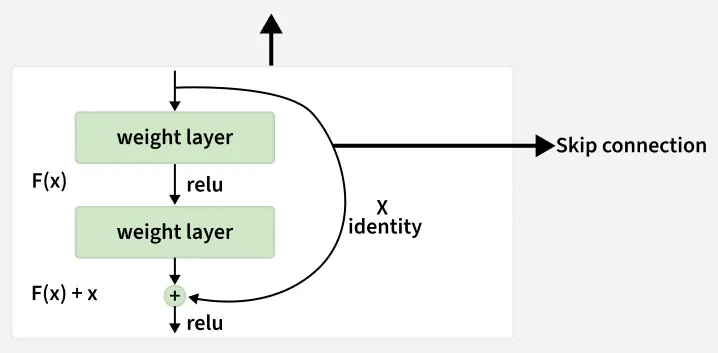
2. Skip (Shortcut) Connection
- Bypasses one or more layers
- Adds input directly to output
- Prevents vanishing gradients
- Improves parameter updates
3. Handling Dimension Mismatch: When input and output dimensions differ
- Zero Padding: Adds extra zeros to the input to match output dimensions
- Linear Projection: Uses a learnable 1x1 convolution to match input and output dimensions for the skip connection.
4. Stacking Residual Blocks : Multiple residual blocks can be stacked to create deep architectures. This allows networks to go very deep without suffering from degradation.
5. Global Average Pooling (GAP): Before the final fully connected layer ResNet uses GAP
- Converts each feature map to a single value by averaging
- Reduces parameters less overfitting
- Produces compact feature representation
Implementation
We will implement ResNet (v1 and v2) for CIFAR-10 and cover data preprocessing, model creation, training and plotting graphs step by step.
Step 1: Importing Libraries
Import libraries like
- tensorflow for building and training the model
- keras defines model layers and structure
- numpy handles numerical operations
- os manages files and directories
import tensorflow as tf
from tensorflow import keras
from tensorflow.keras.layers import Dense, Conv2D, BatchNormalization, Activation
from tensorflow.keras.layers import AveragePooling2D, Input, Flatten, Add
from tensorflow.keras.optimizers import Adam
from tensorflow.keras.callbacks import ModelCheckpoint, LearningRateScheduler, ReduceLROnPlateau
from tensorflow.keras.preprocessing.image import ImageDataGenerator
from tensorflow.keras.regularizers import l2
from tensorflow.keras.models import Model
from tensorflow.keras.datasets import cifar10
import numpy as np
import os
Step 2: Setting Hyperparameters
- Set batch_size, epochs, num_classes and data_augmentation
- Choose ResNet version and number of residual blocks
- Compute depth based on CIFAR ResNet rules
batch_size = 32
epochs = 200
data_augmentation = True
num_classes = 10
subtract_pixel_mean = True
n = 3
version = 1

if version == 1:
    depth = n * 6 + 2
elif version == 2:
    depth = n * 9 + 2

model_type = 'ResNet %dv%d' % (depth, version)
Step 3: Loading and Preprocessing CIFAR-10 Data
- Load CIFAR-10 dataset using Keras.
- Normalize pixel values to range [0, 1].
- Optionally subtract the dataset mean for zero-centered input.
- Convert labels to one hot vectors.
(x_train, y_train), (x_test, y_test) = cifar10.load_data()
input_shape = x_train.shape[1:]


x_train = x_train.astype('float32') / 255
x_test = x_test.astype('float32') / 255

if subtract_pixel_mean:
    x_train_mean = np.mean(x_train, axis=0)
    x_train -= x_train_mean
    x_test -= x_train_mean

y_train = keras.utils.to_categorical(y_train, num_classes)
y_test = keras.utils.to_categorical(y_test, num_classes)

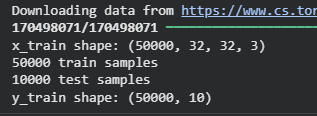
print('x_train shape:', x_train.shape)
print('y_train shape:', y_train.shape)
Output:
Step 4: Defining Learning Rate
Define learning rate for our model.
def lr_schedule(epoch):
    lr = 1e-3
    if epoch > 180:
        lr *= 0.5e-3
    elif epoch > 160:
        lr *= 1e-3
    elif epoch > 120:
        lr *= 1e-2
    elif epoch > 80:
        lr *= 1e-1
    print('Learning rate:', lr)
    return lr
Step 5: Defining a ResNet Layer Function
- Defines a single convolutional layer optionally followed by BatchNorm and ReLU.
- conv_first applies convolution first
def resnet_layer(inputs,
                 num_filters=16,
                 kernel_size=3,
                 strides=1,
                 activation='relu',
                 batch_normalization=True,
                 conv_first=True):
    conv = Conv2D(num_filters,
                  kernel_size=kernel_size,
                  strides=strides,
                  padding='same',
                  kernel_initializer='he_normal',
                  kernel_regularizer=l2(1e-4))
    x = inputs
    if conv_first:
        x = conv(x)
        if batch_normalization:
            x = BatchNormalization()(x)
        if activation is not None:
            x = Activation(activation)(x)
    else:
        if batch_normalization:
            x = BatchNormalization()(x)
        if activation is not None:
            x = Activation(activation)(x)
        x = conv(x)
    return x
Step 6: Defining ResNet v1
- Uses 2 layer residual blocks for each residual unit
- Computes number of residual blocks
- Adds identity or projection shortcuts when feature map dimensions change
- Ends with Global Average Pooling and Dense softmax layer
def resnet_v1(input_shape, depth, num_classes=10):
    if (depth - 2) % 6 != 0:
        raise ValueError('depth should be 6n + 2')

    num_filters = 16
    num_res_blocks = int((depth - 2) / 6)
    inputs = Input(shape=input_shape)
    x = resnet_layer(inputs=inputs)

    for stack in range(3):
        for res_block in range(num_res_blocks):
            strides = 1
            if stack > 0 and res_block == 0:
                strides = 2  # Downsample
            y = resnet_layer(x, num_filters=num_filters, strides=strides)
            y = resnet_layer(y, num_filters=num_filters, activation=None)
            if stack > 0 and res_block == 0:
                x = resnet_layer(x, num_filters=num_filters, kernel_size=1,
                                 strides=strides, activation=None, batch_normalization=False)
            x = Add()([x, y])
            x = Activation('relu')(x)
        num_filters *= 2

    x = AveragePooling2D(pool_size=8)(x)
    y = Flatten()(x)
    outputs = Dense(num_classes, activation='softmax', kernel_initializer='he_normal')(y)
    model = Model(inputs=inputs, outputs=outputs)
    return model
Step 7: Defining ResNet v2
- Uses 3 layer bottleneck residual blocks.
- Handles identity or projection shortcuts for dimension matching.
- Ends with BatchNorm ,ReLU, GAP, Dense, softmax.
def resnet_v2(input_shape, depth, num_classes=10):
    if (depth - 2) % 9 != 0:
        raise ValueError('depth should be 9n + 2')

    num_filters_in = 16
    num_res_blocks = int((depth - 2) / 9)
    inputs = Input(shape=input_shape)
    x = resnet_layer(inputs, num_filters=num_filters_in, conv_first=True)

    for stage in range(3):
        for res_block in range(num_res_blocks):
            activation = 'relu'
            batch_normalization = True
            strides = 1
            if stage == 0:
                num_filters_out = num_filters_in * 4
                if res_block == 0:
                    activation = None
                    batch_normalization = False
            else:
                num_filters_out = num_filters_in * 2
                if res_block == 0:
                    strides = 2
            y = resnet_layer(x, num_filters=num_filters_in, kernel_size=1,
                             strides=strides, activation=activation,
                             batch_normalization=batch_normalization, conv_first=False)
            y = resnet_layer(y, num_filters=num_filters_in, conv_first=False)
            y = resnet_layer(y, num_filters=num_filters_out, kernel_size=1, conv_first=False)
            if res_block == 0:
                x = resnet_layer(x, num_filters=num_filters_out, kernel_size=1,
                                 strides=strides, activation=None, batch_normalization=False)
            x = Add()([x, y])
        num_filters_in = num_filters_out

    x = BatchNormalization()(x)
    x = Activation('relu')(x)
    x = AveragePooling2D(pool_size=8)(x)
    y = Flatten()(x)
    outputs = Dense(num_classes, activation='softmax', kernel_initializer='he_normal')(y)
    model = Model(inputs=inputs, outputs=outputs)
    return model
Step 8: Compiling the Model
- Instantiate v1 or v2 based on version.
- Compile with Adam optimizer, categorical_crossentropy and accuracy metric.
if version == 2:
    model = resnet_v2(input_shape=input_shape, depth=depth, num_classes=num_classes)
else:
    model = resnet_v1(input_shape=input_shape, depth=depth, num_classes=num_classes)

model.compile(loss='categorical_crossentropy',
              optimizer=Adam(learning_rate=lr_schedule(0)),
              metrics=['accuracy'])
model.summary()
Step 9: Setup Callbacks
- ModelCheckpoint saves the best model.
- LearningRateScheduler adjusts learning rate during training.
- ReduceLROnPlateau reduces LR if validation performance plateaus.
save_dir = os.path.join(os.getcwd(), 'saved_models')
model_name = 'cifar10_%s_model.{epoch:03d}.keras' % model_type
os.makedirs(save_dir, exist_ok=True)
filepath = os.path.join(save_dir, model_name)

checkpoint = ModelCheckpoint(filepath=filepath,
                             monitor='val_accuracy',
                             verbose=1,
                             save_best_only=True)
lr_scheduler = LearningRateScheduler(lr_schedule)
lr_reducer = ReduceLROnPlateau(factor=np.sqrt(0.1), cooldown=0, patience=5, min_lr=0.5e-6)
callbacks = [checkpoint, lr_reducer, lr_scheduler]
Step 10: Data Augmentation & Training
- Uses ImageDataGenerator for real time augmentation if enabled.
- history variable stores training metrics for plotting.
if not data_augmentation:
    print('Not using data augmentation.')
    history = model.fit(x_train, y_train,
                        batch_size=batch_size,
                        epochs=epochs,
                        validation_data=(x_test, y_test),
                        shuffle=True,
                        callbacks=callbacks)
else:
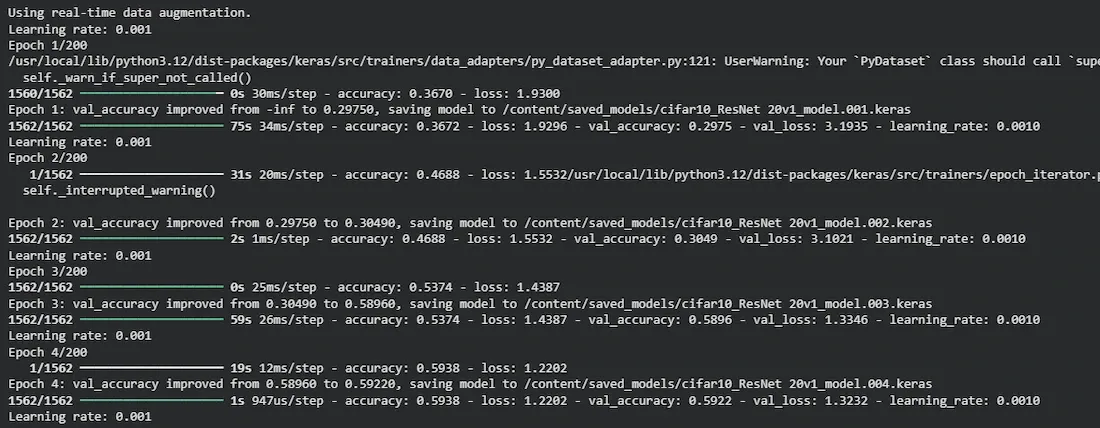
    print('Using real-time data augmentation.')
    datagen = ImageDataGenerator(
        rotation_range=20,
        width_shift_range=0.2,
        height_shift_range=0.2,
        horizontal_flip=True,
        fill_mode='nearest'
    )
    datagen.fit(x_train)
    history = model.fit(datagen.flow(x_train, y_train, batch_size=batch_size),
                        steps_per_epoch=x_train.shape[0] // batch_size,
                        epochs=epochs,
                        validation_data=(x_test, y_test),
                        callbacks=callbacks)
Output:
You can download full code from here.
ResNet Results on ImageNet and COCO
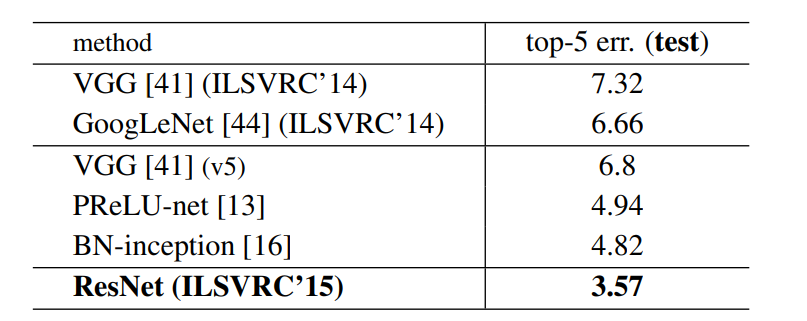
On the ImageNet dataset, a 152-layer ResNet, much deeper than VGG-19, achieved high accuracy with fewer parameters. An ensemble of ResNet models reached around 3.7% top-5 error. On the COCO dataset, ResNet showed a 28% relative improvement in object detection performance.
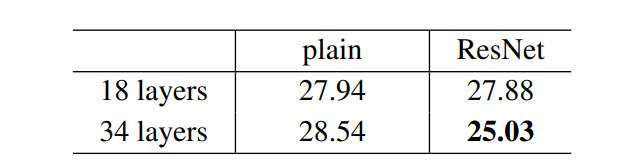
The results show that shortcut connections effectively address the problems caused by increasing network depth as increasing layers from 18 to 34 leads to a decrease in error rate on the ImageNet validation set unlike plain networks.
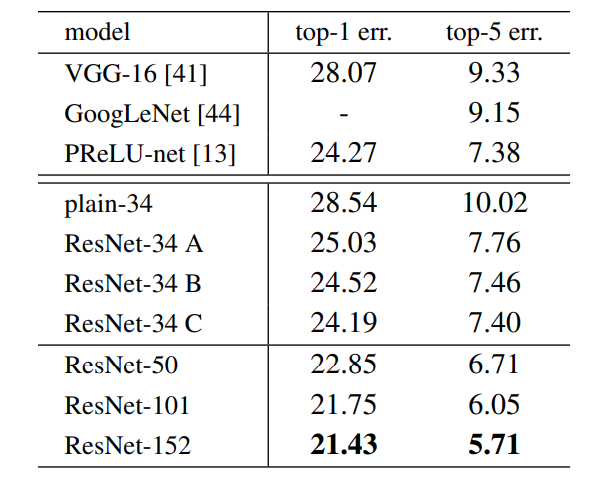
Below are the results on ImageNet Test Set. The 3.57% top-5 error rate of ResNet was the lowest and thus ResNet architecture came first in ImageNet classification challenge in 2015.
Advantages
- Eases training of deep networks by allowing direct gradient flow through skip connections, reducing vanishing gradient problems
- Enables very deep architectures (50–152+ layers) with stable training
- Improves accuracy through residual learning in tasks like image classification and object detection
- Reduces degradation as increasing depth does not increase training error in ResNet
- Achieves better performance with fewer parameters compared to traditional deep networks
Challenges
- Requires high computational power due to its deep architecture
- Needs projection layers to handle dimension mismatch in skip connections
- May overfit on small datasets because of large model capacity
- Training can become unstable without proper batch normalization
- Very deep networks may still face performance degradation in extreme cases