
Password Attack (Password Cracking) occurs when attackers attempt to gain unauthorized access to accounts by guessing or stealing passwords using automated tools and systematic techniques to break authentication and access sensitive information.
- Exploits weak, reused or easily guessable passwords
- Uses methods like brute force and dictionary-based attacks
- Targets user accounts to gain unauthorized access to data
Suppose you create a LinkedIn account with an easy password like "pooja123" or your date of birth is 01/01/1983 and you use the same password for your Facebook and other accounts too. If a hacker cracks your LinkedIn password, they can instantly access your Facebook account and every other account using that with same password. This is why password reuse is extremely dangerous.
Types of Password Attacks
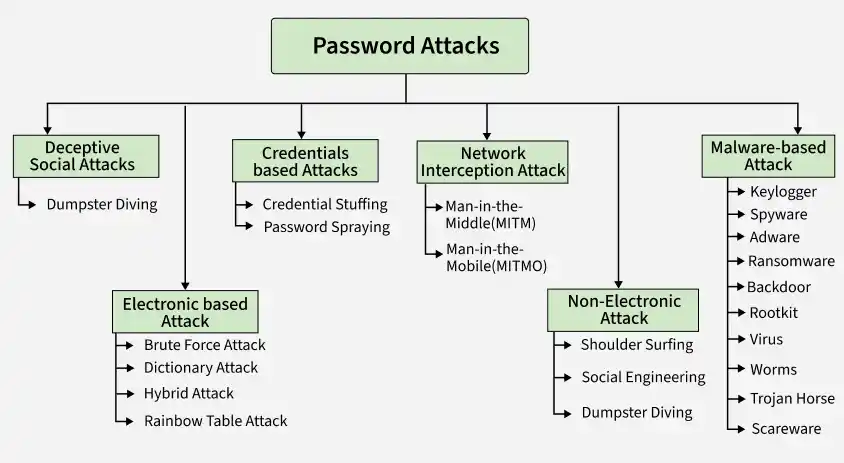
1. Non-Electronic Attacks
In this attack, attackers do not require advanced technical skills or hacking tools. Instead, they rely on observation, deception and human weaknesses to obtain confidential and sensitive information.
- Shoulder surfing: When an attacker physically observes a person nearby entering their password or other confidential information, it is known as shoulder surfing. This may be done by looking over the victim’s shoulder or by using optical devices such as binoculars or hidden cameras.
- Social Engineering: Manipulates human psychology and trust to trick victims into revealing passwords. Attackers follow and impersonate colleagues, IT support staff or authority figures to create urgency and pressure victims into compliance.
- Dumpster Diving: Involves searching through physical trash to find written passwords, sticky notes, documents containing login credentials or other sensitive information that organizations or individuals have improperly disposed of.
2. Electronic Password Cracking Attacks
These attacks leverage computational power and automated tools to systematically guess or crack passwords.
- Brute Force Attack: In this attack an attacker Attempts to gain access by systematically trying combination of passwords until the correct one is found. Modern tools can test thousands or even millions of combinations per second, making weak passwords highly vulnerable.
- Dictionary Attack: Uses precompiled lists of common passwords, phrases and dictionary words to gain access. These lists come from leaked databases and exploit predictable human password choices like "password123" or "admin2024".
- Hybrid Attack: It combines dictionary attack methods with brute force techniques. Attackers start with common words then add numbers, special characters and variations to discover passwords like "SanDiego123" or "Rover2020".
- Rainbow Table Attack: Attempts to decipher password encryptions by using precomputed tables of hash values. Instead of guessing passwords directly, attackers target the encrypted password database itself to reverse-engineer the original passwords.
3. Credential-Based Attacks
These attacks exploit stolen or leaked credentials from previous data breaches.
- Credential Stuffing: Uses stolen username-password pairs from previous data breaches to attempt logins on other platforms. Since many users reuse passwords across multiple accounts, a single breach can compromise numerous services.
- Password Spraying: Tries a few commonly used passwords like "Password123" across multiple accounts instead of many passwords on one account. This method bypasses account lockout mechanisms and is particularly effective in single sign-on (SSO) environments.
4. Network Interception Attacks
These attacks intercept passwords during transmission over networks via internet connected devices.
- Man-in-the-Middle (MITM) Attack: This attack exploits vulnerabilities in communication channels by positioning the attacker between the user and the legitimate server(or client). Attackers intercept authentication messages or communication, capture login credentials and can redirect victims to fake websites that looks like a real one. This attack commonly occurs over unsecured public Wi-Fi or compromised routers.
- Man-in-the-Mobile (MITMO) Attack: The attacker to control over mobile. MITMO attack can steal sensitive information from mobile and sent back to the attacker. This attack commonly occurs over installation and configuration of untrusted app, files, apk via third parties source.
5. Deceptive Social Attacks
These attacks use psychological manipulation and impersonation to steal credentials.
- Phishing Attack: Involves hackers masquerading as legitimate entities through emails, SMS messages or phone calls to steal passwords. Attackers create fake websites that closely resemble real ones and trick victims into entering their credentials. Modern variations include clone phishing, spear phishing and DNS cache poisoning.
6. Malware-Based Attacks
These attacks use malicious software to capture passwords, sensitive and confidential information directly from devices.
- Keylogger Attack : A keylogger records every keystroke made on a device, capturing sensitive data such as usernames, passwords and credit card details. It is often spread through phishing emails or malicious downloads.
- Spyware : Spyware secretly monitors user activity and steals sensitive information like passwords, cookies, personal data and browsing habits. It can also track location, behavior and daily routines.
- Adware : Adware displays unwanted advertisements, often luring users with attractive or “free” offers. Clicking these ads may redirect users to fake websites designed to steal login details or install malicious software.
- Ransomware: Ransomware locks or encrypts a victim’s data and demands payment to restore access. It typically spreads through phishing emails, malicious attachments or software vulnerabilities.
- Backdoor : A backdoor allows attackers to bypass normal authentication and gain unauthorized remote access to a system. It runs secretly in the background and is difficult to detect.
- Rootkit: A rootkit is advanced malware that modifies the operating system to hide attacker activities and maintain persistent access. It can disable security and monitoring tools.
- Virus: A virus is malware that attaches to files and requires user action to spread. It can replicate, slow down systems and damage data, often entering through untrusted downloads.
- Worms : Worms are self-replicating malware that spread across networks without needing a host file. They can quickly infect multiple devices and cause serious damage.
- Trojan Horse: A Trojan disguises itself as legitimate software but carries malicious code. Once installed, it can steal data or give attackers control of the system.
- Scareware : Scareware uses fake alerts (e.g., “Your device is infected”) to trick users into downloading malicious software or providing sensitive information.
Best Practices to Protect Your Passwords
- Create Strong, Unique Passwords: Use passwords that are at least 12 characters long with a mix of uppercase letters, lowercase letters, numbers and special characters. Never use dictionary words, personal information or predictable patterns like "123456" or "password."
- Avoid Password Reuse: Use a different password for every account. If one account gets compromised, your other accounts remain safe.
- Enable Multi-Factor Authentication (MFA): MFA adds an extra layer of security by requiring two or more verification methods before granting access. Even if a hacker cracks your password, they still can't access your account without the second factor.
- Change Passwords Regularly: Update your passwords every 30 days, especially for sensitive accounts. Never reuse old passwords when making changes.
- Use a Password Manager: Password managers securely store all your passwords and can generate strong, random passwords for each account. This way, you only need to remember one master password.
- Additional Security Measures: Never share your passwords with anyone, even friends or family members. Avoid storing passwords in plain text files or unsecured locations. Don't use default passwords that come with devices or applications change them immediately.
Note: A strong password is long, complex and unique never reused across multiple accounts. Combined with multi-factor authentication and regular password updates, you can significantly reduce your risk of falling victim to password attacks.