
Ransomware is a form of malicious software that prevents computer users from accessing their data by encrypting it. Cybercriminals use it to ransom money from individuals or organizations whose data they have hacked, and they hold the data hostage until the ransom is paid. If the cybercriminals do not pay the ransom within the specified time frame, the data may leak to the public or be permanently damaged. One of the most serious issues that businesses face is ransomware.
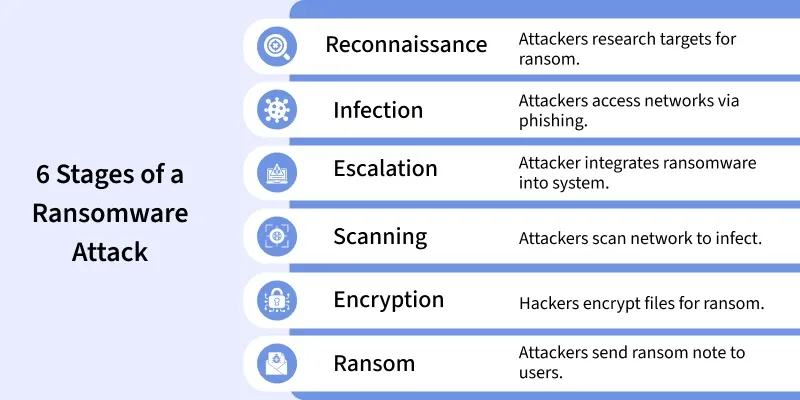
Businesses, individuals, and government organizations have all been victims of ransomware attacks since the mid-2000s, with the recovery of their systems costing large sums of money.
How Does a Computer Get Infected With Ransomware?
One of the most commonly used tactics is phishing. Attackers spread malicious content using email, social media, advertisements, and website pop-ups, among other methods. Let's take some of these:
- Email phishing: Malicious links or attachments trick users into running malware that encrypts files and spreads across connected systems.
- Malicious pop-ups: Fake update or warning pop-ups deliver payloads when clicked, or trick users into visiting attacker-controlled pages.
- Compromised remote desktop (RDP): Attackers brute-force or exploit exposed RDP (port 3389) to gain admin access, disable defenses, and deploy ransomware.
- Drive-by downloads: Visiting an infected or attacker-controlled website triggers a silent download/execute of malware without user interaction.
How Does Ransomware Work?
Ransomware operates more or less through a specific cycle before the targeted user is fully aware that they have been diagnosed with a malware infection.
- Infection: The primary attack vector is believed to occur through phishing emails and other lures, links, drive-by downloads, and compromised software. Targeted users install the ransomware into their system without their knowledge.
- Execution: After installation of the malware, the program then delivers a payload that circulates the system, searching for files of value and then encrypting them with nearly uncrackable security encryption.
- Encryption: Files are protected with the key known only by the violator. The victims will receive a message or a warning that the attackers want to get a ransom in exchange for the decryption key.
- Ransom Demand: The attacker shows the victim how the ransom is to be paid, the usual from being anonymous form of currency being bitcoins.
- Decryption (If Ransom Is Paid): If the victim agrees to pay, this sends the decryption key to the attackers, but data retrievals may not be recovered.
How to Stop Ransomware?
- Avoid untrusted links and attachments. Don’t open emails or click links from unknown senders; verify the source first.
- Keep OS and software updated. Apply security patches promptly to close exploitable vulnerabilities.
- Maintain reliable backups. Keep both local and off-site/cloud backups (offline or immutable when possible) and test restores regularly.
- Limit access & segment networks. Apply least privilege, isolate sensitive systems, and segment networks to stop lateral spread.
- Disable or update risky plugins. Remove/patch deprecated plugins (Flash, Java, etc.) and minimize browser plugins.
- Verify file sources and extensions. Only download files from trusted sites and confirm expected file extensions before opening.
- Train employees on ransomware awareness. Run phishing drills, teach safe browsing, and enforce secure remote-work practices (avoid public Wi-Fi or use VPN).
- Enforce strong authentication. Use strong, unique passwords and enable multi-factor authentication (MFA) everywhere possible.
What Are the Different Types of Ransomware?
There are various types of ransomware, each with different tactics:
- Crypto Ransomware: This type infects files on the victims’ system and then request for payment for the key that would decrypt the files. It is widely employed by the attackers because of its high level of encryption.
- Locker Ransomware: Unlike some other cyber threats that encrypt files, locker ransomware leaves the user with no access to their device or any of its functions, unless the ransom is paid.
- Scareware: Some of them pretend to have infected your PC and ask you to pay to get the ‘problem’ solved, despite the fact there may actually be no problem.
- Ransomware as a Service (RaaS): It is a business model adapted by cyber criminals that allow outsourcing of ransomware to other cyber criminals who are paid some commission on any extraction of ransoms.
- Doxware (Extortionware): Criminals using their knowledge to extort money from the victim by stating that they will expose a variety of new information if the ransom is not met.
What Are the Effects of Ransomware on Businesses?
Ransomware can have devastating effects on businesses, including:
- Financial Loss: Of course, the actual payment of the ransom has a cost, but businesses will also face costs on account of downtime, lost production, and recovery.
- Data Loss: If such backup systems are not well established, then businesses could lose such information forever.
- Reputation Damage: Consumers may also cease to believe in a business who has been a victim of ransomware attack thus resulting to a bad image.
- Legal Liabilities: As for the types of data, some companies may find themselves sued or fined for the customers’ sensitive data leakage.
- Operational Disruptions: During an attack, business operations are freezed therefore, projects take longer time to complete, and business earnings are lost.
History of Ransomware and Famous Ransomware Attacks
Ransomware has been around for over two decades, evolving in sophistication:
1. The AIDS Trojan (1989): It was one of the oldest ransomware malware that sought to function by presenting a message that required users to pay money in order to obtain a code that would unlock the files.
2. CryptoLocker (2013): One popular ransomware that emerged from spam campaigns, and the more unique way, it demanded money in bitcoins.
3. WannaCry (2017): A coordinated ransomware attack across the world which targeted more than 230000 computers in more than 150 countries. It targeted a weakness in the Operating Systems of Microsoft, disrupting operations of organizations such as the NHS in the United Kingdom.
4. Petya (2016 and 2017): Petya was unique because contrary to what typical ransomware does, it encrypted all the hard drive files. Its variant, NotPetya, was even more devastating and much of it is assumed to be state sponsored.
5. Clop / MOVEit & ongoing modern campaigns (2021–2023) — Big-impact data-exfiltration and extortion campaigns (e.g., exploiting file-transfer software) demonstrated the trend to combine data theft with encryption — "double extortion." (See vendor/incident reports for specifics.)
6. LockBit (2020–2024) — prolific & then disrupted (2024) — LockBit became the single most prolific RaaS family by attack volume; in early 2024 an international law-enforcement operation significantly disrupted its infrastructure and seized portions of its extortion site, marking a major enforcement milestone for global cooperation
How to Find Out When Ransomware is Attacking?
Early detection of ransomware attacks is key to minimizing damage:
1. Unusual File Activity: Any new extensions added at the end of the file names, a huge number of files that do not exist before, or files that are locked and encrypted, are signs of ransomware at work.
2. Slow System Performance: If applications become unresponsive, or more specifically, if systems become gradually slower, ransomware may already be active in the background.
3. Unexpected Ransom Demands: Having a ransom note displayed on your screen is an obvious indicator and more often than not, you’re way past this point.
4. Security Alerts: Firewalls or antivirus software or IDS may notify users of certain activities on the system which may be a pointer to ransomware.
How to Stop a Ransomware Attack?
Preventing ransomware attacks requires proactive measures, including:
1. Regular Backups: Run the backups on a normal basis for important information to another device, preferably off the network. This makes it possible to regain the data without having to pay the hackers’ ransom.
2. Security Software: Employ up to date antivirus and anti malware to identify and prevent ransomware from penetrating into your systems.
3. User Training: Inform work place workers on email phishing scams, links on sites that seem suspicious to downloading software from unknown sources.
4. Patch Management: Never allow any software or system to be run without installing necessary security patches and updates.
5. Network Segmentation: Segment networks to limit the spread of ransomware if one section is compromised.