
AWS CloudFormation is an Infrastructure as Code (IaC) service that helps users create and manage AWS resources using code templates.
- It allows you to define AWS resources like EC2 instances, S3 buckets, RDS databases, and networking components in code templates.
- Automates the provisioning and deployment process, eliminating the need to manually configure resources in the AWS Console.
- Ensures infrastructure consistency by creating identical environments across multiple regions or accounts using the same template.
- Supports version control and change management, allowing you to track modifications, roll back updates, and maintain reliable infrastructure.
Templates and Stacks
CloudFormation works using two main concepts:
- Template: A JSON or YAML file that defines the AWS resources to be created.
- Stack: The collection of AWS resources created and managed from the template.
AWS CloudFormation Working
Amazon Web Services (AWS) provides cloud services such as EC2, S3, Auto Scaling, and Load Balancing. AWS CloudFormation helps automate the provisioning of these services using Infrastructure as Code (IaC), reducing manual configuration.
Step-by-step process:
- Define infrastructure in a template.
- CloudFormation reads the template configuration.
- AWS APIs are called to create resources.
- Resources are deployed as a stack.
- Future updates safely modify the existing stack.

Benefits
- Automation: Automates the creation and management of AWS resources.
- Consistency: Creates identical infrastructure using reusable templates.
- Cost Savings: Reduces manual effort and reuses existing templates.
- Security: Applies security policies and configurations consistently.
- Scalability: Easily scales resources based on demand.
Getting Started with AWS CloudFormation
CloudFormation templates are written in JSON or YAML format. In this article, we focus on the JSON template format.
JSON (JavaScript Object Notation) is a text-based format used to represent structured data. In AWS CloudFormation, JSON templates define AWS resources and their configurations in a structured way, which CloudFormation uses to create and manage the AWS infrastructure.
Structure of CloudFormation JSON Template
- Format Version: Defines the version of the CloudFormation template.
- Description: Contains additional details or comments about the template.
- Metadata: Provides extra information using JSON objects.
- Parameters: Accepts custom or dynamic input values during stack creation.
- Mappings: Maps keys to corresponding values for conditional use.
- Conditions: Controls whether specific resources or properties are created.
- Transform: Helps reuse template components using declarative macros.
- Resources: Defines AWS resources like EC2, S3, and Lambda in the stack.
- Outputs: Displays values generated after stack creation, such as IDs or URLs.
Template Terms and Concepts
Understanding The Core Concepts That CloudFormation templates use to organize resources, settings, and functions is key to managing AWS infrastructure efficiently.
- Template: A CloudFormation template is a JSON or YAML file that defines the AWS resources and configurations to be created.
- Stacks: A stack is the collection of AWS resources created from a CloudFormation template and managed as a single unit.
- Formatting: CloudFormation templates use JSON or YAML format. YAML is commonly preferred because it is simpler and more readable.
- Change Sets: Change Sets allow you to preview the changes CloudFormation will make before updating a stack, helping reduce deployment risks.
- Functions: CloudFormation provides built-in functions such as
Fn::SubandFn::Jointo create dynamic and flexible configurations. - Parameters: Parameters allow users to provide custom input values during stack deployment, making templates reusable and flexible.
- Conditions: Conditions control whether specific resources are created or configured based on certain criteria, such as development or production environments.
Template Anatomy
A CloudFormation template consists of several standard sections. The most important are:
1. Resources (Mandatory)
The Resources section defines the AWS resources to be created in the stack.
Resources:
  MyBucket:
    Type: AWS::S3::Bucket
    Properties:
      BucketName: my-app-logs-2025
2. Parameters (Optional but Recommended)
The Parameters section makes your template flexible by allowing user input during stack creation.
Parameters:
  InstanceType:
    Type: String
    Default: t2.micro
    AllowedValues: [t2.micro, m5.large]
3. Outputs (Optional)
The Outputs section displays values after stack creation, such as a server IP address or Load Balancer URL.
4. Mappings (Optional)
The Mappings section stores fixed values, often used for Region-specific configurations like AMI IDs.
Deploy a CloudFormation Template
Deploying a CloudFormation template can be done through multiple methods, each catering to different preferences and workflows
1. AWS Management Console
- Log in, navigate to CloudFormation, and click Create Stack.
- Upload your JSON or YAML template, set parameters, tags, and permissions.
- Click Create Stack to deploy.
2. CloudFormation Designer
- Use a drag-and-drop interface to visually build or modify templates.
- Click Create Stack to deploy the designed template.
3. AWS CLI (Command Line Interface)
- Install and configure the AWS CLI on your system.
- Run CloudFormation commands to deploy templates from the terminal.
- Useful for automation, scripting, and CI/CD pipelines.
Create an AWS CloudFormation Template
There are two main ways to create an AWS CloudFormation template:
1. Use Pre-Built Templates
- Choose an existing or AWS sample template and customize it as needed.
- Useful for quick deployment and learning template structure.
2. Build Your Own Template from Scratch
- Create templates from scratch using AWS Application Composer.
- Uses a drag-and-drop interface to visually design infrastructure.
Steps to Provision an EC2 Instance and LAMP Package Using AWS CloudFormation
An AWS CloudFormation template that provisions an EC2 instance and automatically installs the LAMP stack (Linux, Apache, MySQL, PHP) on it.
If you don’t have an AWS Free Tier account, you can refer to the Amazon Web Services (AWS) – Free Tier Account Set up.
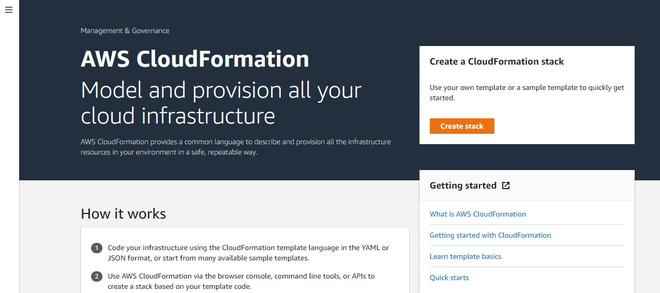
Step 1: Go to the AWS CloudFormation Dashboard
- In the AWS Management Console, navigate to the CloudFormation dashboard and click on Create Stack.
Step 2: Choose a Template
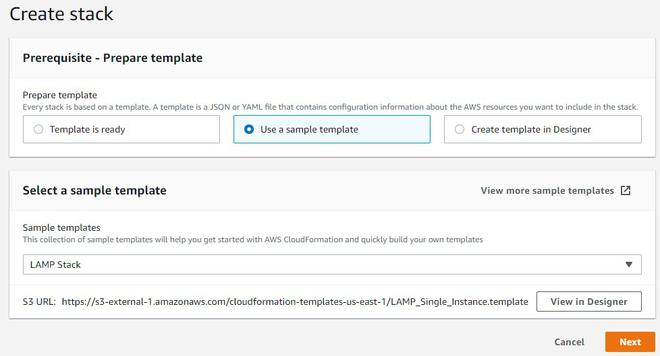
- You'll be redirected to a new page. Select the option Use a sample template.
- Choose the LAMP stack template from the available options, then click View in Designer to see how the template is designed.
Step 3: Customize the Template in the Designer
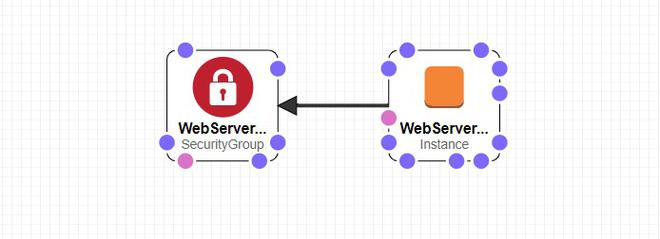
- In the designer page, you will see the template, including an EC2 instance with Apache and MySQL installed. The security groups associated with the instance will also be visible here.
- You can modify this template as needed to meet your specific requirements.
Step 4: Rename the Template
- Once you’ve customized the template, give it a new name that suits your infrastructure setup.

Step 5: Review the Template Code
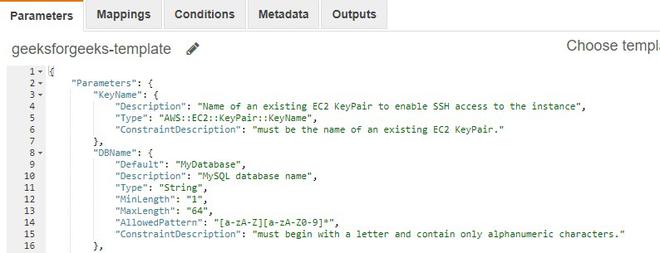
- The template is written in JSON format, which defines all the specifications and dependencies for the resources you’re provisioning.
Step 6: Exit the Designer
- Once you're happy with the template, click the cloud-shaped upload button to exit the designer and return to the main CloudFormation page.
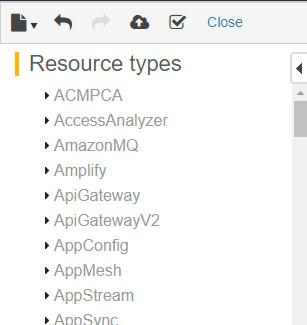
Step 7: Configure Stack Settings
- On the main page, click Next to proceed with configuring the stack settings.
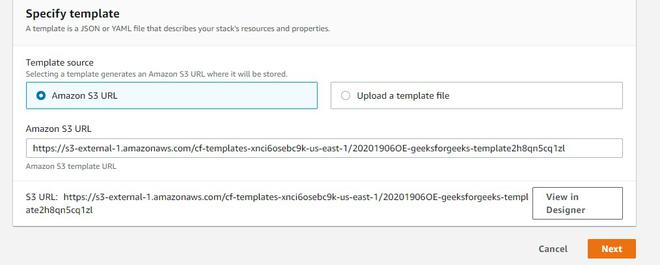
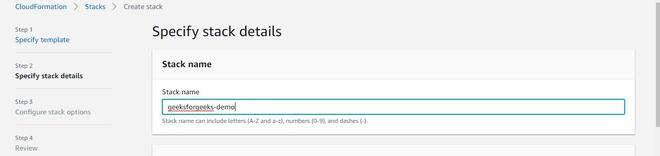
Step 8: Name the Stack
- Provide a stack name for your CloudFormation stack to easily identify it later.
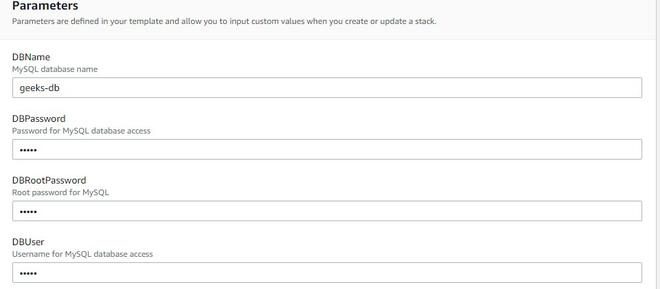
Step 9: Configure Database Settings
- Specify the name of the MySQL database you'd like to create. Set up the database password and provide a name for the database user.
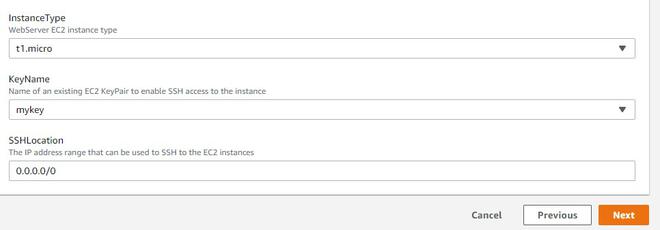
Step 10: Choose Instance Type
- Select the instance type (e.g., t2.micro, m5.large) and choose an available key pair that will allow you to make an SSH connection to the EC2 instance.
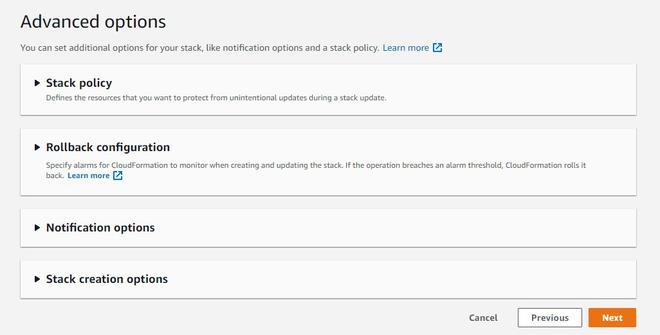
Step 11: Skip Advanced Settings
- If you're not familiar with advanced configurations, you can skip this section and click Next.
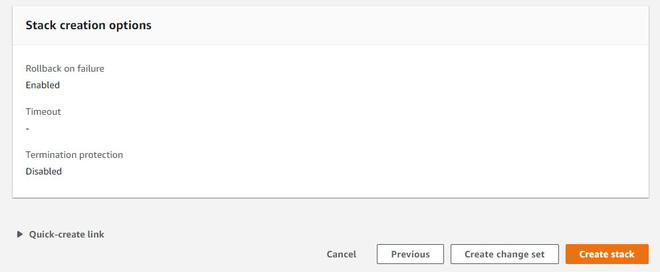
Step 12: Create the Stack
- Finally, click Create Stack. CloudFormation will start creating the instance, and the LAMP stack (Linux, Apache, MySQL, PHP) will be automatically installed on the EC2 instance.
Alternatives to CloudFormation
AWS CloudFormation is a very Famous infrastructure-as-code tool for managing AWS resources several alternatives offer different features and support for multi-cloud environments. Listing out some of very popular alternatives.
- Terraform: An open-source Infrastructure as Code (IaC) tool used to automate cloud infrastructure deployment. It supports multiple cloud providers such as AWS, Azure, and Google Cloud, making it suitable for multi-cloud environments.
- Pulumi: An Infrastructure as Code tool used to automate and manage cloud resources efficiently. It supports cloud platforms like AWS, Azure, OCI, and Google Cloud using programming languages such as Python and JavaScript.
CloudFormation vs. Terraform
A common question for DevOps engineers is which tool to use.
| AWS CloudFormation | Terraform |
|---|---|
| AWS Only. Deep integration with AWS features. | Multi-Cloud. Supports AWS, Azure, Google, etc. |
| Managed. AWS manages the state file for you. | Manual. You must manage the state file (e.g., in S3). |
| JSON or YAML. | HCL (HashiCorp Configuration Language). |
| Official AWS Support plan covers it. | Community support (unless you pay for Terraform Cloud). |
| Built-in feature. | Requires running terraform plan. |
Advanced Features
1. CloudFormation Hooks
- Hooks are a governance feature that invokes logic before a resource is created, updated, or deleted.
- Use Case: "Stop the deployment if someone tries to create an S3 bucket that is NOT encrypted." Hooks act as a proactive compliance guardrail.
2. Drift Detection
- Over time, someone might manually change a resource (e.g., changing a Security Group rule via the Console). This causes the actual infrastructure to "drift" from the CloudFormation template.
- Drift Detection scans your resources and reports any differences, allowing you to fix the manual changes or update your template to match reality.
3. Change Sets
- Before updating a live stack, you should create a Change Set. This is a "preview" that tells you exactly what CloudFormation will do (e.g., "I will modify this EC2 instance and DELETE this database") before you click execute.