
Protecting your PC from unauthorized access is crucial in today's digital age. One innovative method to enhance your computer's security is by using a USB flash drive. This technique involves configuring your system to only start or unlock when a specific USB drive is connected, adding an extra layer of protection. In this guide, we will walk you through the steps to set up USB flash drive security, ensuring your PC remains safe and secure.
Advanced Features:
- It can protect many PCs with the same USB drive
- It can protect several user accounts on a PC
- It can lock user accounts according to an hourly, daily, or weekly schedule, each one with its timetable
- It can send alert messages by Email
- It will prepare a proper LOG file
- It can take pictures of the person who tries to access your computer and attach them to an email or upload them to a remote server
- It also rings the alarm in case of denied access
- It also disables CD AUTORUN to prevent malware from being installed on your PC
- It protects its in-memory process
- For Maximum Security, it frequently changes the security codes stored in your USB
Protecting Data with a USB Drive
Just follow the steps to ensure maximum security using a USB Flash Drive:
Step 1: Download and install Predator on your PC. It can be downloaded from its official site predator-usb.com
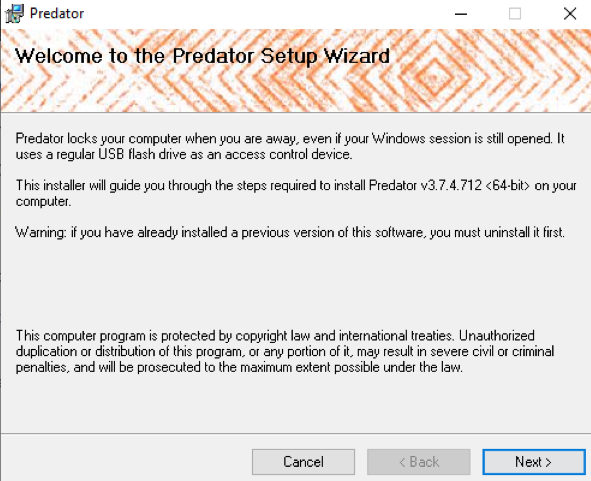
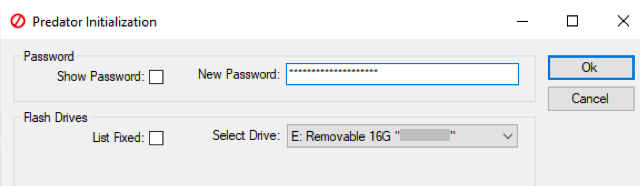
Step 2: When it gets successfully downloaded, plug in your USB Drive. (None of the stored content in your USB Drive will be affected by this method)
Step 3: Create a password of your choice and click on Ok.
Step 4: In the preferences window, take note of a few key settings. First, enter a secure and unique password in the New Password field.
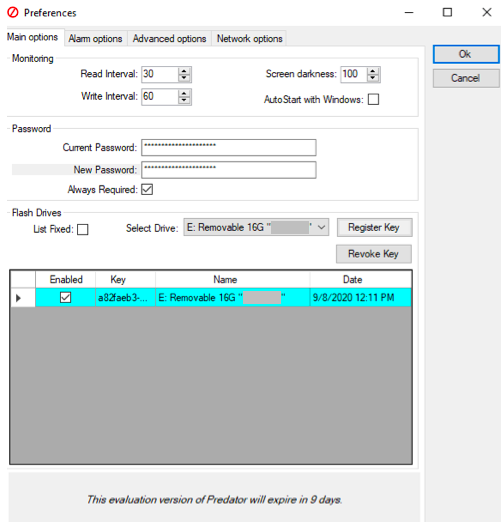
Step 5: If you'd like, you can check the always required box and you'll be asked to enter the password every time you plug-in your USB Drive to unlock your PC.
Step 6: Finally, in the section under Flash Drives, ensure that the correct USB is selected and then click on Create Key.
Step 7: Predator will exit. It starts working and will be visible in the taskbar.
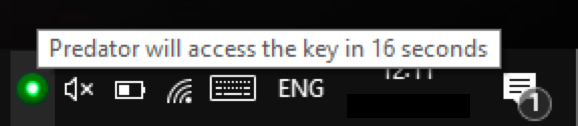
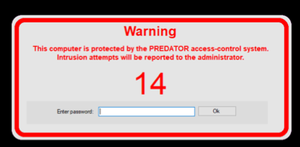
- Now, Every 30 SECONDS, predator will check to ensure that the USB Drive is inserted and if it isn't then the computer will lockdown.
How to choose a Secure Passphrase?
- Instead of common names use passwords that contain at least 15-20 characters.
- Use special characters and symbols to ensure maximum privacy.
- Don't use repetitive passwords.
- Enable two-factor authentication.
Conclusion
Using a USB flash drive to protect your PC is an effective way to enhance your computer's security. By following the steps outlined in this guide, you can set up a robust protection method that prevents unauthorized access. Incorporating USB flash drive security into your routine will give you peace of mind, knowing your PC and data are safeguarded.