
System design is the process of planning and structuring the architecture of a software system based on user requirements. It defines how different components of the system will work together to achieve the desired functionality efficiently.
- Translates user requirements into a technical blueprint by defining system components, data flow, and interactions between services.
- The goal is to create a well-organized and efficient structure that meets the intended purpose while considering factors like scalability, maintainability, and performance.
Example: For example, in an online shopping system, system design decides how components like the user interface, product catalog, payment service, and database interact with each other.
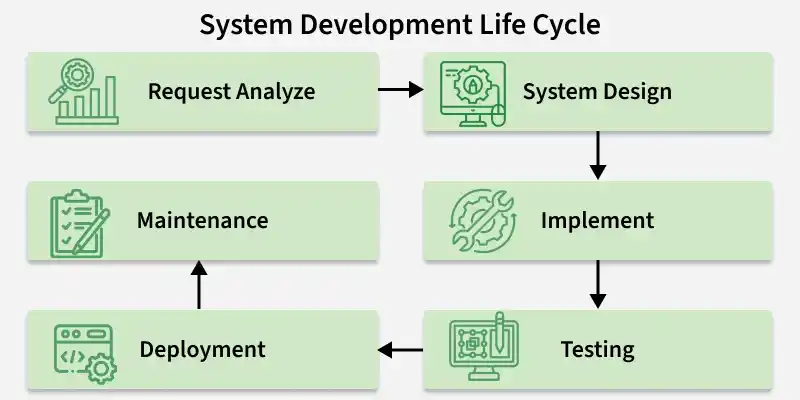
System Design in SDLC
In System Design Life Cycle, without the designing phase, one cannot jump to the implementation or the testing part.
- System Design is a vital step and also provides the backbone to handle exceptional scenarios because it represents the business logic of the software.
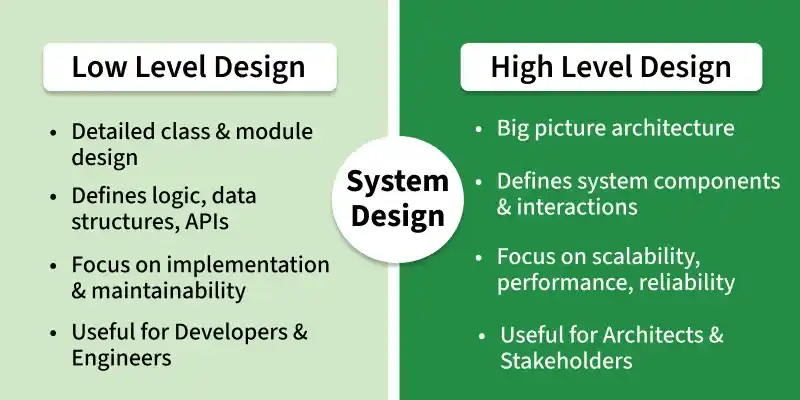
System Design can be divided into two complementary parts
High-Level Design (HLD)
High-level design (HLD) defines the overall architecture of a system and how the main components interact with each other. It provides a big-picture view of the system structure, services, and data flow.
- Identifies major modules, services, and their interactions.
- Focuses on system architecture and high-level decisions.
- Usually created by architects, stakeholders, and senior developers.
Prerequisite Technical Knowledge for HLD
These are the skills and concepts usually required to perform High-Level Design.
- Basic Coding Skills (Data Structures and Algorithms)
- Compared to Low Level Design, High Level Design is typically done by more senior people who have hands-on experience on software projects.
- Knowing the roles of components like databases (SQL and NoSQL), caches (Redis, Memcached, CDNs), and APIs.
- In-depth understanding of Functional Requirements and Non-Functional Requirements.
- Networking and Security Fundamentals like DNS, protocols (TCP/UDP, HTTP, WebSockets), OAuth, JWT, TLS/SSL, rate-limiting, API security, and basic DDOS protection.
- Message queues and streaming tools like Kafka or RabbitMQ.
- Knowledge of Microservices vs. Monoliths (When to split services and how to manage dependencies), fault tolerance, fallback strategies, redundancy, Load Balancer Types & Algorithms.
- Observability tools like Prometheus, Grafana, ELK Stack (Elasticsearch, Logstash, Kibana) and Alerting systems (e.g., PagerDuty)
Topics Covered in HLD
Focuses on system architecture, modules, and their interactions.
- System architecture overview: Defines the major components, modules, and how they interact (e.g., services, queues, databases) .
- Data flow and component interaction: Illustrates how data moves between modules, along with key integrations and interfaces.
- Technology stack and infrastructure: High-level decisions on frameworks, platforms, hardware, databases, and hosting setups.
- Module responsibilities: Describes what each module does and how they relate to one another .
- Performance & trade-offs: Includes design trade-offs, performance considerations, scalability, security, cost and other non-functional factors .
- Artifacts: Commonly includes architecture diagrams, component and deployment diagrams, data flow diagrams, and possibly ER/DB schematic overviews.
Real World Examples of HLD Decisions
High-Level Design (HLD) decisions in real-world systems focus on scalability, performance, and reliability to handle massive user bases and real-time workloads.
- Netflix transitioned their entire backend from a monolith to microservices (starting with encoding and UI services), completing the migration by 2011 to scale rapidly during high-load events like holiday seasons.
- Uber adopted an event-driven architecture where ride requests, location updates, and fare changes emit events that trigger real-time systems like driver matching, billing, and dynamic pricing.
- Twitter deployed a load-balanced architecture with caching of trending topics and tweets to quickly serve millions of users and handle real-time data flows efficiently.
Low-Level Design (LLD)
Low-Level Design (LLD) focuses on the internal implementation details of each component in the system. It provides developers with a clear and detailed blueprint for how modules, classes, and functions should be built.
- Describes the internal logic, classes, methods, and data structures of each module.
- Converts the High-Level Design into detailed implementation plans.
- Usually created by senior developers or designers before coding begins.
Prerequisite Technical Knowledge for LLD
Before creating a Low-Level Design, developers should have a strong understanding of core programming and software design concepts.
- Basic Coding Skills (Data Structures and Algorithms)
- Strong grasp of OOP concepts (Encapsulation, inheritance, polymorphism & abstraction)
Topics Covered in LLD
Covers how each component is implemented, including classes, methods, and logic.
- Component/module breakdown: Detailed internal logic for each module—with class responsibilities, methods, attributes, interactions
- Database schema & structure: Designing tables, keys, indexes, relationships with SQL/NoSQL refinements
- API & interface definitions: Precise request/response formats, error codes, methods, endpoints, and internal interfacing
- Error handling & validation logic: Define how each module manages invalid inputs, failures, edge cases, and logging
- Design patterns & SOLID: Implement design patterns and solid principles to ensure clean, extensible, maintainable code
- UML and pseudocode artifacts: Class diagrams, sequence diagrams, pseudocode or flowcharts to clarify logic paths and method calls
Difference between Low Level Design and High Level Design
HLD defines the overall system architecture, while LLD focuses on the detailed implementation of individual components.
| HIGH-LEVEL DESIGN (HLD) | LOW-LEVEL DESIGN (LLD) |
|---|---|
| Defines the overall system architecture | Focuses on detailed component-level design |
| Describes modules and their interactions | Describes internal logic of each module |
| Also known as macro-level/system design | Also known as micro-level/detailed design |
| Created by solution architects | Created by developers/designers |
| Based on SRS (Software Requirement Specification) | Based on reviewed HLD |
Steps for getting started with System Design
Here are some steps to get started with system design:
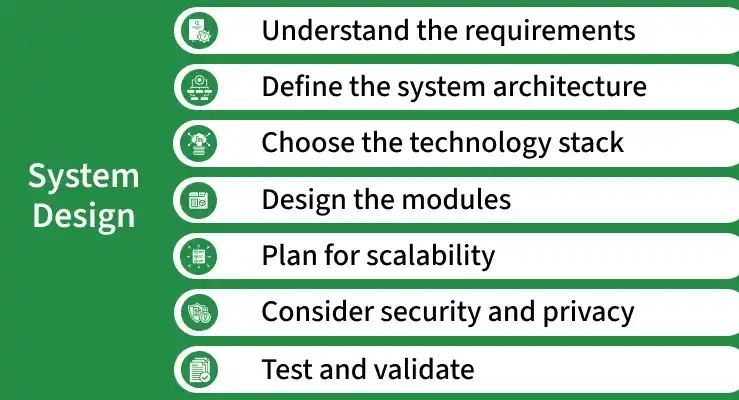
- Understand Requirements: Gather and analyze business needs to clearly define system functionality and avoid issues.
Example: For a food delivery app, requirements may include user login, restaurant listing, order placement, and online payment.
- Define Architecture: Plan overall system structure, components, and their interactions.
Example: In an e-commerce system, the architecture may include services like user service, product service, order service, and payment service.
- Choose Tech Stack: Select suitable technologies, frameworks, and databases based on requirements and scalability.
Example: A web application might use React for frontend, Node.js for backend, and MongoDB as the database.
- Design Modules: Divide the system into smaller components with specific responsibilities.
Example: In a banking system, modules may include account management, transaction processing, and customer management.
- Plan for Scalability: Design the system to handle growth using scalable solutions and identifying bottlenecks.
Example: A video streaming platform may use multiple servers and caching to handle millions of users at the same time.
- Ensure Security & Privacy: Apply security measures like authentication, encryption, and secure communication.
Example: An online banking system uses secure login, encrypted transactions, and multi-factor authentication.
- Test & Validate: Test the system to ensure it meets functional and performance requirements.
Example: Testing a ride-hailing app to ensure booking, driver matching, and payment processing work correctly.
Tips and Tricks to Solve a System Design Problem
System design problems become manageable when broken into smaller, structured steps. There’s no single correct solution, multiple valid approaches can exist.
- Clarify the requirements: Start by asking questions to fully understand the problem, including functional and non-functional requirements. This helps you avoid making incorrect assumptions.
- Start with a high-level design: Draw a simple architecture showing the main components such as clients, servers, databases, and APIs. This gives a clear overview before going into details.
- Break the system into components: Divide the system into smaller services or modules and define their responsibilities and interactions. This makes the design easier to explain and scale.
- Consider scalability and performance: Think about how the system will handle large traffic by using techniques like load balancing, caching, and database sharding.
- Discuss trade-offs: Explain why you choose a particular design or technology and what trade-offs it involves, such as cost vs performance or simplicity vs scalability.
- Refine the design gradually: After the high-level design, go deeper into areas like database design, APIs, and data flow to complete the solution.
Important points to consider when designing a software system
Designing a software system requires balancing performance, scalability, and maintainability to meet both current and future business needs.
- Scalability: The system should be designed to handle increased loads and be able to scale horizontally or vertically as needed.
- Performance: The system should be designed to perform efficiently and effectively, with minimal latency and response time.
- Reliability: The system should be reliable and available, with minimal downtime or system failures.
- Security: The system should be designed with security in mind, including measures to prevent unauthorized access and protect sensitive data.
- Maintainability: The system should be designed to be easy to maintain and update, with clear documentation and well-organized code.
- Interoperability: The system should be designed to work seamlessly with other systems and components, with clear and well-defined interfaces.
- Usability: The system should be designed to be user-friendly and intuitive, with a clear and consistent user interface.
- Cost-effectiveness: The system should be designed to be cost-effective, with a focus on minimizing development and operational costs while still meeting the requirements.