
Google Maps is a web and mobile mapping service developed by Google that provides detailed geographic information. It offers features like satellite imagery, street maps, 360° panoramic street views, real-time traffic updates, and route planning for multiple modes of travel. Users can access it via web browsers or mobile apps on smartphones and tablets.
- Provides directions for driving, walking, cycling, and public transport.
- Shows real-time traffic conditions and alternative routes.
- Offers Street View and satellite imagery for better navigation.
Example: Planning a trip from Gurgaon to Delhi, a user can get the fastest driving route, check traffic conditions, and view nearby landmarks using Google Maps.
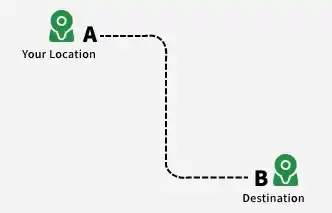
1. System Requirements
This section outlines the key functional and non-functional requirements for building Google Maps.
1. Functional Requirements
This section describes the core features that the system must provide to users.
1. Map Display: The system should provide clear, interactive maps with multiple views and zoom levels.
- Display maps with different levels of zoom.
- Support different map views such as satellite, terrain, and street view.
2. Location Search: The system should allow users to easily search for any location or landmark.
- Search for locations by entering addresses, landmarks, or geographical coordinates.
- Provide suggestions and autocomplete for faster search results.
3. Provide and Recommend the Fastest Route: The system should offer optimal routing options based on distance, time, and transportation type.
- Calculate the best route between source and destination.
- Adapt recommendations depending on mode of transport (car, walking, cycling, public transport).
4. Traffic and Weather Information: The system should provide real-time updates on traffic and weather conditions.
- Display current traffic conditions and predict traffic jams.
- Provide weather updates such as storms and hazardous conditions.
5. Near Me Model: The system should help users find nearby places of interest.
- Show nearby businesses (grocery, gym, salon, etc.) ranked by popularity and rating.
- Display details such as opening hours, services, and directions to reach the place.
2. Non-Functional Requirements
This section defines system qualities such as performance, reliability, and security.
- Availability: Ensure minimal downtime and high system availability.
- Scalability: Support a large number of concurrent users and requests efficiently.
- Accuracy: Provide up-to-date and precise information for locations, routes, and traffic.
- Security: Protect user data and ensure system integrity.
- ETA Accuracy: Travel time estimates can be impacted by factors like weather, road quality, accidents, or roadblocks; exact prediction is not always possible.
2. Capacity estimation
This section estimates the storage, server, and network requirements for a system like Google Maps.
1. Data Storage
This describes the approximate volume of data that needs to be stored and managed.
- Map Data: Estimated at 1 Petabyte (PB). (1 PB = 1,000 TB = 1,000,000 GB)
- Traffic Data: Hundreds of TB generated daily. Assuming 500 TB/day → 500 TB × 365 = 182,500 TB annually.
- POI (Points of Interest) Data: Estimated over 100 TB.
2. Server Resources
This covers computational and memory requirements for processing user requests and updates.
- Processing Power: Billions of requests and real-time traffic updates require massive computational resources. Exact server counts and specs are not publicly available.
- Memory and Storage: Each server needs sufficient memory and local storage depending on its function (rendering, routing, search).
3. Network Bandwidth
This explains the scale of data transfer required to serve global users.
- User Requests: Billions of requests daily for map tiles, navigation, and POI searches. Assuming 10 TB per request × 1 billion requests = 10,000 PB of daily bandwidth.
4. Overall Capacity
This summarizes the total scale of resources needed.
- Data Storage: Several Exabytes (EB). (1 EB = 1,000 PB)
- Servers: Millions of servers distributed globally.
- Network Bandwidth: Extremely high, spanning multiple continents to handle real-time updates and user traffic.
3. Use of Quad Tree in Google Maps
Google Maps doesn't actually use a pure quad tree for its overall data structure. However, it utilizes concepts similar to those used in a quad tree within certain functionalities. Here's why:
1. Data Types in Google Maps
Google Maps deals with two main types of data:
- Static data: Map imagery, street layouts, landmarks.
- Dynamic data: Traffic flow, location of users, POIs with recent updates.
2. Quad Tree's Advantages
This section explains why quad trees are useful for managing spatial data efficiently.
- Spatial Efficiency: A quad tree excels at partitioning 2D space into smaller grids, focusing on areas with more data points. This reduces unnecessary searches in sparsely populated areas.
- Fast Lookups: By recursively dividing space, quad trees enable efficient lookups for points within specific regions. This benefits functionalities like finding nearby POIs or calculating routes.
3. Google Maps Implementation
Google Maps implements similar techniques but not a strict quad tree for several reasons:
- Dynamic Data Variations: Traffic and user locations constantly change, requiring a more flexible structure than a static quad tree.
- Varying Data Density: Different regions have varying densities of roads, POIs, and traffic data. A quad tree's rigid grid may not efficiently handle such discrepancies.
Example implementation:
# Create a quad tree with initial bounds
map_tree = QuadTreeNode(bounds=(0, 0, 100, 100))

# Add points representing landmarks or POIs
map_tree.insert((25, 35))
map_tree.insert((70, 80))
# ... (add more points)

# Find points within a search region
search_region = (50, 50, 75, 75)
points_in_region = map_tree.find_points_in_region(search_region)
print(points_in_region)
4. Low -Level Design
This section describes the internal data structures, processing mechanisms, and communication used in Google Maps.
1. Data Structures
This section explains how different types of data are stored and organized.
- Map Data: Stored in distributed systems like GFS and Bigtable for scalability; map tiles are geographically organized and compressed for fast delivery.
- Traffic Data: Real-time traffic is processed using systems like Apache Flink, while historical data is stored in warehouses like BigQuery for analysis.
- Point of Interest (POI) Data: Stored in geospatial databases with details like name, category, and location; continuously updated for accuracy.
2. Data Processing and Retrieval
This section describes how data is processed and fetched efficiently.
- Map Tile Serving: CDNs deliver map tiles quickly based on user location, while caching improves response time and reduces server load.
- Traffic Flow Calculations: Algorithms like Dijkstra compute shortest paths, with real-time traffic updating routing decisions dynamically.
- POI Search and Querying: Spatial indexing enables fast location-based searches, and fuzzy matching handles typos or incomplete queries.
3. User Interface and Rendering
This section explains how maps are displayed and interacted with by users.
- Interactive Map View: WebGL enables smooth and responsive rendering, with separate layers for tiles, traffic, and POIs.
- Turn-by-Turn Navigation: Uses GPS and road network data to provide accurate navigation with voice and visual guidance.
- User Interactions and Customization: APIs support features like saving routes and sharing locations, with optimized touch gestures for mobile use.
4. Communication and Protocols
This section explains how data is transmitted between client and server.
- Map Tile Requests: Protocol Buffers (protobuf) are used for efficient communication, with a binary format that reduces size and improves speed.
- Real-time Traffic Updates: WebSockets or MQTT enable real-time data streaming, with push notifications for traffic changes.
- API Communication: REST APIs handle backend interaction, while OAuth ensures secure authentication and data privacy.
Note:
This is a high-level overview of Google Maps' low-level design. The actual implementation involves complex algorithms, distributed systems, and constant innovation to ensure its functionality and scalability.
5. High-Level Design
The high-level design's components are described in detail in the low-level design, with an emphasis on their functions and interactions.
Example: For a particular element, such as the Maps Rendering Service, for instance
- Geo-coordinates and zoom level are input.
- Overlay rendering and tile generation are processed.
- Produced: Detailed Map Tiles
There are several components that make up Google Maps' low-level design (LLD), including:
- Rendering of maps: This part is in charge of producing maps of any place on the planet. It makes use of a range of data sources, including terrain data, satellite imagery, and street-level imagery.
- Routing: This part is in charge of giving users directions to their destination while accounting for other variables like road closures and traffic patterns. To determine the fastest and shortest routes, it employs a number of different algorithms.
- Place search: This feature is in charge of assisting users in locating establishments, eateries, landmarks, and other locations of interest. It draws from a wide range of data sources, including social media posts, restaurant reviews, and business listings.
- Real-time data processing: This part is in charge of handling data that is received in real-time from various sources, including social media, weather stations, and traffic sensors. It updates the maps and gives users the most recent information using this data.
Three primary layers comprise Google Maps' high-level design (HLD):
- Presentation layer: The presentation layer is in charge of rendering the maps and giving users the option to look up locations and directions.
- Application layer: This layer is in charge of managing real-time data and processing user requests as well as request routing.
- Data layer: This layer manages the databases' data storage and retrieval.
6. System Design Diagram
A system such as Google Maps needs to be carefully designed with many different components and their interactions in mind. This is a high-level system design overview :
Components
Defines the core building blocks required to design a scalable and efficient map system.
- Map Data Storage: To store and manage the enormous amount of map data, which includes roads, landmarks, points of interest, and real-time traffic information, a massive distributed datastore is required. For effective data retrieval, spatially partitioned data structures such as quadtrees or geohashes can be utilized.
- Geolocation Services: To provide location-based services and ascertain the current location of a user, precise geolocation capabilities are essential. To determine user coordinates, this entails integrating with data from cellular networks, Wi-Fi, and GPS systems.
- Routing Engine: Taking into account a number of variables, including user preferences, traffic conditions, and road types, a robust routing engine determines the quickest or shortest path between two points. Graph algorithms such as A* or Dijkstra's can be used to determine the best routes.
- Map Rendering Engine: Based on the user's location and zoom levels, an effective map rendering engine creates map tiles. In order to do this, map data must be retrieved, processed, and appropriately styled and labelled from the datastore.
- Search and Navigation: Users can locate particular places, companies, or points of interest with the help of a strong search and navigation system. This entails giving precise navigational instructions and indexing map data for effective search.
- Real-time Traffic Updates: In order to provide precise estimated travel times and recommend alternate routes, real-time traffic information is essential. This entails gathering traffic data and feeding it into the routing engine from multiple sources, including sensors, GPS units, and user input.
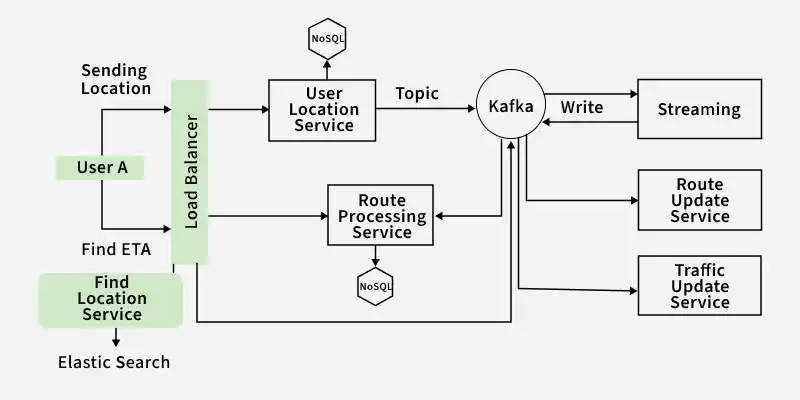
7. Database design
A distributed database architecture is used by Google Maps to provide scalability and reliability. For real-time analytics, they might use Bigtable on Google Cloud, and for structured data, they might use Cloud SQL, a relational database which is already mention in System Design diagram.
Google Maps stores its data in multiple databases. A few of the important databases are:
- Map data database: This database houses the terrain information, satellite imagery, and street-level imagery.
- Routing database: Road network information, traffic patterns, and road closures are all stored in the routing database.
- Places database: This database contains information about places, such as social media posts, restaurant reviews, and business listings.
- Real-time data: Information from traffic sensors, weather stations, and social media platforms is stored in this database.
8. Scalability
One extremely scalable system is Google Maps. It employs a number of strategies, such as the following, to manage numerous concurrent users and requests:
- Load balancing: Google Maps employs load balancers to disperse traffic among several servers. This makes it possible for the system to manage even the highest traffic volume.
- Replication: Data is replicated by Google Maps among several servers. This contributes to maintaining high system availability and preventing data loss.
- Caching: Google Maps caches information that is accessed often. This lessens the strain on the database servers and enhances performance.
9. Microservices and API used
The architecture of Google Maps is based on microservices, with each component implemented as a separate microservice. This enables us to swiftly roll out new features and scale each component independently.
Google Maps makes use of the following APIs:
- Maps API: With this API, programmers can incorporate Google Maps into their own apps.
- Directions API: Developers can determine the optimal path between two locations with the help of the Directions API.
- Places API: Developers can use the Places API to look up and retrieve details about establishments, eateries, and tourist destinations.
- Geocoding API: Developers can use the geocoding API to convert addresses to coordinates.
- Distance Matrix API: Developers can use the Distance Matrix API to determine the time and distance between various locations.
For various operations, the APIs use common HTTP methods like GET, POST, and PUT:
- GET: Get information, like directions or map tiles.
- POST: Send in data, like user location updates or newly contributed points of interest.
- PUT: Modify current information, like a company's address or operating hours.
10. Components Details
This section describes the core components responsible for map serving and routing functionality.
- Map Server: The map data must be stored and served by the map server. Usually, a distributed file system like Google Cloud Storage is used to store the map data. To efficiently serve the map data, the map server employs a number of strategies, including load balancing and caching.
- Routing Service: The routing service is in charge of figuring out the most efficient path between two points. Numerous factors, including user preferences, road types, and traffic conditions, are taken into consideration by the routing service. The routing service employs a number of algorithms, including Dijkstra's algorithm and A* search, to determine the optimal path.