
In today’s digital world, premium music streaming platforms like Spotify require highly scalable and efficient system design to deliver seamless user experiences.
- Ensures high-quality audio streaming with low latency.
- Handles millions of users with scalable and reliable architecture.
- Provides smooth user experience through optimized data delivery.
1. System Requirements
Define all user needs and system expectations to build a scalable and feature-rich music streaming platform.
1. Functional Requirements
Specify the core features and functionalities that users can interact with in the system.
- Users can search for content by title, Genre, description, etc.
- Every audio has its thumbnail.
- Spotify Premium shows content that matches the user's previous preferences.
- Users can download up to 10,000 songs on a maximum of 5 devices under the same account.
- Interested users can upload their audio files.
- Users can listen to uploaded audio files.
- Shareable song links, and Spotify URLs across various social media platforms.
- Users can review their past listening activity.
- Users with premium access to features such as ad-free listening, unlimited skips, high-quality audio streaming, and offline downloads for both users on the two-device subscription plan.
2. Non-Functional Requirements
Define system qualities like performance, scalability, and reliability to ensure a smooth user experience.
- High Availability
- High Reliability
- Good Performance
- Highly Scalable
- Low Latency
2. Capacity Estimation
Estimate system scale, traffic, and storage to design a highly scalable music streaming platform.
- Assume Daily Active Users (DAU) ≈ 500K
- Peak concurrency ~ 5–10% ⇒ ~25K–50K simultaneous users (use ~30K for estimation)
- Sessions per user per day ≈ 5 ⇒ ~2.5M play requests/day
- Average QPS ≈ ~30 requests/sec (consider burst traffic up to 4–5× ⇒ ~120–150 QPS)
- Average song size ≈ 3MB ⇒ 30M songs ≈ ~90TB storage
- Metadata per song ≈ 100 bytes ⇒ ~3GB total metadata
- User data ≈ 1KB per user ⇒ ~0.5GB for 500K users
- With 3× replication ⇒ total storage ≈ ~300TB
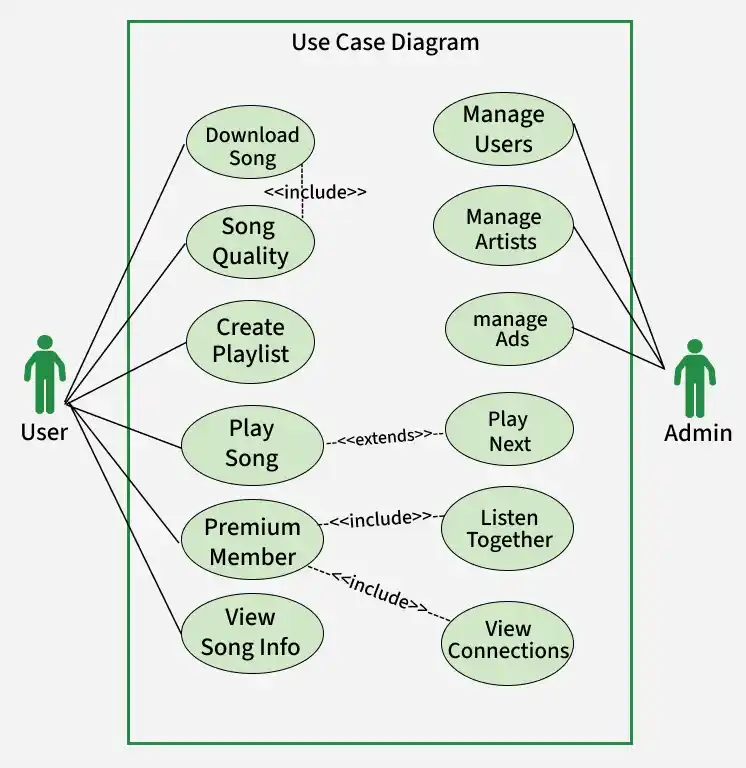
3. Use Case diagram
Below Use Case Diagram Describe the use cases of User and Database System:
4. High-Level Design
Outline the overall system architecture, key components, and how they interact to deliver a scalable and efficient solution.
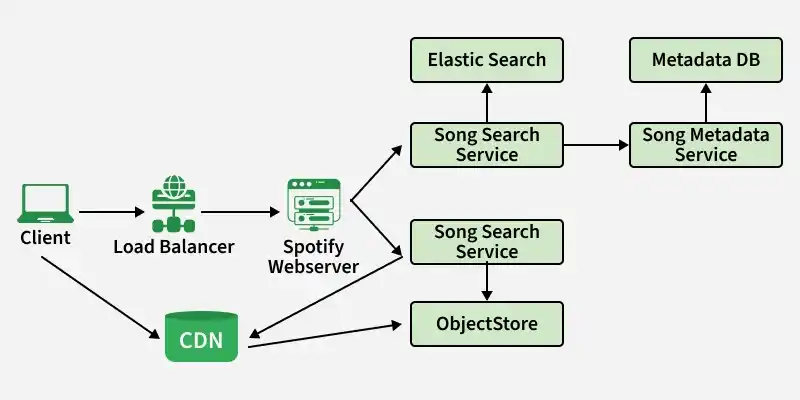
1. Components of High Level Design
Define the core services and components responsible for handling requests, processing data, and delivering a seamless user experience.
- Spotify Web Server: Acts as the entry point for all client requests, handling authentication, rate limiting, and request validation to ensure security and smooth operations
- Song Search Service: Enables fast and efficient music discovery using indexing tools like Elasticsearch for searching songs, artists, and albums
- Song Metadata Service: Fetches and manages song-related data (songs, albums, artists) from the metadata database
- Song Streaming Service: Delivers audio content by fetching files from object storage (e.g., Amazon S3) and CDNs for smooth playback
2. Design Considerations
Identify key factors like scalability, performance, reliability, and trade-offs to ensure an efficient and robust system design.
Metadata Datastore
Define how song data and files are stored efficiently for fast access and scalability.
- Relational Database: Stores structured metadata (songs, users, playlists) for consistency and easy querying
- NoSQL Database: Provides fast and scalable access to frequently used or denormalized data
- Object Store (e.g., Amazon S3): Stores large audio files with high durability and cost optimization
Song Streaming
Explain how audio content is delivered smoothly to users across different network conditions.
- HTTP Range Requests: Streams songs in chunks to enable partial loading and resume capability
- Adaptive Bitrate Streaming: Dynamically adjusts audio quality based on network speed for uninterrupted playback
- Search Failover (e.g., Elasticsearch): Ensures system reliability by falling back to metadata storage if search services fail
5. Low-Level Design
Design classes and objects for features like User, Song, Playlist, and Player, defining their attributes, methods, and interactions to support streaming, search, and user personalization in Spotify.
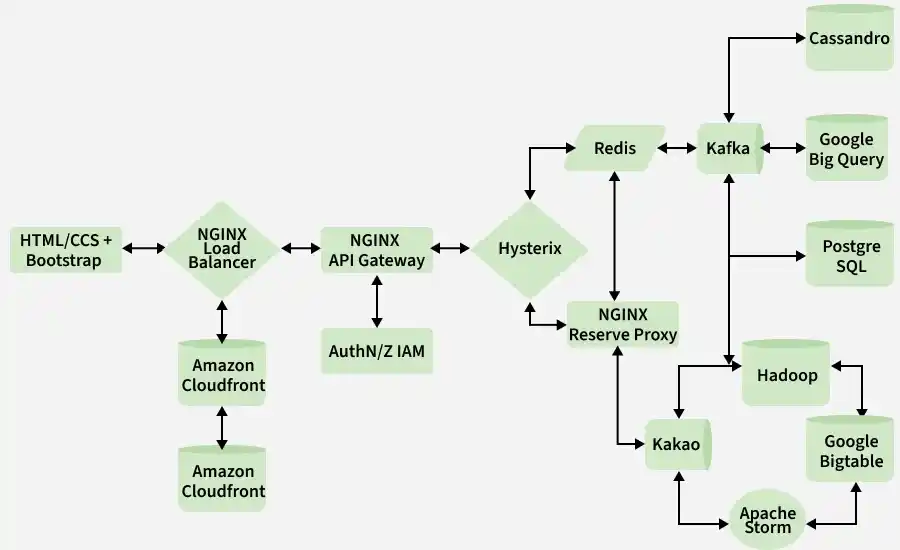
1. Java: Serving as the primary development language, Java is instrumental in crafting Spotify's intricate codebase, offering advantages like comprehensive tooling, robust frameworks, and object-oriented paradigms.
2. NGINX: Acting as an elastic load balancer, API gateway, and service client, NGINX optimizes server operations, enhancing speed, security, and load management. Its open-source nature allows for extensive customization without licensing concerns.
3. Hystrix: This Java-based circuit breaker library bolsters fault tolerance within Spotify's microservices architecture, minimizing failures and enhancing reliability.
4. PostgreSQL: Serving as the SQL database for storing critical user billing and subscription data, PostgreSQL provides a robust, open-source RDBMS solution.
5. Bootstrap: Utilized as the CSS framework for frontend webpage development, Bootstrap streamlines UI design with pre-styled components, ensuring a sleek and responsive user interface.
6. Amazon S3: Facilitating static file storage for licensed Spotify songs, Amazon S3 offers high availability and fault tolerance, essential for housing vast music libraries.
7. Amazon CloudFront: As a CDN provider, CloudFront complements S3, ensuring global accessibility of stored content by efficiently distributing it across multiple regions.
8. Kafka: Powering the event-driven streaming pipeline, Kafka facilitates rapid microservice routing with its high throughput and Java SDK support.
9. Cassandra: Employed as the distributed NoSQL database, Cassandra efficiently manages user data with its scalability and fault-tolerant architecture.
10. Hadoop: Utilized for distributed file storage and batch computing of historical data, Hadoop enables Spotify to analyze large datasets effectively.
11. Google BigQuery: This cloud-based data warehouse empowers Spotify with advanced analytics capabilities, aiding in data-driven decision-making and trend identification.
12. Apache Storm: Offering distributed real-time computation, Storm complements Hadoop by providing optimized analytics for search and recommendation engine results.
13. Google Cloud Bigtable: Serving as a highly available NoSQL database, Bigtable stores essential metadata, seamlessly integrating with BigQuery for enhanced analytics capabilities.
Flow of the Design
Below is the overview flow of the Low-Level Design of Spotify Premium:
- Users interact with the frontend, initiating requests such as song searches.
- Requests are forwarded to the NGINX load balancer, which directs them to the NGINX API gateway for authentication and service routing.
- The API gateway sends requests to NGINX service clients, which interact with various microservices via Kafka for processing.
- Microservices process requests and publish responses on the Kafka pipeline, enabling seamless communication and data retrieval.
- Service clients gather responses from the Kafka pipeline and relay them back to the API gateway for aggregation.
- Aggregated responses are sent back to the frontend, where users receive rendered content, such as search results or song selections.
6. Database Design
Creating a database model for a Spotify-like platform, covering important features like user management, playlist creation, artist following, track liking, premium features, and payment systems.
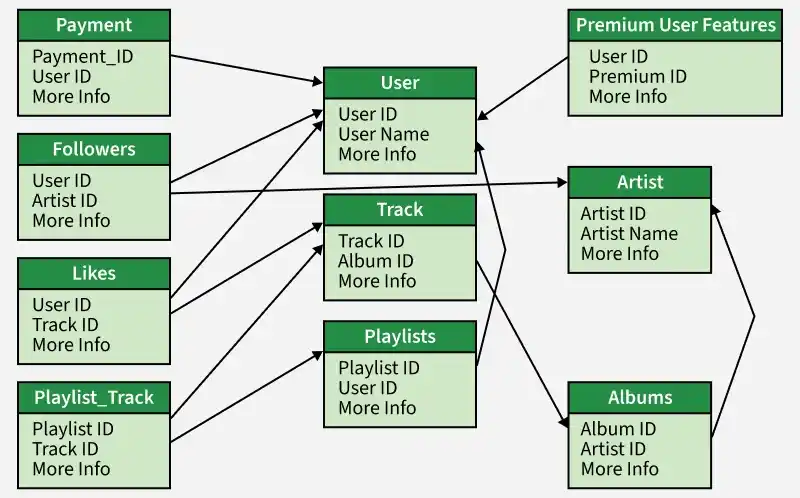
1. User Information
Here we store important details like user names, emails, passwords, birth dates, and profile pictures. We'll also include a feature to identify whether users are regular or premium members.
CREATE TABLE Users (
  User_ID INT AUTO_INCREMENT PRIMARY KEY,
  Name VARCHAR(50) NOT NULL,
  Email VARCHAR(50) NOT NULL UNIQUE,
  Password VARCHAR(100) NOT NULL,
  Date_of_Birth DATE,
  Profile_Image Blob,
  User_Type VARCHAR(10) NOT NULL DEFAULT 'regular'
);
2. Premium User Features
There are special features for premium users, like ad-free listening. These features will be stored in a table, and we'll use another table to connect users with their chosen premium features.
CREATE TABLE Premium_Feature (
  Premium_Feature_ID INT PRIMARY KEY AUTO_INCREMENT,
  Name VARCHAR(50) NOT NULL
);

CREATE TABLE User_Premium_Feature (
  User_ID INT,
  Premium_Feature_ID INT,
  PRIMARY KEY (User_ID, Premium_Feature_ID),
  FOREIGN KEY (User_ID) REFERENCES Users(User_ID),
  FOREIGN KEY (Premium_Feature_ID) REFERENCES Premium_Feature(Premium_Feature_ID)
);
3. Payment Integration
To handle payments, we'll set up tables to store payment details and subscription plans. Another table will link users with their chosen subscription plans.
CREATE TABLE Payment (
  Payment_ID INT PRIMARY KEY AUTO_INCREMENT,
  User_ID INT NOT NULL,
  Payment_Method VARCHAR(50) NOT NULL,
  Payment_Date DATE NOT NULL,
  Amount DECIMAL(10, 2) NOT NULL,
  FOREIGN KEY (User_ID) REFERENCES Users(User_ID)
);

CREATE TABLE Subscription_Plan (
  Subscription_Plan_ID INT PRIMARY KEY AUTO_INCREMENT,
  Name VARCHAR(50) NOT NULL,
  Price DECIMAL(10, 2) NOT NULL,
  Description VARCHAR(500) NOT NULL
);

CREATE TABLE User_Subscription_Plan (
  User_ID INT,
  Subscription_Plan_ID INT,
  Start_Date DATE NOT NULL,
  End_Date DATE NOT NULL,
  PRIMARY KEY (User_ID, Subscription_Plan_ID),
  FOREIGN KEY (User_ID) REFERENCES Users(User_ID),
  FOREIGN KEY (Subscription_Plan_ID) REFERENCES Subscription_Plan(Subscription_Plan_ID)
);
4. Artists Table
This table keeps track of artists' basic details like their names, genres, and images. It helps organize and display information about various artists on the platform.
CREATE TABLE Artists (
  Artist_ID INT AUTO_INCREMENT PRIMARY KEY,
  Name VARCHAR(50) NOT NULL,
  Genre VARCHAR(50),
  Image_URL VARCHAR(255)
);
5. Albums Table
In this table, we store information about albums, such as their names, release dates, and cover images. It helps users find and explore different albums easily.
CREATE TABLE Albums (
  Album_ID INT AUTO_INCREMENT PRIMARY KEY,
  Artist_ID INT,
  Name VARCHAR(50) NOT NULL,
  Release_Date DATE,
  Image VARCHAR(255),
  FOREIGN KEY (Artist_ID) REFERENCES Artists(Artist_ID)
);
6. Tracks Table
Tracks Table stores details about individual songs, including their names, durations, and file locations. It's essential for playing music and organizing songs within albums.
CREATE TABLE Tracks (
  Track_ID INT AUTO_INCREMENT PRIMARY KEY,
  Album_ID INT,
  Name VARCHAR(50) NOT NULL,
  Duration INT NOT NULL,
  Path VARCHAR(255),
  FOREIGN KEY (Album_ID) REFERENCES Albums(Album_ID)
);
7. Playlists Table
This table helps users create and manage playlists by storing their names and associated user IDs. It's where users organize their favorite songs into custom collections.
CREATE TABLE Playlists (
  Playlist_ID INT AUTO_INCREMENT PRIMARY KEY,
  User_ID INT,
  Name VARCHAR(50) NOT NULL,
  Image Blob,
  FOREIGN KEY (User_ID) REFERENCES Users(User_ID)
);
8. Playlist_Tracks Table
Playlist_Tracks Table connects playlists with tracks, allowing users to add songs to their playlists. It keeps track of the order of songs within each playlist.
CREATE TABLE Playlist_Tracks (
  Playlist_ID INT,
  Track_ID INT,
  `Order` INT,
  PRIMARY KEY (Playlist_ID, Track_ID),
  FOREIGN KEY (Playlist_ID) REFERENCES Playlists(Playlist_ID),
  FOREIGN KEY (Track_ID) REFERENCES Tracks(Track_ID)
);
9. Followers Table
This table manages the relationship between users and artists, showing which artists a user follows. It helps users stay updated with their favorite artists' latest releases.
CREATE TABLE Followers (
  User_ID INT,
  Artist_ID INT,
  PRIMARY KEY (User_ID, Artist_ID),
  FOREIGN KEY (User_ID) REFERENCES Users(User_ID),
  FOREIGN KEY (Artist_ID) REFERENCES Artists(Artist_ID)
);
10. Likes Table
Likes Table keeps track of which songs users have liked, helping personalize their music recommendations. It's useful for understanding user preferences and improving recommendations.
CREATE TABLE Likes (
  User_ID INT,
  Track_ID INT,
  Like_Date_Time DATETIME,
  PRIMARY KEY (User_ID, Track_ID),
  FOREIGN KEY (User_ID) REFERENCES Users(User_ID),
  FOREIGN KEY (Track_ID) REFERENCES Tracks(Track_ID)
);
7. Microservices used
Break down the system into independent services like user management, search, metadata, streaming, and recommendation to ensure scalability, flexibility, and easier maintenance.
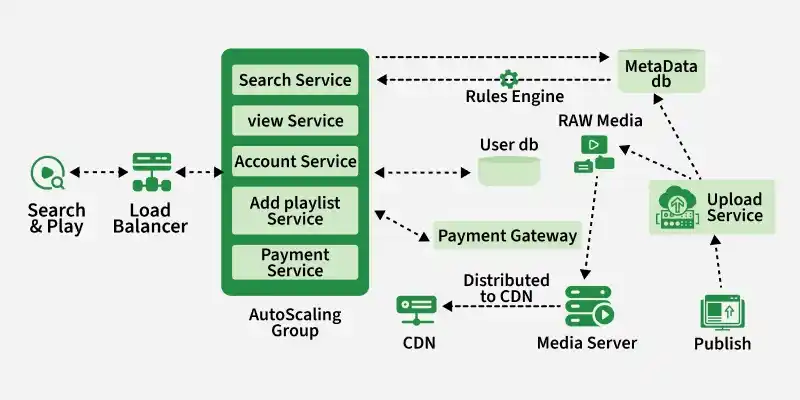
1. Publishing: In the publishing stage, content creators upload their content. This content is stored in both a raw media server and a metadata database. The upload process is facilitated by a service deployed within a containerized environment and auto-scaling group, ensuring scalability.
2. Distribution: Once content is published, it undergoes distribution. The files stored in the raw media server are processed by a media server, which handles tasks like protocol conversion and bitrate optimization. Post-processing, the files are transferred to a content delivery network (CDN), strategically located globally to reduce latency for users.
3. Search and Play: During the search and play phase, clients connect to the system to search for and listen to music. Clients, ranging from smartphones to smart TVs, connect to load balancers, which distribute requests to an auto-scaling group. This group comprises containers running various microservices like search, view, account, add to playlist, and payment services.
4. Amazon Infrastructure: To implement this architecture, Amazon S3 is utilized for storing raw and transcoded files, with Elastic Transcoder for media processing and CloudFront for CDN distribution.
8. API used
Define the key APIs that enable communication between services and handle core functionalities like search, playback, uploads, and user management.
- searchService API: Handles user search requests by fetching relevant data from the metadata database and applying business rules before returning results
- viewService API: Retrieves specific content details (songs, albums, artists) and processes them before sending to the client
- uploadService API: Allows creators to upload songs, ensuring proper storage and availability for streaming
- accountService API: Manages user authentication, profiles, and subscription validation with payment integration
- addPlaylistService API: Adds songs to user playlists while enforcing rules like limits and validations
- paymentService API: Processes secure payments and updates user subscription status for premium features
Example: When a user searches for a song on Spotify, the
searchService APIfetches results, and upon selecting a track, theviewService APIand streaming services work together to deliver the content seamlessly.
9. Scalability
As Spotify scales to 50 million users and 200 million songs, the system must efficiently handle large volumes of data and traffic by optimizing storage and database management.
Storing Data
Estimate and plan storage requirements to efficiently handle growing data at scale.
- Song metadata (~100 bytes each) ⇒ 200M songs ≈ ~20GB
- User data (~1KB each) ⇒ 50M users ≈ ~50GB
- Requires scalable storage solutions to handle continuous growth
Managing the Database
Design database architecture to handle high read/write loads and ensure performance.
- Use Leader–Follower replication
- Leader handles writes; Followers handle read requests
- Improves read performance and distributes database load
Handling Complexity
Incorporate advanced scaling techniques as the system grows in size and traffic.
- Advanced techniques like sharding and multi-leader setups help scale further
- Useful for very high traffic but add operational complexity
- Should be adopted based on system needs and scale
Example: In Spotify, replication helps serve millions of read requests (song searches, playlists), while sharding can distribute user data across multiple servers for better scalability.