
Composition is the strongest type of relationship in class diagrams, representing a strict whole–part dependency. In Composition the part (child) class is strictly dependent on the whole (parent) class. If the parent is destroyed, the child objects are also destroyed.
In UML class diagrams, composition is denoted by a filled (solid black) diamond at the parent class side.
The line connects the parent (whole) to the child (part).
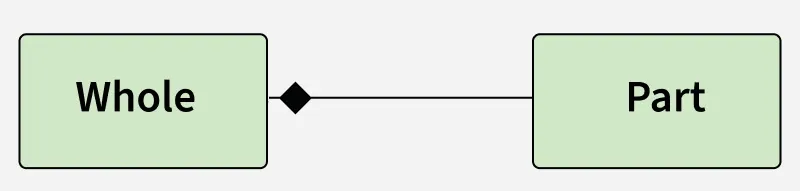
Understanding Composition with an example:
Imagine a digital contact book application. The contact book is the whole, and each contact entry is a part. Each contact entry is fully owned and managed by the contact book. If the contact book is deleted or destroyed, all associated contact entries are also removed.
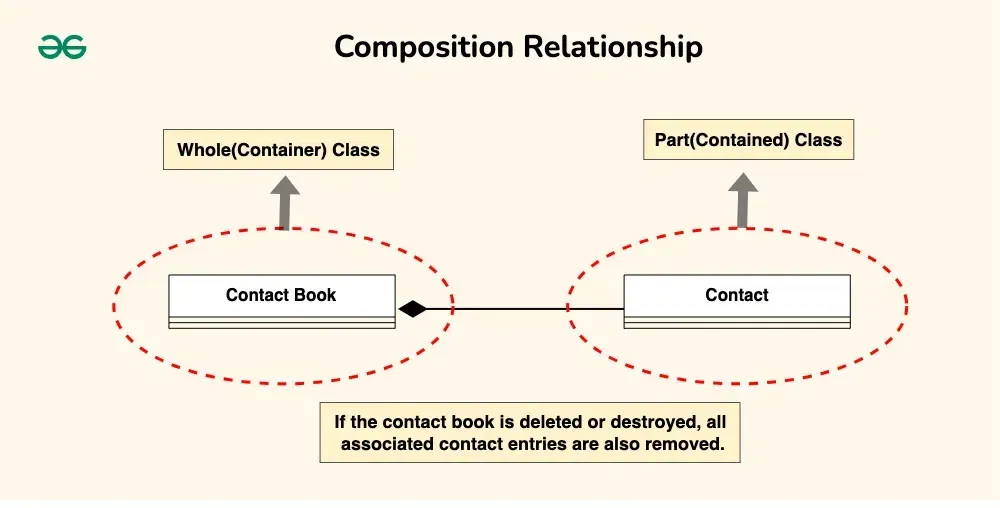
#include <iostream>
#include <string>
#include <vector>
using namespace std;

// Represents a single contact entry
class Contact {
public:
    Contact(const string& n, const string& p) : name(n), phone(p) {}
    void display() const { cout << name << " - " << phone << "\n"; }
private:
    string name, phone;
};

// Represents the ContactBook which owns Contact objects (Composition)
class ContactBook {
public:
    void addContact(const string& name, const string& phone) {
        contacts.emplace_back(name, phone);
    }
    void showContacts() const {
        for (const auto& c : contacts) c.display();
    }
private:
    vector<Contact> contacts;
};

int main() {
    // Whole: ContactBook
    ContactBook myBook;

    // Parts: Contacts inside ContactBook
    myBook.addContact("Alice", "123-456");
    myBook.addContact("Bob", "987-654");

    myBook.showContacts();
}
import java.util.*;

// Represents a single contact entry
class Contact {
    private String name, phone;
    Contact(String n, String p) { name = n; phone = p; }
    void display() { System.out.println(name + " - " + phone); }
}

// Represents the ContactBook which owns Contact objects (Composition)
class ContactBook {
    private List<Contact> contacts = new ArrayList<>();
    void addContact(String n, String p) { contacts.add(new Contact(n, p)); }
    void showContacts() { for (Contact c : contacts) c.display(); }
}

public class Main {
    public static void main(String[] args) {
        // Whole: ContactBook
        ContactBook myBook = new ContactBook();

        // Parts: Contacts inside ContactBook
        myBook.addContact("Alice", "123-456");
        myBook.addContact("Bob", "987-654");

        myBook.showContacts();
    }
}
# Represents a single contact entry
class Contact:
    def __init__(self, name, phone):
        self.name = name
        self.phone = phone
    def display(self):
        print(f"{self.name} - {self.phone}")

# Represents the ContactBook which owns Contact objects (Composition)
class ContactBook:
    def __init__(self):
        self.contacts = []
    def add_contact(self, name, phone):
        self.contacts.append(Contact(name, phone))
    def show_contacts(self):
        for c in self.contacts:
            c.display()

# Whole: ContactBook
myBook = ContactBook()

# Parts: Contacts inside ContactBook
myBook.add_contact("Alice", "123-456")
myBook.add_contact("Bob", "987-654")

myBook.show_contacts()
// Represents a single contact entry
class Contact {
    constructor(name, phone) {
        this.name = name;
        this.phone = phone;
    }
    display() {
        console.log(`${this.name} - ${this.phone}`);
    }
}

// Represents the ContactBook which owns Contact objects (Composition)
class ContactBook {
    constructor() {
        this.contacts = [];
    }
    addContact(name, phone) {
        this.contacts.push(new Contact(name, phone));
    }
    showContacts() {
        this.contacts.forEach(c => c.display());
    }
}

// Whole: ContactBook
const myBook = new ContactBook();

// Parts: Contacts inside ContactBook
myBook.addContact("Alice", "123-456");
myBook.addContact("Bob", "987-654");

myBook.showContacts();
Output
Alice - 123-456
Bob - 987-654