
In this article we are going to learn how can we change the font of textpresent inside the Radio box. In order to do this we will follow 3 steps:
Python3 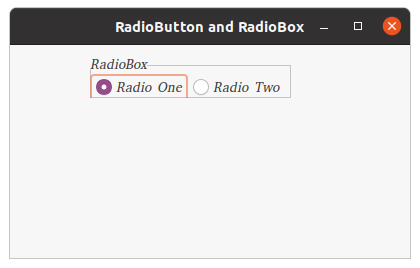
Step 1: Create a wx.Font object variable named f. Step 2: Create a Radio box. Step 3: Set f as font for Radio box using SetFont() method.
Syntax: wx.RadioBox.SetFont(self, font) ParametersCode Example:
Parameter Input Type Description font wx.Font font to be used for radio box
import wx


class FrameUI(wx.Frame):

    def __init__(self, parent, title):
        super(FrameUI, self).__init__(parent, title = title, size =(300, 200))

        # function for in-frame components
        self.InitUI()

    def InitUI(self):
        # parent panel for radio box
        pnl = wx.Panel(self)

        # list of choices
        lblList = ['Radio One', 'Radio Two']

        # create wx.Font object
        fnt = wx.Font(10, family = wx.FONTFAMILY_DECORATIVE, style = wx.FONTSTYLE_ITALIC,
                                                            weight = wx.FONTWEIGHT_LIGHT)

        # create radio box containing above list
        self.rbox = wx.RadioBox(pnl, label ='RadioBox', pos =(80, 10), choices = lblList,
                                         majorDimension = 1, style = wx.RA_SPECIFY_ROWS)

        # set fnt as font for text in radiobox
        self.rbox.SetFont(fnt)

        # set frame in centre
        self.Centre()
        # set size of frame
        self.SetSize((400, 250))
        # show output frame
        self.Show(True)


# wx App instance
ex = wx.App()
# Example instance
FrameUI(None, 'RadioButton and RadioBox')
ex.MainLoop()