
Set is a built-in Python data type used to store a collection of unique items.
- Stores only unique elements; duplicate values are automatically removed.
- Unordered collection, so elements do not have a fixed position and cannot be accessed using indexes.
- Supports fast search, insertion and deletion operations using hashing internally.
Example: This example shows how to create a set with some numbers and check its type.
s = {10, 50, 20}
print(s)
print(type(s))
Output
{10, 50, 20}
<class 'set'>
Note: There is no specific order for set elements to be printed
Type Casting
set() method is used to convert other data types, such as lists or tuples, into sets.
s = set(["a", "b", "c"])
print(s)
Output
{'c', 'b', 'a'}
{'d', 'c', 'b', 'a'}
Check unique and Immutable
Sets cannot have duplicate values. While you cannot modify the individual elements directly, you can still add or remove elements from the set.
# a set cannot have duplicate values
s = {"Geeks", "for", "Geeks"}
print(s)

# values of a set cannot be changed
s[1] = "Hello"
print(s)
Output
{'Geeks', 'for'}
TypeError: 'set' object does not support item assignment
Explanation:
- s = {"Geeks", "for", "Geeks"} duplicates are removed, only unique values remain.
- s[1] = "Hello" Error, set elements cannot be changed directly. Only add() or remove() can modify a set.
Heterogeneous Element
Sets can store heterogeneous elements in it, i.e., a set can store a mixture of string, integer, boolean, etc datatypes.
s = {"Geeks", "for", 10, 52.7, True}
print(s)
Output
{True, 52.7, 'Geeks', 10, 'for'}
Frozen Sets
Frozenset is an immutable version of a set. Its elements cannot be changed after creation, but you can perform operations like union, intersection and difference. Use frozenset() to create one.
s = set(["a", "b", "c"])
print("Normal Set:", s)

fs = frozenset(["e", "f", "g"])
print("Frozen Set:", fs)
Output
('Normal Set:', set(['a', 'c', 'b']))
('Frozen Set:', frozenset(['e', 'g', 'f']))
Note: Frozensets are immutable, so methods like add() or remove() cannot be used. They are also hashable, which allows them to be used as dictionary keys.
Internal working of Set
Python sets are implemented using a hash table, similar to dictionaries, where the set elements are stored as keys with dummy values. If multiple elements map to the same index, Python handles the collision by storing them in the same bucket.
The diagram below illustrates how sets internally manage collisions to support efficient insertion, deletion, and lookup operations.
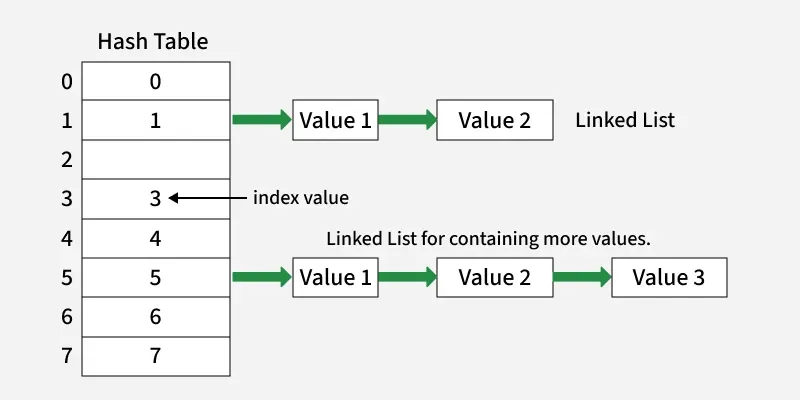
- Each index in the hash table represents a possible hash value where elements are stored based on their computed hash key.
- When two elements map to the same index, they are linked together using a linked list, forming a chain at that position.
- This chaining mechanism helps efficiently handle collisions, allowing multiple elements to exist at the same hash index without overwriting each other.
Sets with Numerous operations on a single HashTable:
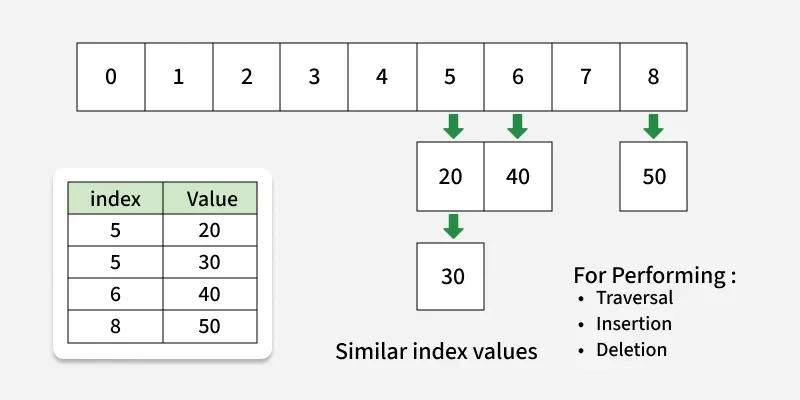
The hash table stores elements based on their computed index values for example, values 20 and 30 are placed at index 5, while 40 goes to index 6 and 50 to index 8. When multiple values share the same index, they are linked together, forming a chain (as seen at index 5).
During traversal, insertion or deletion, the algorithm moves through these linked elements at each index to access or modify data efficiently.
Methods for Sets
1. Adding elements: add() function is used to insert new elements into a set. It automatically ignores duplicates.
s = {"a", "b", "c"}
s.add("d")
print(s)
Output
{'c', 'd', 'a', 'b'}
2. Union: union() function combines two sets and returns a new set with all unique elements.
a = {"x", "y"}
b = {"y", "z"}
u = a.union(b)
print(u)
Output
{'z', 'y', 'x'}
3. Intersection: intersection() function returns a new set containing elements that are common to both sets.
a = {1, 2, 3}
b = {2, 3, 4}
i = a.intersection(b)
print(i)
Output
{2, 3}
4. Difference: difference() function returns a set containing elements that are in the first set but not in the second.
a = {1, 2, 3}
b = {2, 3, 4}
d = a.difference(b)
print(d)
Output
{1}
5. Clear: clear() function removes all elements from a set, leaving it empty.
s = {1, 2, 3}
s.clear()
print(s)

Output
set()
Operators for Sets
Sets and frozen sets support the following operators:
| Operators | Notes |
|---|---|
| key in s | containment check |
| key not in s | non-containment check |
| s1 == s2 | s1 is equivalent to s2 |
| s1 != s2 | s1 is not equivalent to s2 |
| s1 <= s2 | s1 is subset of s2 |
| s1 < s2 | s1 is proper subset of s2 |
| s1 >= s2 | s1 is superset of s2 |
| s1 > s2 | s1 is proper superset of s2 |
| s1 | s2 | the union of s1 and s2 |
| s1 & s2 | the intersection of s1 and s2 |
| s1 - s2 | the set of elements in s1 but not s2 |
| s1 ˆ s2 | the set of elements in precisely one of s1 or s2 |