
Python provides flexible data structures such as lists, which can be used to represent 1D and 2D arrays. A 2D list in Python is essentially a list of lists, commonly used to store data in a table-like format with rows and columns.
This article focuses on correct and incorrect ways to create 1D and 2D lists in Python.
Creating a 1-D list
A 1D list stores elements in a linear sequence. Although Python does not have a native 1D array type, lists serve the same purpose efficiently.
Using Naive Methods
Manually initializing and populating a list without using any advanced features or constructs in Python is known as creating a 1D list using "Naive Methods".
N = 5
ar = [0]*N
print(ar)
Output
[0, 0, 0, 0, 0]
Explanation: [0] * N creates a list of size N.
Using List Comprehension
N = 5
arr = [0 for _ in range(N)]
print(arr)
Output
[0, 0, 0, 0, 0]
Explanation: range(N) controls list length.
Creating a 2-D list
A 2D list represents data in rows and columns. Correct initialization is important to avoid unintended shared references.
Using Naive Method
Here we are multiplying the number of columns and hence we are getting the 1-D list of size equal to the number of columns and then multiplying it with the number of rows which results in the creation of a 2-D list.
rows, cols = (5, 5)
arr = [[0]*cols]*rows
print(arr)
Output
[[0, 0, 0, 0, 0], [0, 0, 0, 0, 0], [0, 0, 0, 0, 0], [0, 0, 0, 0, 0], [0, 0, 0, 0, 0]]
Explanation:
- [[0] * cols] creates one inner list.
- * rows duplicates references, not lists.
- All rows point to the same list object.
Note: Using this method can sometimes cause unexpected behaviors. In this method, each row will be referencing the same column. This means, even if we update only one element of the array, it will update the same column in our array.
rows, cols = (5, 5)
arr = [[0]*cols]*rows
print(arr, "before")

arr[0][0] = 1 # update only one element
print(arr, "after")
Output
([[0, 0, 0, 0, 0], [0, 0, 0, 0, 0], [0, 0, 0, 0, 0], [0, 0, 0, 0, 0], [0, 0, 0, 0, 0]], 'before')
([[1, 0, 0, 0, 0], [1, 0, 0, 0, 0], [1, 0, 0, 0, 0], [1, 0, 0, 0, 0], [1, 0, 0, 0, 0]], 'after')
Using List Comprehension
Here we are basically using the concept of list comprehension and applying a loop for a list inside a list and hence creating a 2-D list.
rows, cols = 5, 5
arr = [[0 for _ in range(cols)] for _ in range(rows)]
print(arr)
Output
[[0, 0, 0, 0, 0], [0, 0, 0, 0, 0], [0, 0, 0, 0, 0], [0, 0, 0, 0, 0], [0, 0, 0, 0, 0]]
Explanation:
- Inner comprehension creates a new list per row.
- Rows are independent objects.
- Safe for element-wise update
Using Empty List and Loops
Here we are appending zeros as elements for a number of columns times and then appending this 1-D list into the empty row list and hence creating the 2-D list.
arr = []
rows, cols = 5, 5
for _ in range(rows):
    row = []
    for _ in range(cols):
        row.append(0)
    arr.append(row)
print(arr)
Output
[[0, 0, 0, 0, 0], [0, 0, 0, 0, 0], [0, 0, 0, 0, 0], [0, 0, 0, 0, 0], [0, 0, 0, 0, 0]]
Explanation:
- Builds each row explicitly.
- Functionally equivalent to nested list comprehension.
- Useful for step-by-step construction.
Initializing 2D Lists: Reference Behavior
The code below, compares two ways of initializing a 2D list in Python. Using list multiplication ([[0]*cols]*rows) creates multiple references to the same inner list, causing aliasing where changes affect all rows. Using a nested list comprehension creates a separate list for each row, avoiding aliasing and correctly forming a 2D array.
rows, cols = (5, 5)
# 1st approach
arr = [[0]*cols]*rows
arr[0][0] = 1

for row in arr:
    print(row)

# 2nd approach
arr = [[0 for i in range(cols)] for j in range(rows)]

arr[0][0] = 1
for row in arr:
    print(row)
Output
[1, 0, 0, 0, 0]
[1, 0, 0, 0, 0]
[1, 0, 0, 0, 0]
[1, 0, 0, 0, 0]
[1, 0, 0, 0, 0]
[1, 0, 0, 0, 0]
[0, 0, 0, 0, 0]
[0, 0, 0, 0, 0]
[0, 0, 0, 0, 0]
[0, 0, 0, 0, 0]
Explanation:
- In ist approach ([[0]*cols]*rows), all rows reference the same inner list.
- Updating arr[0][0] modifies that shared list, so the first element in every row changes.
- Python creates only one inner list and one 0 object, not separate copies.
- This shared reference behavior is known as shallow copying (aliasing).
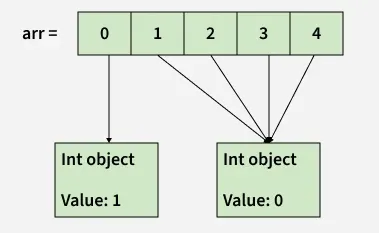
If we assign the 0th index to another integer say 1, then a new integer object is created with the value of 1 and then the 0th index now points to this new int object as shown below
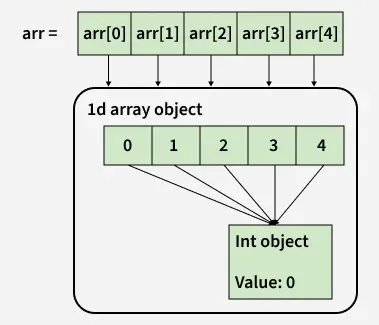
Similarly, when we create a 2d array as "arr = [[0]*cols]*rows" we are essentially extending the above analogy.
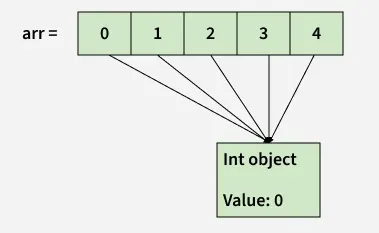
- Only one integer object is created.
- A single 1d list is created and all its indices point to the same int object in point 1.
- Now, arr[0], arr[1], arr[2] .... arr[n-1] all point to the same list object above in point 2.
The above setup can be visualized in the image below.
Now lets change the first element in first row of "arr" as arr[0][0] = 1
- arr[0] points to the single list object we created we above.(Remember arr[1], arr[2] …arr[n-1] all point to the same list object too).
- The assignment of arr[0][0] will create a new int object with the value 1 and arr[0][0] will now point to this new int object.(and so will arr[1][0], arr[2][0] … arr[n-1][0])
This can be clearly seen in the below image.
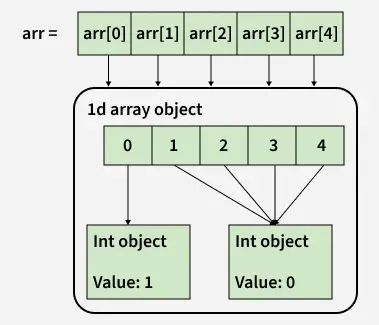
So when 2d arrays are created like this, changing values at a certain row will affect all the rows since there is essentially only one integer object and only one list object being referenced by the all the rows of the array.
Tracing out errors caused by such usage of shallow lists is difficult. Hence the better way to declare a 2d array is
rows, cols = (5, 5)
print([[0 for i in range(cols)] for j in range(rows)])
Output
[[0, 0, 0, 0, 0], [0, 0, 0, 0, 0], [0, 0, 0, 0, 0], [0, 0, 0, 0, 0], [0, 0, 0, 0, 0]]
This method creates 5 separate list objects, unlike method 2a. One way to check this is by using the 'is' operator which checks if the two operands refer to the same object.
rows, cols = (5, 5)

arr = [[0 for i in range(cols)] for j in range(rows)]
print(arr[0] is arr[1])

arr = [[0]*cols]*rows
print(arr[0] is arr[1])
Output
False
True
Explanation:
- "arr = [[0 for i in range(cols)] for j in range(rows)]" creates a separate list for each row.
- "arr[0] is arr[1]" returns False, confirming both rows are different objects in memory.
- "arr = [[0]*cols]*rows" creates one inner list and reuses its reference for all rows.
- "arr[0] is arr[1]" returns True, showing both rows point to the same list object.
- The is operator checks whether two variables refer to the same object, not just equal values.