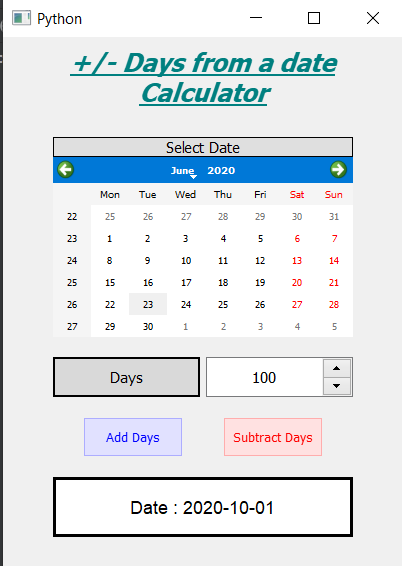
In this article we will see how we can create a days from date calculator in PyQt5, days from date calculator is used to add or subtract the days from the selected date to get the new date. This calculator is used to get the exact date which would come after given number of days. Below is how the calculator will like
PyQt5 is cross-platform GUI toolkit, a set of python bindings for Qt v5. One can develop an interactive desktop application with so much ease because of the tools and simplicity provided by this library. Below is the command to install the PyQt5
pip install PyQt5
GUI Implementation Steps :
1. Create a heading label that display the calculator name
2. Create label to show user to select the date
3. Create a QCalendarWidget object for user to select the date
4. Create a label and spin box for telling user to enter days and get the days
5. Create two push buttons for adding and subtracting the days
6. Create a label to show the calculated date
Back-End Implementation :
1. Add action to both the push button
2. Inside the add push button action get the days and call the calculate method and pass days as argument
3. Inside the subtract push button action get the days and make the days negative and call the calculate method and pass days as argument
4. Inside the calculate method get the selected date of the calendar
5. Add the passed days to the selected date
6. Show the new date with the help of result label
Below is the implementation
Python3 1==
# importing librariesfromPyQt5.QtWidgetsimport*fromPyQt5importQtCore,QtGuifromPyQt5.QtGuiimport*fromPyQt5.QtCoreimport*importdatetimeimportsysclassWindow(QMainWindow):def__init__(self):super().__init__()# setting titleself.setWindowTitle("Python ")# width of windowself.w_width=400# height of windowself.w_height=530# setting geometryself.setGeometry(100,100,self.w_width,self.w_height)# calling methodself.UiComponents()# showing all the widgetsself.show()# method for componentsdefUiComponents(self):# creating head labelhead=QLabel("+/- Days from a date Calculator",self)head.setWordWrap(True)# setting geometry to the headhead.setGeometry(0,10,400,60)# fontfont=QFont('Times',15)font.setBold(True)font.setItalic(True)font.setUnderline(True)# setting font to the headhead.setFont(font)# setting alignment of the headhead.setAlignment(Qt.AlignCenter)# setting color effect to the headcolor=QGraphicsColorizeEffect(self)color.setColor(Qt.darkCyan)head.setGraphicsEffect(color)# creating a labelb_label=QLabel("Select Date",self)# setting properties labelb_label.setAlignment(Qt.AlignCenter)b_label.setGeometry(50,100,300,20)b_label.setStyleSheet("QLabel""{""border : 1px solid black;""background : rgba(70, 70, 70, 25);""}")b_label.setFont(QFont('Times',9))# creating a calendar widget to select the dateself.calendar=QCalendarWidget(self)# setting geometry of the calendarself.calendar.setGeometry(50,120,300,180)# setting font to the calendarself.calendar.setFont(QFont('Times',6))# creating a labeldays_label=QLabel("Days",self)# setting geometry to the labeldays_label.setGeometry(50,320,147,40)# setting alignmentdays_label.setAlignment(Qt.AlignCenter)# setting stylesheetdays_label.setStyleSheet("QLabel""{""border : 2px solid black;""background : rgba(70, 70, 70, 35);""}")days_label.setFont(QFont('Times',9))# creating a spin box to get the daysself.days=QSpinBox(self)# setting geometry to the spin boxself.days.setGeometry(203,320,147,40)# setting maximum value of spin boxself.days.setMaximum(99999999)# setting font and alignmentself.days.setFont(QFont('Times',9))self.days.setAlignment(Qt.AlignCenter)# creating a push buttonadd=QPushButton("Add Days",self)# setting geometry to the push buttonadd.setGeometry(80,380,100,40)# adding action to the buttonadd.clicked.connect(self.add_action)# adding color effect to the push buttoncolor=QGraphicsColorizeEffect()color.setColor(Qt.blue)add.setGraphicsEffect(color)# creating a push buttonsubtract=QPushButton("Subtract Days",self)# setting geometry to the push buttonsubtract.setGeometry(220,380,100,40)# adding action to the buttonsubtract.clicked.connect(self.subtract_action)# adding color effect to the push buttoncolor=QGraphicsColorizeEffect()color.setColor(Qt.red)subtract.setGraphicsEffect(color)# creating a label to show resultself.result=QLabel(self)# setting properties to result labelself.result.setAlignment(Qt.AlignCenter)# setting geometryself.result.setGeometry(50,440,300,60)# making it multi lineself.result.setWordWrap(True)# setting stylesheet# adding border and backgroundself.result.setStyleSheet("QLabel""{""border : 3px solid black;""background : white;""}")# setting fontself.result.setFont(QFont('Arial',11))# method called by the add push buttondefadd_action(self):# get the days from the spin boxdays=self.days.value()# call the calculate actionself.calculate(days)# method called by the subtract push buttondefsubtract_action(self):# get the days from the spin box# make the days value negativedays=0-self.days.value()# call the calculate actionself.calculate(days)defcalculate(self,days):# get the selected date of calendarselected_date=self.calendar.selectedDate()# adding days to the selected daysnew_date=selected_date.addDays(days)# showing this date through labelself.result.setText("Date : "+new_date.toString(Qt.ISODate))# create pyqt5 appApp=QApplication(sys.argv)# create the instance of our Windowwindow=Window()# start the appsys.exit(App.exec())

 PyQt5 is cross-platform GUI toolkit, a set of python bindings for Qt v5. One can develop an interactive desktop application with so much ease because of the tools and simplicity provided by this library. Below is the command to install the PyQt5