It is not always possible to get the dataset in CSV format. So, Pandas provides us the functions to convert datasets in other formats to the Data frame. An excel file has a '.xlsx' format.
Before we get started, we need to install a few libraries.
pip install pandas
pip install xlrd
For importing an Excel file into Python using Pandas we have to use pandas.read_excel() function.
Syntax: pandas.read_excel(io, sheet_name=0, header=0, names=None,....)
Return: DataFrame or dict of DataFrames.
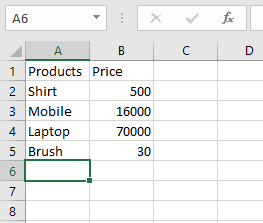
Let’s suppose the Excel file looks like this:
Now, we can dive into the code.
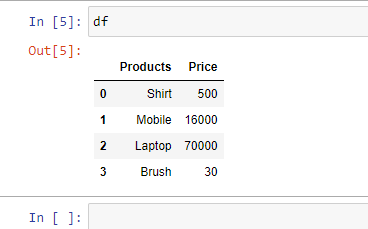
Example 1: Read an Excel file.
import pandas as pd

df = pd.read_excel("sample.xlsx")
print(df)
Output:
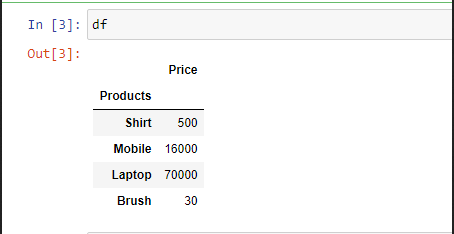
Example 2: To select a particular column, we can pass a parameter "index_col".
import pandas as pd

# Here 0th column will be extracted
df = pd.read_excel("sample.xlsx",
                   index_col = 0)

print(df)
Output:
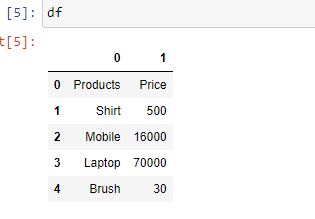
Example 3: In case you don't prefer the initial heading of the columns, you can change it to indexes using the parameter "header".
import pandas as pd

df = pd.read_excel('sample.xlsx',
                   header = None)
print(df)
Output:
Example 4: If you want to change the data type of a particular column you can do it using the parameter "dtype".
import pandas as pd

df = pd.read_excel('sample.xlsx',
                   dtype = {"Products": str,
                            "Price":float})
print(df)
Output:
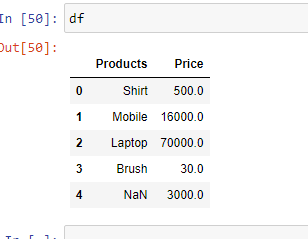
Example 5: In case you have unknown values, then you can handle it using the parameter "na_values". It will convert the mentioned unknown values into "NaN"
import pandas as pd
df = pd.read_excel('sample.xlsx',
                   na_values =['item1',
                               'item2'])
print(df)
Output: