
PL/SQL is Oracle’s procedural extension of SQL that allows developers to combine SQL queries with programming features like loops, conditions and exception handling.
- It allows execution of SQL queries and DML commands inside procedural blocks.
- It supports variables, calculations and conditional statements.
- It helps create reusable program units like procedures, functions and triggers.
- It provides exception handling for managing runtime errors.
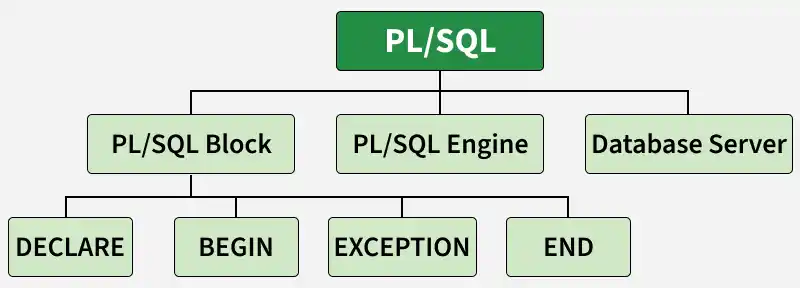
Features of PL/SQL
PL/SQL brings the benefits of procedural programming to the relational database world. Some of the most important features of PL/SQL include:
- Block Structure: Multiple SQL statements can execute in one block.
- Procedural Constructs: Supports procedures, functions, loops, triggers and packages.
- Error Handling: Uses exception handling to manage errors.
- Reusable Code: Stored procedures and functions can be reused.
- Performance: Reduces network traffic by executing SQL in a single block.
Structure of PL/SQL Block
PL/SQL extends SQL with procedural language features, making it more powerful. The basic unit of PL/SQL is a block and PL/SQL programs are made of nested blocks.
Typically, each block performs a logical action in the program. A block has the following structure:
DECLARE
    -- Declaration statements

BEGIN
    -- Executable statements

EXCEPTION
    -- Exception handling statements

END;
/
PL/SQL code is written in blocks, which consist of three main sections:
- DECLARE Section: Used to declare variables, constants, records and cursors for temporary data storage. It starts with
DECLAREand is optional. - BEGIN–END Section: Contains the main program logic, SQL statements, loops and conditions. It starts with BEGIN and ends with END. This section is mandatory.
- EXCEPTION Section: Used to handle runtime errors that occur during program execution. It starts with EXCEPTION and is optional.
PL/SQL Identifiers
In PL/SQL, identifiers are names used to represent various program elements like variables, constants, procedures, cursors, triggers etc. These identifiers allow you to store, manipulate and access data throughout your PL/SQL code.
1. Variables in PL/SQL
A variable in PL/SQL is a named memory location used to store data during program execution. Each variable has a name, datatype and optional initial value.
Syntax:
variable_name datatype [NOT NULL := value ];- variable_name: The name of the variable.
- datatype: The data type of the variable (e.g., INTEGER, VARCHAR2).
- NOT NULL: This optional constraint means the variable cannot be left empty.
Example: Declaring Variables
This example shows how to declare variables in a PL/SQL block.
SET SERVEROUTPUT ON;

DECLARE
    var1 INTEGER;
    var2 REAL;
    var3 VARCHAR2(20);

BEGIN
    NULL;
END;
/
Output:
PL/SQL procedure successfully completed.- The program executes successfully because the block contains no errors.
- No output is displayed because the NULL statement performs no action.
2. Displaying Output in PL/SQL
DBMS_OUTPUT is a built-in package in PL/SQL used to display output messages and debugging information from PL/SQL blocks, procedures, packages and triggers.
Example: Displaying Output
SET SERVEROUTPUT ON;

DECLARE
    var VARCHAR2(40) := 'I love GeeksForGeeks';

BEGIN
    DBMS_OUTPUT.PUT_LINE(var);

END;
/
Output:
I love GeeksForGeeks
PL/SQL procedure successfully completed.
- dbms_output.put_line : This command is used to direct the PL/SQL output to a screen.
3. Comments in PL/SQL
In PL/SQL, comments can be put within the code which has no effect in the code. There are two syntaxes to create comments in PL/SQL :
- Single Line Comment: To create a single line comment , the symbol - - is used.
- Multi Line Comment: To create comments that span over several lines, the symbol /* and */ is used.
Example: Adding Comments
-- This is a single-line comment

/*
  This is a multi-line comment
  that spans over multiple lines.
*/
4. Taking input from users
In PL/SQL, user input can be taken using substitution variables. These variables start with the & symbol and store the entered value in a variable.
Example: Taking Input from Users
SET SERVEROUTPUT ON;

DECLARE

    -- taking input for variable a
    a NUMBER := &a;

    -- taking input for variable b
    b VARCHAR2(30) := &b;

BEGIN
    NULL;

END;
/
Output:
Enter value for a: 24
old   2: a number := &a;
new   2: a number := 24;
Enter value for b: 'GeeksForGeeks'
old   3: b varchar2(30) := &b;
new   3: b varchar2(30) := 'GeeksForGeeks';
- &a and &b are substitution variables where the user will be prompted to provide values.
- The user is asked to enter values for a and b when the code runs.
5. Other Identifiers in PL/SQL
Apart from variables, PL/SQL also supports several other identifiers used for different purposes.
- Constants: Store fixed values that cannot be changed during program execution.
- Procedures: Named PL/SQL blocks used to perform specific tasks.
- Functions: Similar to procedures but return a value.
- Cursors: Used to process query results row by row.
- Triggers: Automatically execute when specific database events occur.
- Packages: Collections of related procedures, functions and variables grouped together.
PL/SQL Practical Example
Let’s combine all the above concepts into one practical example. We’ll create a PL/SQL block that takes two numbers from the user, calculates their sum and displays the result.
-- PL/SQL code to print sum of two numbers taken from the user.
SET SERVEROUTPUT ON;

DECLARE

    -- taking input for variable a
    a INTEGER := &a;

-- taking input for variable b
    b INTEGER := &b;
    c INTEGER;

BEGIN
    c := a + b;
    DBMS_OUTPUT.PUT_LINE('Sum of ' || a || ' and ' || b || ' is = ' || c);
END;
/
Example :
Enter value for a: 2
Enter value for b: 3

Sum of 2 and 3 is = 5

PL/SQL procedure successfully completed.
PL/SQL Execution Environment
The PL/SQL engine works inside the Oracle database engine. When a PL/SQL block is executed, SQL and PL/SQL statements are processed together in one request. This reduces network traffic and improves performance.
SQL vs. PL/SQL
| SQL | PL/SQL |
|---|---|
| SQL is a query language used to manage databases. | PL/SQL is a procedural extension of SQL. |
| Executes one statement at a time. | Executes multiple statements in a block. |
| Does not support loops or conditions. | Supports loops, conditions and variables. |
| Used for data manipulation and queries. | Used for writing complete programs. |
| Error handling is limited. | Supports exception handling. |
| SQL statements are executed individually. | Entire block is executed together. |
| Mainly declarative language. | Combination of procedural and SQL language. |