
One-Hot Encoding is a data preprocessing technique used to convert categorical data into a numerical format that machine learning models can understand. It creates separate binary columns for each category, where 1 represents the presence of a category and 0 represents its absence.
- Converts categorical values into binary columns
- Prevents models from assuming an incorrect order between categories
- Improves machine learning model performance
- Helps capture relationships between categorical features
- Required for many machine learning algorithms that accept numerical input only
Working of One-Hot Encoding
One-Hot Encoding creates a separate column for each category in the dataset. In the fruit example, when the fruit is Apple, the Fruit_Apple column gets the value 1 while the other fruit columns contain 0. Similarly, for Mango and Orange, their respective columns contain 1 and the remaining columns contain 0.
- Each category gets its own binary column
- 1 indicates the presence of a category
- 0 indicates the absence of a category
- Converts categorical values into numerical format for machine learning models
| Fruit | Categorical value of fruit | Price |
|---|---|---|
| apple | 1 | 5 |
| mango | 2 | 10 |
| apple | 1 | 15 |
| orange | 3 | 20 |
The output after applying one-hot encoding on the data is given as follows
| Fruit_apple | Fruit_mango | Fruit_orange | price |
|---|---|---|---|
| 1 | 0 | 0 | 5 |
| 0 | 1 | 0 | 10 |
| 1 | 0 | 0 | 15 |
| 0 | 0 | 1 | 20 |
Implementation
One-Hot Encoding can be implemented in Python using libraries such as Pandas and Scikit-learn, which provide simple and efficient methods for converting categorical data into binary columns.
1. Using Pandas
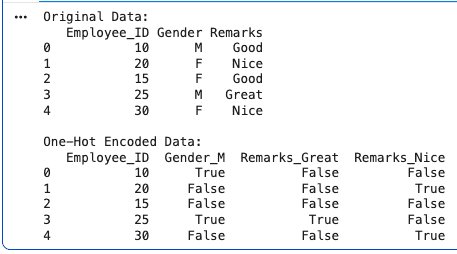
Pandas provides the get_dummies() function to perform one-hot encoding on categorical columns.
- Converts categorical values into binary columns
- Easy and efficient for preprocessing datasets
- drop_first=True removes one redundant column to avoid multicollinearity
- Example: Gender with values M and F becomes Gender_M and Gender_F columns
import pandas as pd

data = {
    'Employee_ID': [10, 20, 15, 25, 30],
    'Gender': ['M', 'F', 'F', 'M', 'F'],
    'Remarks': ['Good', 'Nice', 'Good', 'Great', 'Nice']
}

df = pd.DataFrame(data)

print("Original Data:")
print(df)

encoded_df = pd.get_dummies(
    df,
    columns=['Gender', 'Remarks'],
    drop_first=True
)

print("\nOne-Hot Encoded Data:")
print(encoded_df)
Output:
2. Using Scikit Learn Library
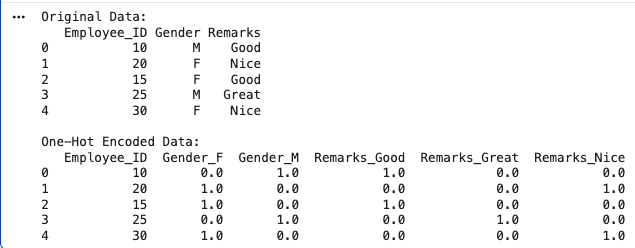
Scikit-learn (sklearn) provides the OneHotEncoder function to convert categorical variables into binary columns for machine learning models.
- Converts categorical data into binary format
- Automatically identifies categories
- Useful for machine learning preprocessing
- select_dtypes() helps select categorical columns automatically
import pandas as pd
from sklearn.preprocessing import OneHotEncoder

data = {
    'Employee_ID': [10, 20, 15, 25, 30],
    'Gender': ['M', 'F', 'F', 'M', 'F'],
    'Remarks': ['Good', 'Nice', 'Good', 'Great', 'Nice']
}

df = pd.DataFrame(data)

print("Original Data:")
print(df)

categorical_columns = df.select_dtypes(include=['object']).columns

encoder = OneHotEncoder(sparse_output=False)

encoded_data = encoder.fit_transform(df[categorical_columns])

encoded_df = pd.DataFrame(
    encoded_data,
    columns=encoder.get_feature_names_out(categorical_columns)
)

final_df = pd.concat(
    [df.drop(columns=categorical_columns), encoded_df],
    axis=1
)

print("\nOne-Hot Encoded Data:")
print(final_df)
Output:
Download full code from here
Advantages
- Converts categorical data into numerical format for machine learning models
- Helps improve model performance by representing categories clearly
- Prevents incorrect ordinal relationships between categories
Limitations
- Increases the number of columns in the dataset
- Can create sparse datasets with many 0 values
- May lead to overfitting when categories are too many and data is limited