
Canny edge detection algorithm is used technique for identifying edges in images. Its efficiency and accuracy make it a crucial tool in applications such as lane detection, object recognition, image segmentation and more.
The Canny edge detection algorithm is structured as a multi-stage process, each step essential for producing clean and continuous edges. Its steps are:
1. Noise Reduction Using a Gaussian Filter
To prevent false detection caused by image noise, the algorithm first applies a Gaussian blur. This smoothes out minor intensity variations making true edges more prominent.
- The Gaussian kernel used is typically 5×55×5 with a standard deviation (
\sigma ) of 1.4 - The kernel must be normalized so its values sum to 1.
- The equation for Gaussian filter kernel is:
G_\sigma = \frac{1}{2\pi\sigma^2} e^{-\frac{x^2 + y^2}{2\sigma^2}}
2. Gradient Calculation
The algorithm computes the intensity gradient for each pixel, both horizontally and vertically, using Sobel operators:
- Sobel-X: Detects vertical edges.
- Sobel-Y: Detects horizontal edges.
3. Non-Maximum Suppression
To refine the edge map and thin the edges to one-pixel width, non-maximum suppression identifies and keeps only those pixels at the local maxima (in the gradient direction), suppressing all others.
- Each pixel is compared along the gradient direction with its neighbours.
- If a neighbouring pixel has a greater gradient magnitude, the current pixel is suppressed (set to zero).
4. Double Thresholding
This step distinguishes strong edges from weak ones based on two threshold values:
- Pixels above the high threshold: Marked as strong edges.
- Pixels below the low threshold: Suppressed (not considered edges).
- Pixels between thresholds: Marked as weak i.e they may or may not be an edge.
5. Edge Tracking by Hysteresis
Weak pixels remain part of the final edge only if they are connected to strong pixels i.e., part of a continuous edge. Hysteresis ensures that only genuine edges form the output.
Implementation of the Canny Edge Detection
Step 1: Import libraries
- NumPy: For array operations.
- OpenCV: For image processing functions.
- Matplotlib: For displaying images.
import numpy as np
import cv2
import matplotlib.pyplot as plt
Step 2: Define Canny_detector Function
- Color images are converted to grayscale, as edge detection operates on intensity changes.
- A Gaussian blur smooths the image to reduce the impact of noise which might otherwise produce false edges.
- Computes horizontal (x-direction) and vertical (y-direction) intensity gradients using Sobel operators.
- Converts these to magnitude and angle for each pixel.
- Initializes "weak" and "strong" edge thresholds as fractions of the maximum magnitude found.
- Classifies pixels as strong edges, weak edges or non-edges based on the calculated thresholds.
def Canny_detector(img, weak_th=None, strong_th=None):

    img = cv2.cvtColor(img, cv2.COLOR_BGR2GRAY)

    img = cv2.GaussianBlur(img, (5, 5), 1.4)

    gx = cv2.Sobel(np.float32(img), cv2.CV_64F, 1, 0, 3)
    gy = cv2.Sobel(np.float32(img), cv2.CV_64F, 0, 1, 3)

    mag, ang = cv2.cartToPolar(gx, gy, angleInDegrees=True)

    height, width = img.shape

    mag_max = np.max(mag)
    if weak_th is None:
        weak_th = mag_max * 0.1
    if strong_th is None:
        strong_th = mag_max * 0.5


    nms = np.zeros_like(mag)

    for i_x in range(1, width-1):
        for i_y in range(1, height-1):

            grad_ang = ang[i_y, i_x]
            grad_ang = grad_ang % 180

            if (0 <= grad_ang < 22.5) or (157.5 <= grad_ang <= 180):
                before = mag[i_y, i_x - 1]
                after  = mag[i_y, i_x + 1]

            elif (22.5 <= grad_ang < 67.5):
                before = mag[i_y - 1, i_x + 1]
                after  = mag[i_y + 1, i_x - 1]

            elif (67.5 <= grad_ang < 112.5):
                before = mag[i_y - 1, i_x]
                after  = mag[i_y + 1, i_x]

            else:  # 112.5 - 157.5
                before = mag[i_y - 1, i_x - 1]
                after  = mag[i_y + 1, i_x + 1]

            if mag[i_y, i_x] >= before and mag[i_y, i_x] >= after:
                nms[i_y, i_x] = mag[i_y, i_x]
            else:
                nms[i_y, i_x] = 0

    result = np.zeros_like(nms)

    strong = 255
    weak = 75

    for i_x in range(width):
        for i_y in range(height):
            val = nms[i_y, i_x]

            if val >= strong_th:
                result[i_y, i_x] = strong
            elif val >= weak_th:
                result[i_y, i_x] = weak
            else:
                result[i_y, i_x] = 0

    return result
Step 3: Load and Check the Input Image
- Reads the target image file.
- Checks if the file loads successfully to prevent errors later.
You can download the sample image from here.
frame = cv2.imread('sample.jpeg')
if frame is None:
    print("Error: image not found! Please check the path.")
Step 4: Apply Canny Edge Detection
Calls the Canny_detector function to process the image and obtain the edge map.
canny_img = Canny_detector(frame)
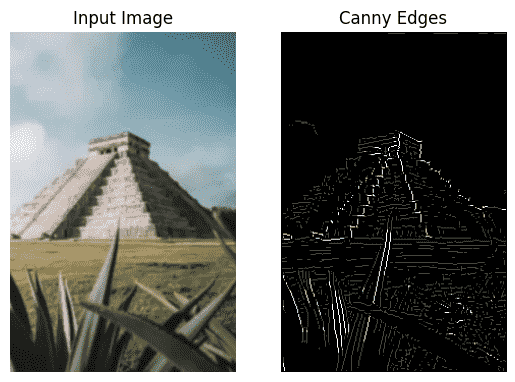
Step 5: Visualize Results
plt.subplot(1, 2, 1)
plt.title('Input Image')
plt.imshow(cv2.cvtColor(frame, cv2.COLOR_BGR2RGB))
plt.axis('off')
plt.subplot(1, 2, 2)
plt.title('Canny Edges')
plt.imshow(canny_img, cmap='gray')
plt.axis('off')
plt.show()
Output:
You can download the source code from here.