
The Serializable interface in Java is a marker interface available in the java.io package. It is used to indicate that the objects of a class can be converted into a byte stream (serialization) and later reconstructed back into objects (deserialization). Since it is a marker interface, it does not contain any methods or fields and is mainly used for object persistence and data transfer.
- Works with ObjectOutputStream and ObjectInputStream.
- Helps save and restore the state of an object.
- Allows objects to be transmitted over a network.
Syntax:
public interface Serializable
Illustration:
import java.io.Serializable;
class Student implements Serializable {
int id;
String name;
}
Serialization and Deserialization Process in Java
This figure illustrates how a Java object is converted into a byte stream during serialization and later reconstructed into the original object during deserialization.
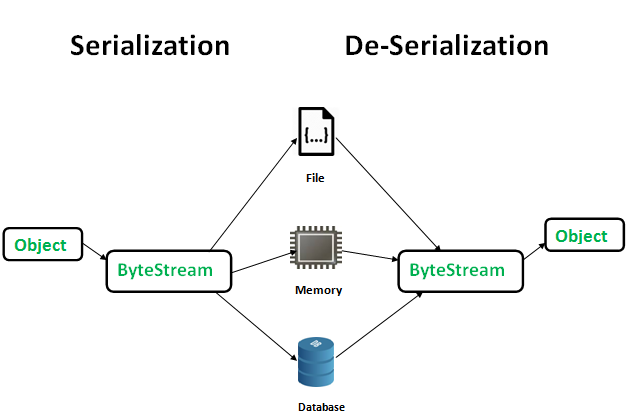
1. Serialization (Object -> Byte Stream)
- A Java object is created in memory.
- During serialization, the object's state is converted into a byte stream using ObjectOutputStream.
2. Storage Phase
- The serialized byte stream is saved in a file, memory, or database.
- At this stage, the actual object no longer exists in its original form; only its byte representation is stored.
3. Deserialization (Byte Stream -> Object)
- The stored byte stream is read using ObjectInputStream.
- Java reconstructs the original object from the byte stream.
4. Final Result
- The deserialized object becomes available in memory.
- It can now be used just like the original object that was serialized.
Example: The below example shows a class that implements Serializable Interface.
 java.io.Serializable;

public static class Student implements Serializable {
    public String name = null;
    public String dept = null;
    public int id = 0;
}
Here, you can see that Student class implements Serializable, but does not have any methods to implement from Serializable.
Example: Below example code explains Serializing and Deserializing an object.
import java.io.*;

// By implementing Serializable interface
// we make sure that state of instances of class A
// can be saved in a file.
class A implements Serializable {
    int i;
    String s;

    // A class constructor
    public A(int i, String s)
    {
        this.i = i;
        this.s = s;
    }
}

public class Test {
    public static void main(String[] args)
        throws IOException, ClassNotFoundException
    {
        A a = new A(20, "GeeksForGeeks");

        // Serializing 'a'
        FileOutputStream fos
            = new FileOutputStream("xyz.txt");
        ObjectOutputStream oos
            = new ObjectOutputStream(fos);
        oos.writeObject(a);

        // De-serializing 'a'
        FileInputStream fis
            = new FileInputStream("xyz.txt");
        ObjectInputStream ois = new ObjectInputStream(fis);
        A b = (A)ois.readObject(); // down-casting object

        System.out.println(b.i + " " + b.s);

        // closing streams
        oos.close();
        ois.close();
    }
}
Output:
20 GeeksForGeeks Explanation: This program demonstrates serialization by converting an object of class A into a byte stream and storing it in the file xyz.txt using ObjectOutputStream. It then performs deserialization by reading the object back from the file using ObjectInputStream and restoring its original state, which is displayed as 20 GeeksForGeeks.
Advantages of Serialization in Java
- Object Persistence: Allows objects to be saved to files and restored later.
- Easy Data Storage: Simplifies storing complete object states without manual coding.
- Supports Network Communication: Enables objects to be transmitted over networks.
- Facilitates Distributed Computing: Useful for exchanging objects between different systems or JVMs.
- Reduces Development Effort: Automatically converts objects into byte streams.
- Session Management: Helps preserve user session data in web applications.
Must Read: Serialization and Deserialization in Java