
Scanner is a predefined class in Java used to take input from the user. It is present in the java.util package and supports different types of input such as integers, strings, float values, and characters. The Scanner class makes input handling simple and user-friendly in Java programs.
- Used to read user input from keyboard.
- Supports different data types like int, double, String, etc.
- Uses methods such as nextInt(), nextLine(), and nextDouble().
Example: Java program to demonstrate the use of Scanner class to take input from user
import java.util.Scanner;

class Geeks
{
    public static void main(String[] args) {

        Scanner sc = new Scanner(System.in);
        System.out.println("Enter your name:");
        String name = sc.nextLine();

        System.out.println("Hello, " + name + " Welcome to the GeeksforGeeks.");

    }

}
Output:

Explanation: In the above code example, we use the nextLine() of Scanner class to read the line value which is entered by the user and print it in the console.
Steps To Use Scanner Class to Take Input
Step 1: Import Scanner Package
Import the java.util.Scanner package at the beginning of the program.
import java.util.Scanner
public class Geeks{
public static void main(String [] args){
}
}
Step 2: Create Scanner Object
Scanner sc = new Scanner (System.in);
Here "sc" is an object of the Scanner class. We can give it different names for our ease such as in, var or obj etc. Using this object we can use the methods of the Scanner class.
Step 3: Take Integer Input
int age = sc.nextInt();
Scanner Input Types
The scanner class helps take the standard input stream in Java. So, we need some methods to extract data from the stream. The methods used for extracting data are mentioned below:
Method | Description |
|---|---|
| Used for reading Boolean value | |
| Used for reading Byte value | |
| Used for reading Double value | |
| Used for reading Float value | |
| Used for reading Int value | |
| Used for reading Line value | |
| Used for reading Long value | |
| Used for reading Short value |
Let us look at the code snippet to read data of various data types.
Example 1: Java program to read data of various types using Scanner class
import java.util.Scanner;

// Driver Class
public class Geeks
 {
    // main function
    public static void main(String[] args) {

        // Declare the object and initialize with
        // predefined standard input object
        Scanner sc = new Scanner(System.in);

        System.out.println("Enter your name:");

        // String input
        String name = sc.nextLine();

        System.out.println("Enter your gender (M/F): ");

        // Character input
        char gender = sc.next().charAt(0);

        // Numerical data input
        // byte, short and float can be read

        System.out.println("Enter your age: ");
        int age = sc.nextInt();

        System.out.println("Enter your cgpa: ");
        double cgpa = sc.nextDouble();

        // Print the values to check if the input was
        // correctly obtained.
        System.out.println("Name: " + name);
        System.out.println("Gender: " + gender);
        System.out.println("Age: " + age);

        System.out.println("CGPA: " + cgpa);
    }
}
Output:
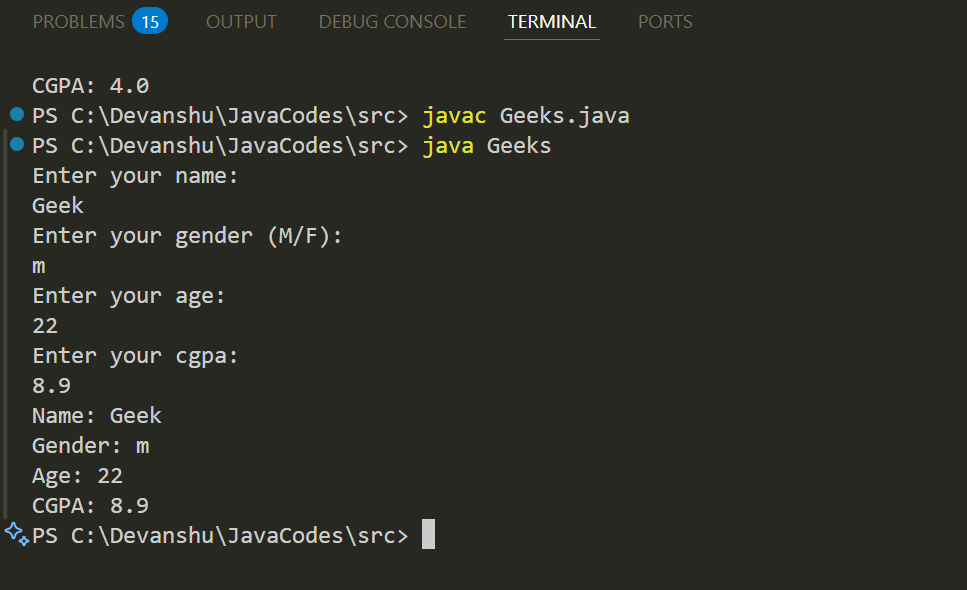
Explanation: In the above code example, we use the Scanner class to take different types of input values from user and print it in the console.
- hasNextInt(): This method is used to check if the token is an integer.
- hasNextLine(): This method is used to check if there is an input in next line.
- useDelimiter(): This method changes the default whitespace delimiter.
Example 2: Java program to read some values using Scanner class and print their mean.
import java.util.Scanner;

public class Geeks
{
    public static void main(String[] args) {

        // Declare an object and initialize with
        // predefined standard input object
        Scanner sc = new Scanner(System.in);

        // Initialize sum and count of input elements
        int sum = 0, count = 0;

        System.out.println("Enter integers to calculate the mean (type 'done' to finish):");

        // Loop to read input until "done" is entered
        while (sc.hasNext()) {
            if (sc.hasNextInt()) {

                // Read an int value
                int num = sc.nextInt();
                sum += num;
                count++;
            } else {
                String input = sc.next();
                if (input.equalsIgnoreCase("done")) {
                    break;
                } else {
                    System.out.println("Invalid input. Please enter an integer or type 'done' to finish.");
                }
            }
        }

        // Calculate and display the mean
        if (count > 0) {
            // Use double for precise mean calculation

            double mean = (double) sum / count;
            System.out.println("Mean: " + mean);
        } else {
            System.out.println("No integers were input. Mean cannot be calculated.");
        }

    }
}
Output:

Explanation: In the above code example, we use the hasNext() and hasNextInt() method to take the input values from user and then user give the input value they can specify that the input value is ended and they can type "done" to find the mean value of given input.
Important Points about Scanner Class
- System.in is used for keyboard input; File object is used for file input.
- Use nextXYZ() methods for numeric inputs like nextInt(), nextShort(), etc.
- Use nextLine() to read a full string/line.
- Use next().charAt(0) to read a single character.
- Always close the Scanner object after use.
- Scanner reads input as tokens (words separated by spaces). Example: "How are you" -> "How", "are", "you".