
Java is an object-oriented programming language widely used in enterprise applications, Android development, and backend systems. Understanding Java fundamentals is crucial for acing interviews and establishing a solid programming foundation.
1. Is Java Platform Independent? If yes, how?
Yes, Java is a platform-independent language. Unlike many programming languages, the Java compiler (javac) compiles a program into bytecode (a .class file). This bytecode is not tied to any specific hardware or operating system but requires a Java Virtual Machine (JVM) to execute.
Although the JVM itself is platform-dependent, bytecode generated on one system can run on any other system that has a compatible JVM installed. This is what makes Java platform independent.
2. What is a JVM?
- JVM stands for Java Virtual Machine, which is a Java interpreter. It is responsible for loading, verifying, and executing the bytecode created in Java.
- Although it is platform dependent, which means the software of JVM is different for different Operating Systems, it plays a vital role in making Java platform Independent.
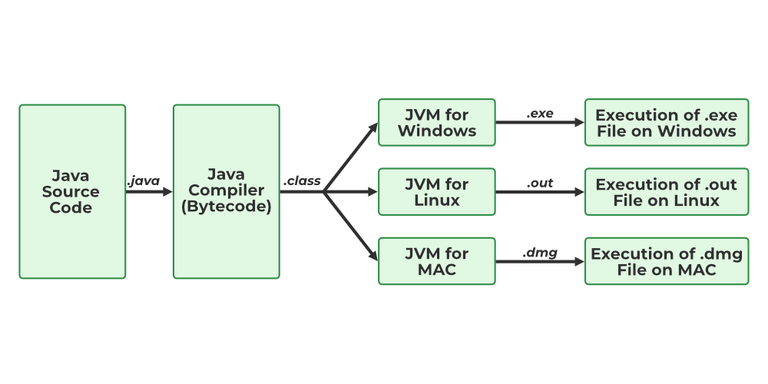
To know more about the topic refer to JVM in Java.
3. What is JIT?
JIT stands for (Just-in-Time) compiler is a part of JRE(Java Runtime Environment), it is used for better performance of the Java applications during run-time. The use of JIT is mentioned in step by step process mentioned below:
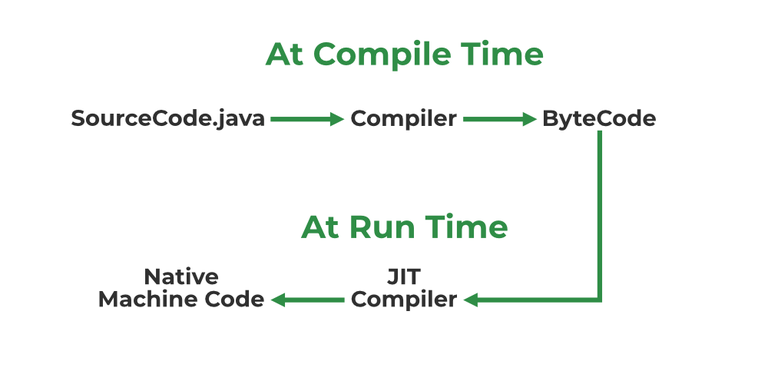
- Source code is compiled with javac to form bytecode
- Bytecode is further passed on to JVM
- JIT is a part of JVM, JIT is responsible for compiling bytecode into native machine code at run time.
- The JIT compiler is enabled throughout, while it gets activated when a method is invoked. For a compiled method, the JVM directly calls the compiled code, instead of interpreting it.
- As JVM calls the compiled code that increases the performance and speed of the execution.
To know more about the topic refer to JIT in Java.
4. Difference between JVM, JRE and JDK.
- JVM: JVM also known as Java Virtual Machine is a part of JRE. JVM is a type of interpreter responsible for converting bytecode into machine-readable code. JVM itself is platform dependent but it interprets the bytecode which is the platform-independent reason why Java is platform-independent.
- JRE: JRE stands for Java Runtime Environment, it is an installation package that provides an environment to run the Java program or application on any machine.
- JDK: JDK stands for Java Development Kit which provides the environment to develop and execute Java programs. JDK is a package that includes two things Development Tools to provide an environment to develop your Java programs and, JRE to execute Java programs or applications.
To know more about the topic refer to the Differences between JVM, JRE and JDK.
5. What are Memory storages available with JVM?
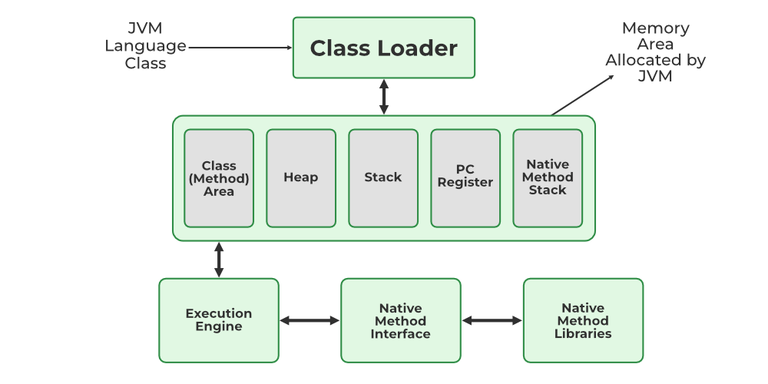
JVM consists of a few memory storages as mentioned below:
- Class(Method) Area: stores class-level data of every class such as the runtime constant pool, field, and method data, and the code for methods.
- Heap: Objects are created or objects are stored. It is used to allocate memory to objects during run time.
- Stack: stores data and partial results which will be needed while returning value for method and performing dynamic linking
- Program Counter Register: stores the address of the Java virtual machine instruction currently being executed.
- Native Method Stack: stores all the native methods used in the application.
To know more about the topic refer to JVM Memory Storages.
6. what is class Loader?
A Class Loader in Java is a part of the Java Virtual Machine (JVM) responsible for loading Java classes into memory at runtime.
Key Responsibilities of Class Loader:
- Loading: Reads class bytecode (.class file) from disk, network, or other sources.
- Linking: Verifies bytecode (security check) and Prepares static fields
- Initialization: Executes static blocks and Initializes static variables
7. Explain public static void main(String args[]) in Java.
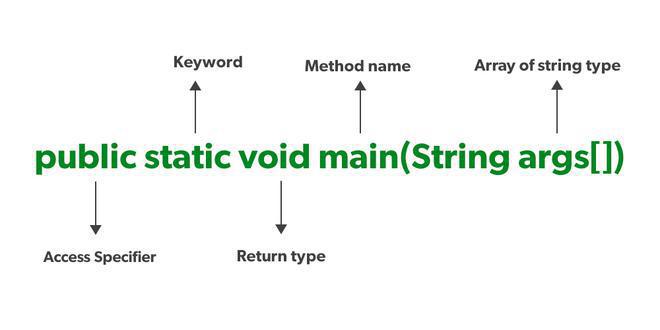
Unlike any other programming language like C, C++, etc. In Java, we declared the main function as a public static void main (String args[]). The meanings of the terms are mentioned below:
- public: the public is the access modifier responsible for mentioning who can access the element or the method and what is the limit. It is responsible for making the main function globally available. It is made public so that JVM can invoke it from outside the class as it is not present in the current class.
- static: static is a keyword used so that we can use the element without initiating the class so to avoid the unnecessary allocation of the memory.
- void: void is a keyword and is used to specify that a method doesn’t return anything. As the main function doesn't return anything we use void.
- main: main represents that the function declared is the main function. It helps JVM to identify that the declared function is the main function.
- String args[]: It stores Java command-line arguments and is an array of type java.lang.String class.
8. What will happen if we don’t declare the main method as static?
- The main method in Java is declared as public static void main(String[] args) because the JVM needs to call it without creating an object.
- If the main method is not static, it becomes an instance method, and the JVM cannot call it directly since no object exists at the start of execution.
- The code will compile successfully, but at runtime, the JVM will throw an error like:
Error: Main method is not static in class Example, please define the main method as:
public static void main(String[] args)
9. What are Packages in Java?
Packages in Java can be defined as the grouping of related types of classes, interfaces, etc providing access to protection and namespace management.
10. Why Packages are used?
Packages are used in Java in order to prevent naming conflicts, control access, and make searching/locating and usage of classes, interfaces, etc easier.
11. What are the advantages of Packages in Java?
There are various advantages of defining packages in Java.
- Packages avoid name clashes.
- The Package provides easier access control.
- We can also have the hidden classes that are not visible outside and are used by the package.
- It is easier to locate the related classes.
12. How many types of packages are there in Java?
There are two types of packages in Java
- User-defined packages
- Build In packages
13. Why is Java not 100% Object-Oriented?
Because it contains primitive data types (int, boolean, char, etc.) which are not objects.
14. What is the use of the System.out.println() method?
It is used to print output to the console.
- System -> class
- out -> static PrintStream object
- println() -> method to print a message
15. What is Comments in Java?
Used to explain code and ignored by the compiler.
- Single-line -> //
- Multi-line -> /* ... */
- Documentation -> /** ... */