
HashMap is a data structure in Java used to store elements in key-value pairs. It uses hashing to provide fast operations like insertion, deletion, and lookup. HashMap is part of the Java Collection Framework and is widely used for efficient data handling.
- HashMap stores data using key-value pairs where keys are unique.
- It provides average O(1) time complexity for basic operations.
- It is not thread-safe and allows one null key and multiple null values.
Basic Structure of HashMap
Internally, a HashMap is implemented as an array of nodes, where each node stores a key-value pair.
class Node<K, V> {
int hash;
K key;
V value;
Node<K, V> next;
}
Each Node contains:
- hash: the hash code of the key
- key: the key object
- value: the associated value
- next: reference to the next node in case of a collision
Hashing and Index Calculation
When a key-value pair is inserted, the hash code of the key is calculated using the hashCode() method, and then an index is derived to find the bucket (array position).
Formula:
index = hashCode(key) & (n - 1)
Here, n is the number of buckets (initially 16 by default). The bitwise AND operation ensures even distribution of entries across buckets.
import java.util.HashMap;
public class GFG{

    public static void main(String[] args){

        HashMap<String, Integer> map = new HashMap<>();
        map.put("apple", 3);
        map.put("banana", 5);
        map.put("orange", 2);

        System.out.println(map.get("banana")); // prints 5
    }
}
Output
5
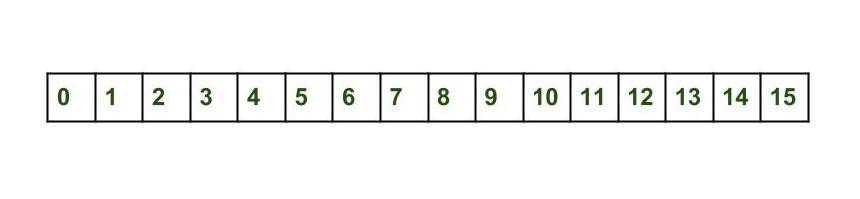
Initially Empty hashMap
Here, the hashmap's size is taken as 16.
HashMap map = new HashMap();
Internally, the default capacity is 16, so the array looks like below:
Internal Working of put() Method in HashMap
1. Inserting First Key-Value Pair
When we insert a key-value pair into a HashMap using the put() method, the following internal steps occur:
map.put(new Key("vishal"), 20);
Steps:
- Calculate the hash code of key "vishal" -> suppose it is 118.
- Calculate the index using the index method -> it becomes 6.
- Create a node object:
{
int hash = 118;
Key key = {"vishal"};
Integer value = 20;
Node next = null;
}
Since bucket 6 is empty, the node is placed at index 6.
2. Inserting Second Key-Value Pair
map.put(new Key("sachin"), 30);
- Calculate the hash code of key "sachin" — suppose it is 115.
- Calculate the index using the index method — it becomes 3.
- Create a node object:
{
int hash = 115;
Key key = {"sachin"};
Integer value = 30;
Node next = null;
}
Since bucket 3 is empty, the node is placed at index 3.
3. Inserting Third Key-Value Pair (Collision Example)
map.put(new Key("vaibhav"), 40);
- Calculate the hash code of key "vaibhav" -> suppose it is 118.
- Calculate the index using the index method -> it becomes 6.
- Create a node object:
{
int hash = 118;
Key key = {"vaibhav"};
Integer value = 40;
Node next = null;
}
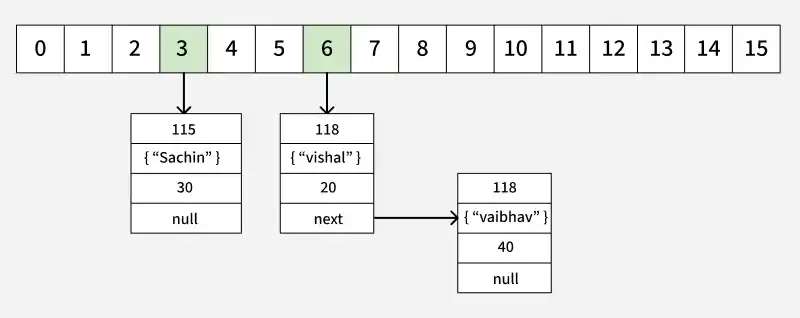
At index 6, another node already exists -> this causes a collision.
HashMap then checks:
- If both keys have the same hashCode() and equals(), replace the existing value.
- Otherwise, link the new node to the existing one via a linked list.
Now HashMap becomes:
Internal Working of get() Method
The get(K key) method retrieves a value based on its key. Let’s continue with the same example.
Example:
map.get("banana")
Step-by-Step Process
- Calculate hash code of Key {"banana"}. It will be generated as 115.
- Calculate index by using index method it will be 3.
- Go to index 3 of the array and compare the first element's key with the given key. If both are equals then return the value, otherwise, check for the next element if it exists.
- In our case, it is found as the first element and the returned value is 3.
Collision Handling in HashMap
A collision occurs when two different keys produce the same index in the HashMap. To handle this:
- Before Java 8: Collisions are managed using a linked list — new nodes are added at the same index, linked via the next reference.
- Since Java 8: If a bucket contains more than 8 nodes, the linked list is converted into a balanced tree (TreeNode) for faster lookup (O(log n) instead of O(n)).