
Cybercriminals often mask data using hashing, encryption, encoding, or steganography, making it difficult to understand what the information actually represents. Being able to identify these techniques is essential for digital forensics, incident response, and security analysis.
- Hashes: one-way transformations for integrity
- Ciphers/encoding: reversible methods for confidentiality or formatting
- Steganography: hides data inside files to avoid detection
Types of Hidden or Transformed Data
Below are three ways in which data can be hidden or transformed:
1. Hashes
A hash is a one-way function that converts data into a fixed-length value that cannot be reversed.
- Used for integrity verification
- Common algorithms: MD5, SHA-1, SHA-256
- Cannot be decrypted only cracked or matched
2. Ciphers / Encoded Text
A cipher or encoding transforms readable text into another form that can be reversed using the correct method or key.
- Can be decoded or decrypted
- Examples: ROT13, Base64, Caesar cipher
- Used for confidentiality or formatting, not integrity
3. Steganography
Steganography hides data inside files such as images, audio, or text so the hidden content is not detectable.
- Goal is concealment, not encryption
- Works by embedding data inside file structures
- Requires extraction tools to reveal hidden information
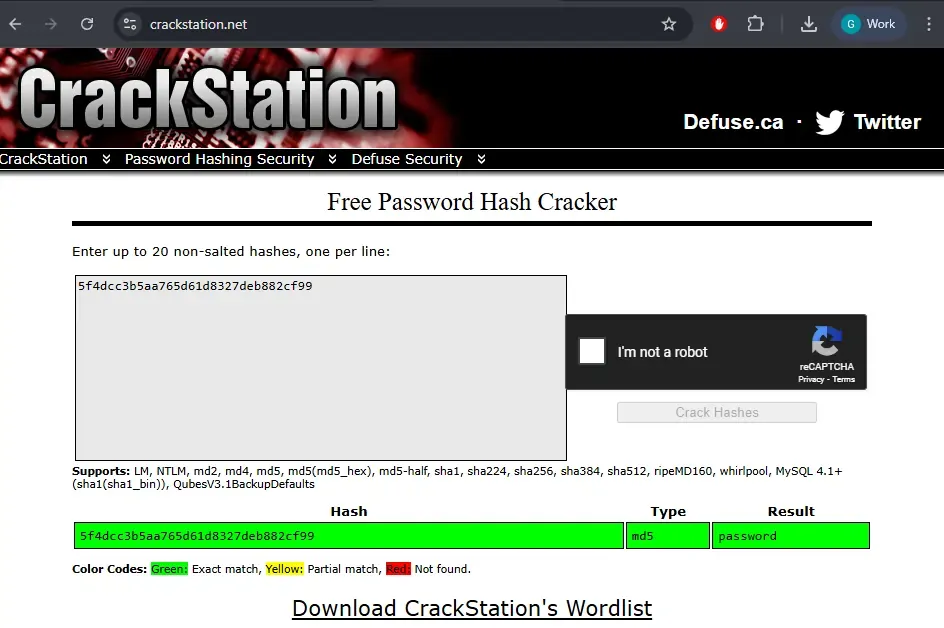
Lab 1: Identifying Hashes
You receive a list of suspicious strings found in logs. Determine if these are hashes, and which algorithm is used.
Sample Strings:
5f4dcc3b5aa765d61d8327deb882cf99
098f6bcd4621d373cade4e832627b4f6
Tools:
- hash-identifier
- CrackStation
- Hash Analyzer
Lab 2: Identifying Ciphers or Encoded Text
Try to decode this flag found in a text file named secret.txt
Gur synt vf: frpergZrffntr123Tasks:
- Identify the encoding/cipher
- Decode the message
- Determine how you can automate this process
Tools:
- CyberChef
- Rot13 Decoder
- Base64
Lab 3: Spotting Steganography in Images
You receive a suspicious file: victim.png

Tasks:
- Use
strings victim.pngto find embedded readable text. - Use
exiftool victim.pngto check image metadata. - Try
steghide extract -sf victim.png(try common passwords like "password", "1234").
Tools:
cli commands:
strings victim.png
exiftool victim.png
steghide extract -sf victim.png
Online based:
- Steganography
- Steganography encode-decode
Hint: Try uploading this image into the first steganography tool listed and decode it