
Structured Streaming with Apache Spark and Apache Kafka enables scalable, real-time data processing for modern applications. It combines Spark’s structured processing model with Kafka’s distributed event streaming to handle continuous data efficiently.
Together, they provide fault tolerance, scalability, and exactly-once processing guarantees for production-grade streaming pipelines.
- Processes real-time data streams at scale.
- Ensures fault tolerance and high availability.
- Supports exactly-once processing semantics.
- Enables real-time analytics, monitoring, and event-driven architectures.
Prerequisites:
Apache Kafka
Apache Kafka is an open-source distributed event streaming platform originally developed by LinkedIn. It acts as a commit log, allowing producers to publish messages to topics and consumers to subscribe to them. Key features include:
- Topics and Partitions: Messages are categorized into topics, which are divided into partitions for parallelism and scalability. Each partition is an ordered, immutable sequence of records.
- Producers and Consumers: Producers send data to topics, while consumers read from them. Kafka supports offset management, enabling consumers to track their position in the stream.
- Durability and Scalability: Data is replicated across brokers for fault tolerance, and retention policies control how long messages are stored.
- Use in Streaming: Kafka excels at handling high-throughput streams, making it ideal for decoupling data producers from processors.
Structured Streaming in Apache Spark 2.2
Structured Streaming, introduced in Spark 2.0 and enhanced in 2.2, is a scalable and fault-tolerant stream processing engine built on the Spark SQL engine. It treats streaming data as an unbounded table, allowing you to write queries using the same DataFrame/Dataset API as for batch processing.
Key aspects in Spark 2.2:
- Micro-Batch Execution: Streams are processed in small batches (e.g., every few seconds), providing low-latency processing.
- Unified API: Use SQL-like operations on streaming DataFrames, with optimizations from the Catalyst optimizer and Tungsten execution engine.
- Fault Tolerance: Achieved through checkpointing and write-ahead logs (WAL), ensuring at-least-once or exactly-once semantics depending on the configuration.
- Event-Time Processing: Handles late-arriving data with watermarks, allowing aggregations based on the time embedded in the data rather than processing time.
Why Integrate Kafka with Structured Streaming?
Combining Kafka's reliable messaging with Structured Streaming's processing capabilities enables:
- Real-Time ETL: Ingest data from Kafka, transform it (e.g., filter, aggregate), and output to sinks like databases or back to Kafka.
- Decoupling: Producers and consumers operate independently, improving system resilience.
- Scalability: Handle massive data volumes across distributed clusters.
- End-to-End Guarantees: In Spark 2.2, you get exactly-once semantics for reading from Kafka, though writing back is at-least-once.
This integration is common in scenarios like log analysis, real-time dashboards, and machine learning inference on streams.
Hands-On Lab: Processing Kafka Data with Spark Structured Streaming (Docker Setup)
In this lab, we will:
- Create a Kafka topic
- Produce streaming JSON messages
- Read Kafka data using Spark Structured Streaming
- Parse JSON in real time
- Perform stateful aggregation
- Output continuously updated results
By the end of this lab, you will have built a real-time streaming pipeline.
Architecture Overview
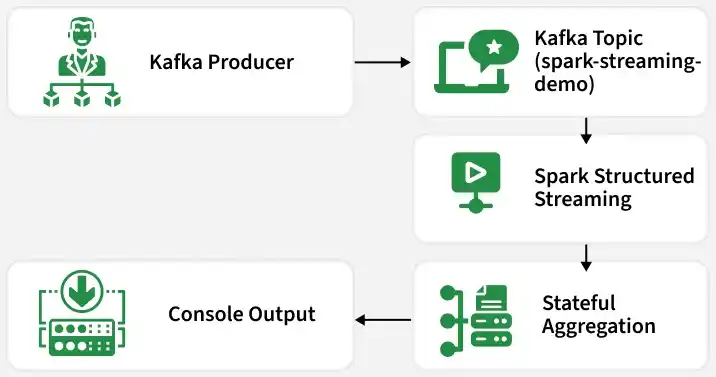
Prerequisites
Make sure the following are installed:
- Docker
- Docker Compose
- Java 11 (inside Spark image)
- Internet connection (to download Spark Kafka connector)
Step 1: Start Kafka and Spark Using Docker
Create a docker-compose.yml file:
version: '3'

services:
  zookeeper:
    image: confluentinc/cp-zookeeper:7.5.0
    container_name: zookeeper
    environment:
      ZOOKEEPER_CLIENT_PORT: 2181

  kafka:
    image: confluentinc/cp-kafka:7.5.0
    container_name: kafka
    depends_on:
      - zookeeper
    ports:
      - "9092:9092"
    environment:
      KAFKA_BROKER_ID: 1
      KAFKA_ZOOKEEPER_CONNECT: zookeeper:2181
      KAFKA_LISTENERS: PLAINTEXT://0.0.0.0:9092
      KAFKA_ADVERTISED_LISTENERS: PLAINTEXT://kafka:9092
      KAFKA_LISTENER_SECURITY_PROTOCOL_MAP: PLAINTEXT:PLAINTEXT
      KAFKA_OFFSETS_TOPIC_REPLICATION_FACTOR: 1

  spark:
    image: apache/spark:3.5.0
    container_name: spark
    ports:
      - "8080:8080"
      - "7077:7077"
Start services:
docker-compose up -dVerify containers:
docker psStep 2: Create Kafka Topic
Enter Kafka container:
docker exec -it kafka bashCreate topic:
/usr/bin/kafka-topics \
  --create \
  --topic spark-streaming-demo \
  --bootstrap-server kafka:9092 \
  --partitions 1 \
  --replication-factor 1
Verify:
/usr/bin/kafka-topics --list --bootstrap-server kafka:9092Exit container:
exitStep 3: Produce Sample Messages
Enter Kafka container again:
docker exec -it kafka bashStart producer:
/usr/bin/kafka-console-producer \
  --topic spark-streaming-demo \
  --bootstrap-server kafka:9092
Send JSON messages:
{"user":"alice","action":"login"}
{"user":"bob","action":"logout"}
{"user":"alice","action":"purchase"}
{"user":"bob","action":"login"}
Keep this terminal open.
Step 4: Start Spark Shell with Kafka Connector
In other terminal enter Spark container:
docker exec -it spark bashStart Spark shell:
/opt/spark/bin/spark-shell \
--packages org.apache.spark:spark-sql-kafka-0-10_2.12:3.5.0 \
--conf spark.jars.ivy=/tmp/.ivy2
Wait until you see:
scala>Step 5: Read Stream from Kafka
Run in the scala terminal below codes from step 5 to step 8.
val kafkaDF = spark.readStream
  .format("kafka")
  .option("kafka.bootstrap.servers", "kafka:9092")
  .option("subscribe", "spark-streaming-demo")
  .option("startingOffsets", "latest")
  .load()

kafkaDF.printSchema()
Kafka data is read as binary.
Step 6: Parse JSON Data
import org.apache.spark.sql.functions._
import org.apache.spark.sql.types._

val schema = new StructType()
  .add("user", StringType)
  .add("action", StringType)

val parsedDF = kafkaDF
  .selectExpr("CAST(value AS STRING) as json")
  .select(from_json(col("json"), schema).as("data"))
  .select("data.*")

parsedDF.printSchema()
Step 7: Perform Stateful Aggregation
val actionCounts = parsedDF
  .groupBy("action")
  .count()
Spark now maintains aggregation state internally.
Step 8: Write Output to Console
val query = actionCounts.writeStream
  .outputMode("complete")
  .format("console")
  .option("truncate", false)
  .option("checkpointLocation", "/tmp/checkpoint")
  .start()

query.awaitTermination()
Expected Output
In the kafka terminal publish a message again to see real time results, As messages are published, Spark prints something like:
Batch: 1
+---------+-----+
|action   |count|
+---------+-----+
|login    |2    |
|logout   |1    |
|purchase |1    |
+---------+-----+
Each "Batch" represents one micro-batch execution.
End to End Workflow
- A Kafka topic is created to store streaming messages.
- A producer sends JSON messages (like user actions) to the Kafka topic.
- Kafka stores each message in order and assigns it a unique offset.
- Spark Structured Streaming connects to Kafka and reads the new messages.
- Spark reads data in small micro-batches (not one message at a time).
- The Kafka message (binary data) is converted into a readable JSON format.
- Spark extracts structured fields like
userandaction. - Spark groups the data by action and counts occurrences.
- Spark stores intermediate results in a checkpoint folder for recovery.
- After each batch, Spark prints the updated counts to the console.
- This process repeats continuously as new messages arrive.