
Ansible is an open-source IT automation engine that automates provisioning, configuration management, application deployment, orchestration, and many other IT processes. Unlike other management tools, Ansible is agentless meaning it installs no software or agents on the remote systems it manages.
It uses YAML (Yet Another Markup Language), a simple English-like language, to describe automation jobs in files called Playbooks.
Key Features of Ansible
- Agentless: No software or daemons need to be installed on the managed nodes. It uses existing SSH (Linux) or WinRM (Windows) facilities.
- Idempotency: A core philosophy of Ansible. It ensures that running a playbook multiple times results in the same system state, preventing side effects. If a service is already running, Ansible won't try to start it again.
- Declarative Syntax: You define what the system state should look like (e.g., "Nginx should be present"), and Ansible handles how to achieve it.
- Extensible: Supports hundreds of built-in modules and allows for custom modules written in Python.
Ansible Architecture
The Ansible architecture is straightforward. It consists of a Control Node (where Ansible is installed) and Managed Nodes (the servers you are automating).

1. Control Node
The machine where Ansible is installed and from which you run the playbooks. It can be your laptop or a central server. (Note: Windows is not currently supported as a Control Node).
2. Managed Nodes (Hosts)
These are the network devices (servers, switches, cloud instances) that you want to manage. Ansible creates a connection to these nodes via SSH or WinRM to execute tasks.
3. Inventory
The Inventory is a file (usually located at /etc/ansible/hosts) that lists all the Managed Nodes.
- Static Inventory: A simple text file listing IP addresses or hostnames.
- Dynamic Inventory: Scripts that dynamically query cloud providers (AWS, Azure, GCP) to fetch the list of currently running instances.
4. Modules
Modules are the "tools" in the Ansible toolkit. They are small programs that Ansible pushes to the managed nodes to perform specific tasks (e.g., yum, apt, service, copy, user).
- Core Modules: Maintained by the Ansible team.
- Custom Modules: Written by users for specific tasks.
5. Playbooks
Playbooks are the blueprint of automation. Written in YAML, they define a list of tasks to be executed across a set of hosts.
6. Plugins
Plugins extend Ansible’s core functionality. Common examples include:
- Connection Plugins: Handle communication (SSH, WinRM, Docker).
- Callback Plugins: Handle logging and display of output.
How Ansible Works
Ansible works by connecting to your nodes and pushing out small programs, called "Ansible Modules," to them.
The Workflow:
- Create Inventory: Define the IP addresses of the hosts you want to manage.
- Write Playbook: Define the desired state of those hosts in a YAML file.
- Execute: Run the playbook using the
ansible-playbookcommand. - Connect & Push: Ansible connects to the target nodes (via SSH/WinRM).
- Fact Gathering: Ansible gathers system details (IP, OS version, CPU) from the target; these are called "Facts."
- Execute Modules: Ansible executes the modules defined in the playbook on the remote node.
- Clean Up: Ansible removes the modules after execution and reports the status (Changed, Failed, or OK).
Use Cases of Ansible
Ansible is a powerful automation tool widely adopted across various industries to streamline IT operations, enhance efficiency, and reduce human error.
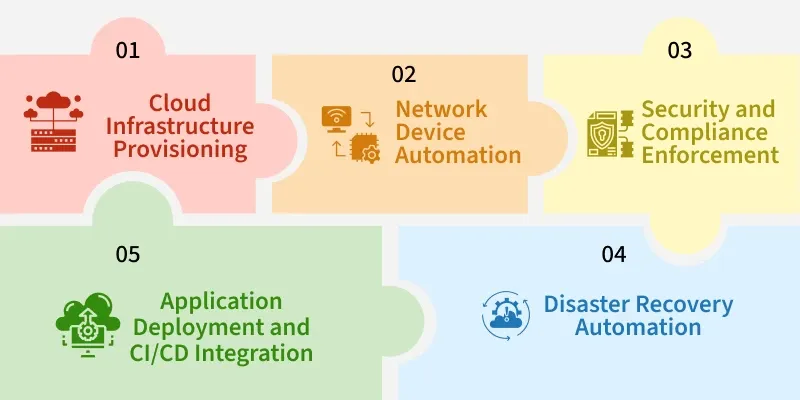
Here are some real-world use cases explaining how organizations uses Ansible:
1. Cloud Infrastructure Provisioning
Organizations utilize Ansible to automate the provisioning of cloud resources across platforms like AWS, Azure, and Google Cloud. For instance, a company can use Ansible playbooks to launch EC2 instances, configure networking, and deploy applications consistently across multiple environments.
2. Network Device Automation
Network engineers employ Ansible to automate the configuration of network devices such as routers, switches, and firewalls. This includes tasks like setting up VLANs, applying security policies, and ensuring compliance with network standards, leading to consistent and error-free network configurations.
3. Security and Compliance Enforcement
Ansible assists in automating security configurations and compliance checks across IT infrastructures. Organizations use Ansible playbooks to enforce security policies, manage user permissions, and apply patches, ensuring systems are secure and compliant with industry standards.
4. Disaster Recovery Automation
In disaster recovery scenarios, Ansible automates the restoration of services by executing predefined playbooks that restore configurations, reinstall software, and reapply settings, minimizing downtime and ensuring business continuity.
5. Application Deployment and CI/CD Integration
Development teams integrate Ansible into their CI/CD pipelines to automate the deployment of applications. Ansible playbooks can automate tasks like pulling the latest code, running tests, and deploying applications to various environments, facilitating continuous integration and delivery.
Ansible Playbook With Example
These are the ordered list of tasks that are saved so you can run those tasks in that order repeatedly. Playbooks are written in YAML and are easy to read, write, share and understand. Ansible playbooks can perform wide variety of tasks as mentioned below
- Deploying and configuring applications
- Managing system configurations
- Orchestrating complex workflows
Example
The language used to write Ansible playbooks is YAML, which is human-readable. The following sections will cover the structure and examples of Ansible playbooks.
---
- name: Setup Apache Web Server
  hosts: webservers  # Target group defined in Inventory
  become: true       # Execute commands with sudo/root privileges

  tasks:
    - name: Install apache2 package
      apt:
        name: apache2
        state: present
        update_cache: yes

    - name: Start and enable Apache service
      service:
        name: apache2
        state: started
        enabled: yes

    - name: Create a custom index.html
      copy:
        dest: /var/www/html/index.html
        content: "<h1>Welcome to Ansible Automation!</h1>"
Explanation of the Playbook:
hosts: webservers: Targets only the servers grouped under "webservers" in the inventory file.become: true: Tells Ansible to usesudoto run these commands (since installing software requires root permissions).tasks: The list of actions to perform.- The
aptmodule installs the package. - The
servicemodule ensures the server is running and will start automatically on reboot (enabled: yes). - The
copymodule writes a file to the remote server.