
Ansible roles provide the ground and framework for setting up your tasks, variables, handlers, metadata, templates, and all other files. They allow us to reuse and share our Ansible code. This way, we can reference them, call them in our playbooks with a few lines of code, and then reutilize those very same roles across various projects without having to duplicate our work.
What are Ansible's Roles?
Ansible Roles are reused between projects or playbooks, resulting in a more modular and maintainable approach to infrastructure automation. They support Don't Repeat Yourself (DRY) best practices and encourage Ansible projects to follow a common framework. Overall, Ansible roles improve code organization, encourage cooperation, and speed up the automation development process.
Components of Ansible Roles
Below are some components of Ansible Roles
- Handlers: Handlers are tasks that run only when other jobs notify them to do so and they are commonly used to restart services.
- Templates: If you want to generate configuration files dynamically as part of your automation, then templates in the templates directory help in doing so. These files use Jinja2 templating syntax to insert variable values.
- Defaults: This directory contains default values for variables for the role. These are the defaults unless a user changes them.
- Tasks: The tasks directory may contain the basic automation logic. Each job represents one or more tasks that Ansible conducts on the target hosts.
Why Roles Are Useful in Ansible
- When first starting with Ansible, it's customary to focus on creating playbooks to quickly automate repetitive operations.
- As new users automate more and more operations with playbooks and their Ansible skills improve, they will reach a point when using only Ansible playbooks is insufficient. Ansible Roles to the rescue!
- You can easily share our code with others because it is organized and structured by Ansible principles.
- Placing Ansible code into roles allows us to structure our automation projects into logical groups while adhering to the separation of concerns design philosophy.
How to Install and Configure Ansible
Here is the step-by-step guide to installing and configuring Ansible
Step 1: Role Directory Structure
First, you have to make a role with the name my_role.
$ ansible-galaxy init etc/ansible/roles/roledemo --offlineOutput:

Step 2: Create Variables
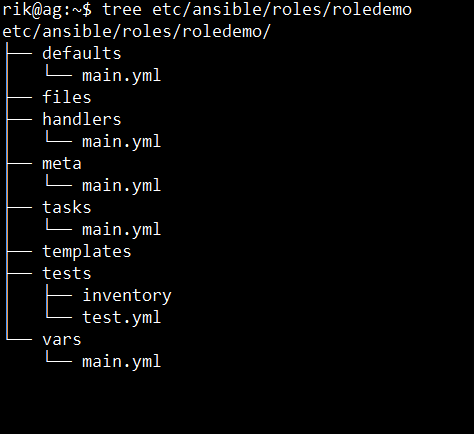
Check and list the files in a directory, and install the tree program on your PC.
$ tree etc/ansible/roles/roledemoOutput:
Step 3: Create Tasks
In the next step, the tasks to be defined, edit tasks/main.yml.
# my_role/tasks/main.yml
---
- name: Install Apache
  yum:
    name: httpd
    state: present

- name: Start Apache service
  service:
    name: httpd
    state: started

- name: Get system uptime
  command: uptime
  register: uptime_output

- name: Display system uptime
  debug:
    var: uptime_output.stdout

- name: Create a greeting file
  template:
    src: hello.j2
    dest: /tmp/hello.txt

- name: Display greeting file content
  command: cat /tmp/hello.txt
  register: greeting_output

- name: Show greeting
  debug:
    var: greeting_output.stdout
Step 4: Add the Role in a Playbook
After that, add a playbook with the following roles.
# site.yml
- hosts: localhost
  roles:
    - my_role
Step 5: Run the Playbook
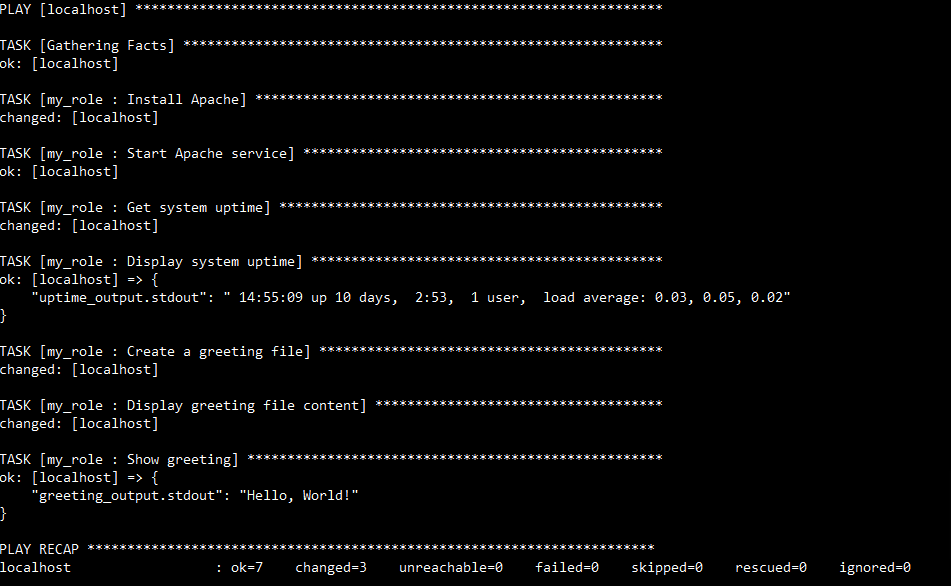
Lastly, you need to run the Playbook with ansible-playbook.
ansible-playbook site.ymlOutput:
Managing Ansible Roles
- Organizing roles for improved management: Divide roles into various directories according to their functionality or application. This makes it easier to find and manage jobs as your automation environment expands.
- Install roles from Ansible Galaxy: You might exchange Ansible roles in this repository. You can install roles from Galaxy using the ansible-galaxy command-line tool.
- Update and delete roles: You can modify the contents of the role directory or use the ansible-galaxy tool that allows you to change or remove roles.
Best Practices of Ansible Roles
- Documenting roles effectively: Document each role's purpose, usage, and variables to help team members understand and collaborate.
- Testing roles for reliability: Implement testing frameworks like Ansible Molecule to guarantee that roles are reliable and correct across several settings.
- Use Dynamic Inventory With Clouds: If you're using a cloud service, you shouldn't save your inventory in a static file. See Working with Dynamic Inventory. This is not limited to clouds; if you have another system that maintains a canonical list of systems in your infrastructure, using dynamic inventory is a good idea in general.
- Keep roles modular and reusable: It can design roles that are modular and reusable across several projects. Avoid hardcoding values and instead aim for flexibility and scalability.
Conclusion
In this article we have learned about Creating and Managing Roles in Ansible: Examples and Best Practices. Ansible roles function as numerous modules within a single Ansible playbook. This article has given you a quick overview of Ansible and Ansible Roles.