
Ansible Roles provide an obvious foundation and structure for your configuration: tasks, variables, handlers, metadata, templates, and the rest of your files. They also offer a mechanism for efficient reusing and sharing of Ansible code. Metadata for the role, including role dependencies and optional Galaxy metadata like platform support. This is essential for posting the part to Galaxy as a standalone, but not for using it in your play.
What are Ansible's Roles?
Ansible Roles provides an organized manner to arrange tasks, templates, files, and variables. This structure simplifies the management of complicated automation installations by containing everything related to a given role within its directory. Roles enable you to create default variables that can be overridden when the role is used in an Ansible playbook. This can reference and invoke them in our playbooks with only a few lines of code, and then they can be used in the same roles across multiple projects without duplicating our code.
Why Roles Are Useful in Ansible?
- When starting with Ansible, it's customary to focus on creating playbooks to quickly automate repetitive operations. As new users automate more and more operations with playbooks their Ansible skills improve.
- We can easily share our code with others because it is organized and structured by Ansible principles. We'll see an example of how to do that later with Ansible Galaxy.
- Organizing our Ansible content into roles creates a more manageable framework than simply utilizing playbooks.
- Finally, putting our Ansible code into roles allows us to structure our automation projects into logical groups and adhere to the separation of concerns design principle.
The Directory structure on Ansible Role
Below is the Directory structure on Ansible Role
- Meta: This directory will include metadata about your role with requirements needed to be run in any system, hence it won't run until dependencies inside are met..
- Tasks: This directory provides the main set of tasks that the role must do.
- Vars: This directory takes precedence over the default directory and can only be overwritten.
- Defaults: It contains the role's default variables as these variables have the lowest priority.
- Files: This contains all of the static files used within the role.
- Handlers: All handlers are in use here but not in the Task directory. And automatically summoned from here.
How to Create Ansible Roles
Step 1: Directory Structure and Conventions
Typically, an Ansible role has the following directory structure.
roles/
└── example_role/
    ├── defaults/
    │   └── main.yml
    ├── files/
    ├── handlers/
    │   └── main.yml
    ├── meta/
    │   └── main.yml
    ├── tasks/
    │   └── main.yml
    ├── templates/
    ├── tests/
    │   └── inventory
    │   └── test.yml
    └── vars/
        └── main.yml
Step 2: Make a Role
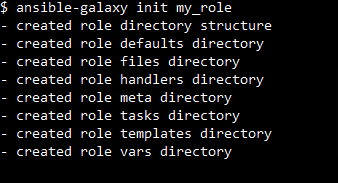
In the further step, You can use the ansible-galaxy command to create a role.
$ ansible-galaxy init my_roleOutput:
Step 3: Define Tasks
The next step is to indicate in tasks/main.yml the tasks you want the role to perform.
---
- name: Ensure nginx is installed
  apt:
    name: nginx
    state: present

- name: Start nginx service
  service:
    name: nginx
    state: started
    enabled: yes
Step 4: Handle Notifications
Next, You should handle the notification to be triggered in handlers/main.yml.
---
- name: restart nginx
  service:
    name: nginx
    state: restarted
Version Control and Dependency Management
Using Git for Version Control
Step 1: Get a Git repository started
Initiate a Git repository first in the Ansible roles directory.
git initStep 2: Add Files
Fill out the repository with your role files.
git add roles/example_roleStep 3: Remote Repository
Move your role to a remote repository (GitHub, GitLab, etc.):
git remote add origin <remote-repo-url>
git push -u origin main
Managing Role Dependencies with Ansible Galaxy
Install Dependencies
Installing the roles specified in meta/main.yml requires running the following command.
ansible-galaxy install -r requirements.ymlOutput:

Update Dependencies
You can use the following to update roles to the most recent versions or a particular version.
ansible-galaxy install -r requirements.yml --forceOutput:

Handling Role Updates and Versioning
Tagging Versions
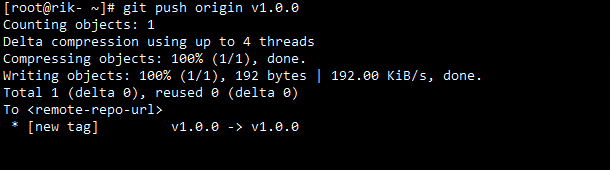
To identify different iterations of your role, use Git tags. This facilitates monitoring modifications and undoing them as needed.
git tag -a v1.0.0 -m "Version 1.0.0"
git push origin v1.0.0
Version Constraints
In your specifications.yml, set version limits to guarantee compatibility.
- src: geerlingguy.nginx
  version: "2.0.0"
Advantages of Best Practices of Ansible Role
- Reusability: Ansible roles are developed using Vandalized Architecture; hence they can be reused with different sets of values.
- Testing: Best practice systems include automated testing for roles. The risk of errors occurring at production time is therefore reduced directly in proportion to ensuring that the roles work as expected before they are deployed.
- Compliance: Normally, the roles developed by the best practices adhered to the guidelines and standards of the company, ensuring compliance with all the internal or external laws that may apply.
- Consistency: You can learn new things every day by putting best practices into practice.
Best Practices for Organizing Roles
- Modularity: Every role ought to concentrate on a specific duty or function. This method makes it possible to reuse roles in many situations without making any changes.
- Documentation: Provide README.md files and other documentation in your role directories to describe the functions, variables, and usage guidelines of the role.
- Naming conventions: Give roles names that are clear and concise, indicating their purpose. To configure Nginx, for instance, a role should be named Nginx rather than something generic like a webserver.
Conclusion
In this article, we have learned about Best Practices for Managing Ansible Roles. Ansible Roles are a powerful component of Ansible that allows for reuse and promotes configuration modularization, but they are frequently disregarded in favor of simple playbooks for the task at hand.