
Amazon API Gateway is a fully managed service that makes it easy for developers to create, publish, maintain, monitor, and secure APIs at any scale. In modern cloud architecture, API Gateway is the glue that coordinates microservices, handling the traffic management, authorization, and processing of hundreds of thousands of concurrent API calls.
- Sits between client applications and backends, abstracting underlying infrastructure.
- Supports RESTful APIs (HTTP and REST types) and real-time bidirectional APIs (WebSocket type).
- Features built-in throttling and routing limits to safeguard backend services from traffic spikes.
- Provides native authorization mechanisms including AWS Cognito, IAM roles, and custom Lambda authorizers.
- Manages multiple deployment stages concurrently, enabling seamless version transitions (e.g., v1 to v2).

API Gateway Workflow
The communication routing lifecycle between client systems and backend resources follows a 4-step workflow:
- Client Request: A client application sends an HTTP or WebSocket request (e.g., GET /users/123) to your API Gateway endpoint.
- Gateway Processing: API Gateway processes traffic management, verifies authorization, executes validation rules, and determines routing targets.
- Backend Routing: API Gateway forwards the request to the configured integration (such as triggering an AWS Lambda function or routing to an EC2 instance).
- Response Forwarding: The backend processes the payload and returns the response to API Gateway, which forwards it back to the client.
The Three Types of API Gateways
Choosing the right API type is the first structural decision. AWS offers three distinct gateway options:
| Feature | HTTP API | REST API | WebSocket API |
|---|---|---|---|
| Best For | Serverless workloads, simple microservices, low-latency applications. | Enterprise apps, public monetization, complex routing, private APIs. | Real-time communication apps like chat or live monitoring dashboards. |
| Protocol | HTTP/1.1 | HTTP/1.1 | WebSocket (TCP-based persistent) |
| Performance | Lowest Latency (optimized for speed). | Higher latency (due to feature overhead). | Stateful, full-duplex persistent connection. |
| Cost Model | Cheapest (~$1.00 per million requests). | More Expensive (~$3.50 per million requests). | Metered by connection minutes and message count. |
| Key Features | Native OIDC/OAuth, CORS support, auto-deployments. | API Keys, Usage Plans, AWS WAF, Edge-optimized endpoints, caching. | Push notifications, real-time two-way client-server routing. |
Start with HTTP APIs if you are building a new serverless application. They are faster and up to 70% cheaper.
Only choose REST APIs if you need specific advanced features like API Keys, throttling per client, or AWS WAF support.
Pricing of Amazon API Gateways
AWS API Gateway runs on a pay-as-you-go model with no upfront commitments:
- Free Tier: Includes 1 million API calls per month for the first 12 months.
- HTTP APIs: Charges ~$1.00 per million requests for the first 300 million, decreasing to ~$0.90 per million requests thereafter.
- REST APIs: Charges ~$3.50 per million requests, plus additional charges for data transfer and optional caching.
- WebSocket APIs: Charges ~$1.00 per million messages and ~$0.25 per million connection minutes.
Note: Prices are estimates for the US East (N. Virginia) region and may vary.
Amazon API Gateway Architecture
API Gateway provides a consistent developer experience for building serverless applications, serving as the interface to access S3, EC2, Lambda, or external web endpoints.
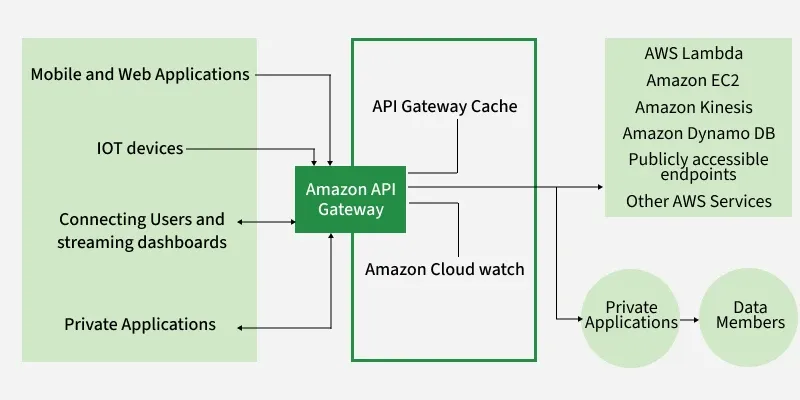
The integrated architecture consists of the following key components:
- Amazon API Gateway Engine: Handles the creation, security, deployment, and execution of your API endpoints.
- API Gateway Cache: Caches endpoint responses to improve request latency and minimize backend call volume.
- Amazon CloudWatch: Gathers and visualizes monitoring data, latency metrics, and execution logs using dashboards.
Working with Amazon API Gateway
You can configure and access Amazon API Gateway through four standard interfaces:
- AWS Management Console
- AWS SDKs (including API Gateway V1 and V2 APIs)
- AWS Command Line Interface (CLI)
- AWS Tools for Windows PowerShell
To deploy an HTTP API, you must first create a target backend, such as an AWS Lambda function. After creating the Lambda function, configure the HTTP API using API Gateway to map to it.

Step-by-Step Creation of an HTTP API Gateway
The following process outlines how to create and deploy an HTTP API in the AWS Management Console:
1. Choose API Type: Navigate to the API Gateway console and select HTTP API as the desired product.

2. Select Integration: Add an integration, pointing API Gateway to invoke your previously created target Lambda function.

3. Define Routes and Methods: Create routes and map appropriate HTTP methods (such as GET, POST, or PATCH) based on application requirements.

4. Deploy the API: Select or configure an API stage (such as $default) to deploy your API and make it publicly accessible.

5. Review and Create: Review your configuration summaries and click Create to establish the live API endpoint.

Advantages
- Traffic Management: Sets throttling rules and burst limits to protect backends from denial-of-service attacks or runaway scripts.
- Authentication: Integrates with AWS Cognito, IAM policies, and Lambda Authorizers to strictly control access.
- Input Validation: Validates incoming request parameters before hitting backends, saving processing costs on malformed requests.
- Monitoring and Logging: Integrates with Amazon CloudWatch to track latency, error rates, and data transfer volumes.
- Serverless Integration: Acts as the standard, direct gateway interface to expose AWS Lambda functions as HTTP endpoints.
Security Best Practices
- Least Privilege Roles: When granting API Gateway permission to trigger downstream services, assign IAM roles with minimal necessary permissions.
- Implement Throttling: Configure global and client-level throttling thresholds to prevent DDoS exploits or budget-exhausting scripts.
- Enforce HTTPS: Maintain secure default configurations; API Gateway endpoints use SSL/TLS by default to protect data in transit.
- Enforce Request Validation: Enable validation models to reject syntactically incorrect client payloads early, preventing unnecessary backend processing.