
pgvector is an open‑source PostgreSQL extension that brings native vector similarity search directly into the relational database. It allows you to store, index and query high‑dimensional embeddings ike those from language or image models, without relying on a separate vector database.
- Seamlessly integrates AI‑powered search and recommendations into Postgres
- Supports similarity metrics such as cosine, inner product and L2 distance
- Ideal for building retrieval, ranking and personalization systems
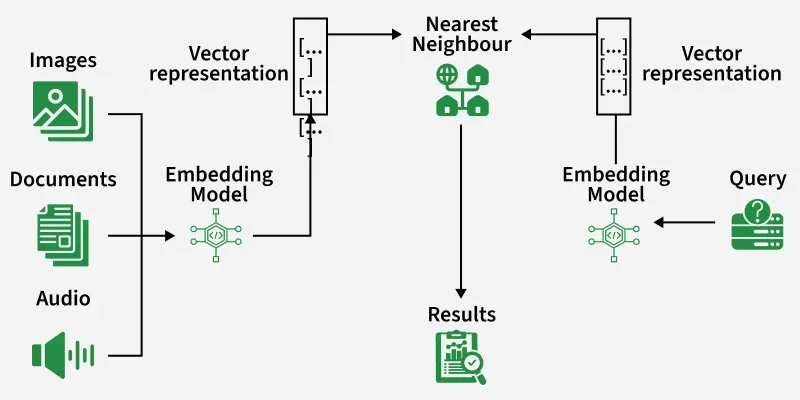
Key features
- Native PostgreSQL Integration: Works as a standard Postgres extension, letting you perform vector search using familiar SQL syntax without external dependencies.
- Efficient Vector Storage: Supports fixed-dimension vector data types for storing embeddings from text, image, or audio models directly in database tables.
- Multiple Similarity Metrics: Enables vector comparisons using cosine similarity, Euclidean (L2) distance, and inner product for flexible semantic search.
- Indexing for Fast Search: Provides IVFFlat and HNSW indexing options for approximate nearest neighbor (ANN) retrieval, ensuring efficient search across millions of vectors.
Implementation
Let's see how pgvector can be implemented.
Step 1: Install Packages
We will:
- Installs PostgreSQL and its contrib modules.
- postgresql-server-dev-14 provides postgres.h, required for building pgvector.
- Also installs compilers and libraries needed for the build.
!apt-get update -qq
!apt-get install -y postgresql postgresql-contrib postgresql-server-dev-14 git make gcc libpq-dev
Step 2: Start PostgreSQL and Set Password
We will:
- Starts the PostgreSQL service.
- Sets a password for the postgres user.
!service postgresql start
!sudo -u postgres psql -c "ALTER USER postgres PASSWORD 'password';"
Output:

Step 3: Build pgvector
Now we will:
- Clone the official pgvector repository.
- Compiles the extension from source using PostgreSQL dev headers.
- Installs the built files into the PostgreSQL extension directory.
!git clone https://github.com/pgvector/pgvector.git
%cd pgvector
!make
!make install
%cd /content
Step 4: Enable the pgvector Extension
We will start the PostgreSQL again to ensure the service is running and load the pgvector extension into the current Postgres instance.
!service postgresql start
!sudo -u postgres psql -c "CREATE EXTENSION IF NOT EXISTS vector;"
Output:

Step 5: Create Table and Perform Similarity Query
Here we will:
- Create a documents table with a vector column of dimension 3.
- Inserts three example embeddings.
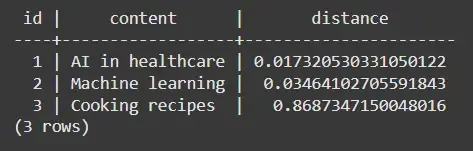
- Uses the <-> operator to compute Euclidean distance between stored vectors and a query vector.
- Orders results by distance to find the most similar entries.
!sudo -u postgres psql -c "CREATE TABLE IF NOT EXISTS documents (id SERIAL PRIMARY KEY, content TEXT, embedding vector(3)); INSERT INTO documents (content, embedding) VALUES ('AI in healthcare', '[0.11, 0.45, 0.33]'), ('Machine learning', '[0.12, 0.44, 0.34]'), ('Cooking recipes', '[0.87, 0.13, 0.55]'); SELECT id, content, embedding <-> '[0.10,0.46,0.32]' AS distance FROM documents ORDER BY distance LIMIT 3;"
Output:
Step 6: Fix Authentication
PostgreSQL by default uses peer authentication, we’ll switch it to password authentication.
- Edits pg_hba.conf to allow password-based access.
- Restarts PostgreSQL to apply changes.
- Resets the password for the postgres user for Python access.
!sudo sed -i 's/local\s*all\s*postgres\s*peer/local all postgres md5/' /etc/postgresql/14/main/pg_hba.conf
!service postgresql restart
!sudo -u postgres psql -c "ALTER USER postgres WITH PASSWORD 'password';"
Output:
Step 7: Connect to PostgreSQL
We will connect to PostgreSQL in python:
- Installs Python bindings for PostgreSQL and pgvector.
- Connects securely using psycopg2.
- Registers pgvector’s custom vector data type.
- Performs a similarity search using a query embedding.
!pip install psycopg2-binary pgvector


import psycopg2
from pgvector.psycopg2 import register_vector

conn = psycopg2.connect(
    "dbname=postgres user=postgres password=password host=localhost port=5432")
register_vector(conn)

cur = conn.cursor()
cur.execute(
    "SELECT id, content FROM documents ORDER BY embedding <-> %s LIMIT 2",
    ([0.10, 0.46, 0.32],)
)
print(cur.fetchall())

cur.close()
conn.close()
Output:
[(1, 'AI in healthcare'), (2, 'Machine learning')]
pgvector vs. Other Vector Databases
Let's compare pgvector with other vector databases such as FAISS, ChromaDB and Milvus.
| Feature | pgvector | FAISS | ChromaDB | Milvus |
|---|---|---|---|---|
| Base | PostgreSQL extension | Standalone C++ library | Python-native DB | Distributed vector DB |
| Index Types | IVFFlat, HNSW | Flat, IVFFlat, HNSW | HNSW | IVF, HNSW, DiskANN |
| Persistence | PostgreSQL-backed | In-memory / Disk | Local / Persistent | Highly persistent |
| Deployment | Built into Postgres | Separate | Local or cloud | Cluster-based |
| Ease of Use | Easy (SQL) | Medium | Easy | Complex |
| Best For | Integrating AI search into existing Postgres DBs | Research / Local apps | Light-weight AI prototypes | Large-scale enterprise search |
Applications
- Semantic Search: Find documents, FAQs or images based on meaning rather than keywords.
- Recommendation Systems: Suggest similar products, songs or movies based on embeddings.
- Chatbot Memory (RAG): Store and retrieve context embeddings for large language models.
- Image and Audio Similarity: Compare multimedia embeddings for similarity detection.
- Hybrid Search: Combine traditional SQL filters with vector search for context-aware retrieval.
Advantages
- Seamless Integration: Works directly within PostgreSQL, i.e., no separate DB needed.
- Flexible Indexing: Supports both exact and approximate search (IVFFlat, HNSW).
- ACID-Compliant: Inherits all Postgres transaction and consistency guarantees.
- Unified Querying: Combine SQL and vector search in one query (hybrid search).
- Lightweight Setup: Easy to integrate into existing infrastructure.
Limitations
- Performance at Scale: Slower than dedicated vector databases for billions of vectors.
- Limited GPU Acceleration: Relies on CPU-based operations only.
- Storage Overhead: Large vectors can increase DB size quickly.