
Duplicate data points in SQL mean that the same record appears more than once in a table. Handling duplicates is important because they can give wrong results, increase data size, and slow down queries.The process typically includes:
- Identifying Duplicates: Use GROUP BY with HAVING COUNT(*) > 1 to find duplicate records.
- Listing Duplicate Records: Join the original table with the duplicate result to view all duplicate rows.
- Removing Duplicates: Use ROW_NUMBER() with DELETE to keep one record and remove the rest.
Examples of Duplicate Data:
- In the context of a customer database, it means that the customers listed more than once in the database.
- Moves or interactions between buyers and sellers that occur in a sales database.
- It refers to the earlier situation where there were copied or repeated product listings in an inventory database.
Steps to Handle Duplicate Data
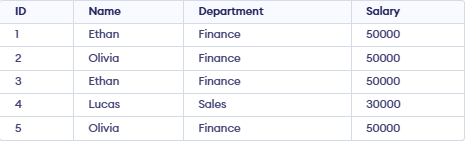
Firstly, create a sample employee table that contains duplicate records so we can demonstrate how to identify and remove duplicate data using SQL queries.
Identifying Duplicate Records
To find duplicates, we use GROUP BY with HAVING and COUNT()
Syntax:
SELECT column1, COUNT(*)
FROM table_name
GROUP BY column1
HAVING COUNT(*) > 1;
Query :
SELECT Name, Department, COUNT(*) AS duplicate_count
FROM Employee
GROUP BY Name, Department
HAVING COUNT(*) > 1;
Output:

- The query groups all employees who have the same name and department.
- It counts how many times each name–department combination appears
Viewing Duplicate Rows
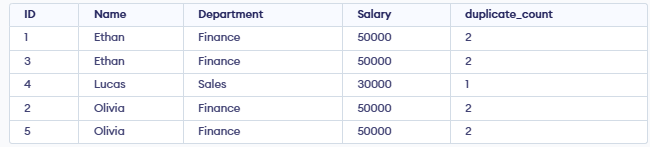
Display all rows that are duplicated using a window function.
SELECT *,
       COUNT(*) OVER (PARTITION BY column1) AS duplicate_count
FROM table_name;
Query:
SELECT *,COUNT(*) OVER (PARTITION BY Name, Department) AS duplicate_count FROM Employee;Output:
Methods for Handling Duplicate Data in SQL Queries
Many different ways exist to prevent and get rid of duplicity in SQL. The most common techniques include:
- Using ROW_NUMBER() with Common Table Expressions (CTEs)
- Using the DISTINCT Keyword
- Using GROUP BY and HAVING Clauses
1.Using ROW_NUMBER() with Common Table Expressions (CTEs)
The ROW_NUMBER() function gives a number to each row in a group. When used with CTEs, it helps to remove duplicate rows.
Syntax:
WITH CTE AS (
    SELECT *,
           ROW_NUMBER() OVER (PARTITION BY column1, column2 ORDER BY column3) AS row_num
    FROM table_name
)
DELETE FROM table_name
WHERE EXISTS (
    SELECT 1
    FROM CTE
    WHERE CTE.row_num > 1
      AND table_name.primary_key = CTE.primary_key
);
Query:
WITH CTE AS (
    SELECT *,
           ROW_NUMBER() OVER (PARTITION BY Name, Department ORDER BY ID) AS rn
    FROM employees
)
DELETE FROM employees
WHERE ID IN (
    SELECT ID
    FROM CTE
    WHERE rn > 1
);
Output:

2.Using DISTINCT Keyword
The DISTINCT keyword in SQL removes duplicate rows from the results, showing only unique records.
Syntax:
SELECT DISTINCT column1, column2
FROM table_name;
Query:
SELECT DISTINCT Name, Department
FROM employees;
Output:

3.Using GROUP BY and HAVING Clauses
The GROUP BY clause groups rows based on specified columns, and aggregate functions like COUNT or SUM operate on each group. The HAVING clause is used to filter these groups based on a condition.
Syntax:
SELECT column1, COUNT(*)
FROM table_name
GROUP BY column1
HAVING COUNT(*) > 1;
Query:
DELETE FROM employees
WHERE ID NOT IN (
    SELECT MIN(ID)
    FROM employees
    GROUP BY Name, Department
);
Output:

Handling Duplicates in Data Merging
When merging data from multiple sources, duplicates are often inevitable. Here are some strategies to handle them:
1. Standardizing Data
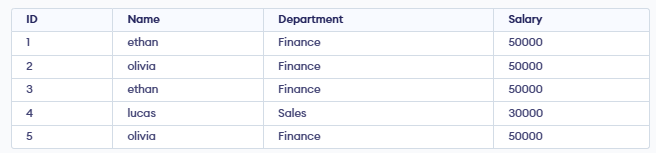
Standardizing data involves cleaning and transforming data to ensure consistency. This can include removing leading/trailing spaces, converting to a common case (e.g., all lowercase) and normalizing formats (e.g., date formats).
Syntax:
UPDATE table_name
SET column1 = TRIM(LOWER(column1));
Query:
UPDATE employees
SET Name = TRIM(LOWER(Name));
Output:
2. Using UNION and UNION ALL
The UNION operator merges the results of two queries and removes any duplicate rows, while UNION ALL merges the results but keeps all rows, including duplicates.
SELECT column1, column2
FROM table1
UNION
SELECT column1, column2
FROM table2;
This query combines the results from table1 and table2 and removes duplicates.