
To do a lot of interesting programming stuff using the Dart programming language, we have to install the Dart SDK. Dart SDK is a pre-compiled version so we have to download and extract it only.
In this article, we will learn how to perform Dart SDK Download.

Install Dart SDK in Windows
Step 1 : Download Dart SDK
Download Dart SDK from the Dart SDK archive page.
Use this Link to Dart SDK Download
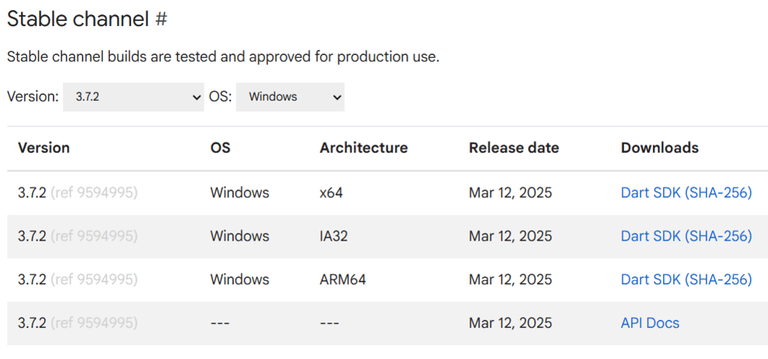
Click on DART SDK to download SDK for Windows 64-Bit Architecture. The download will start and a zip file will be downloaded.
Note: To download SDK for any other OS select OS of your choice.
Step 2 : Extract the downloaded zip file.
Extract the contents of the downloaded zip file and after extracting the contents of the zip file will be as shown:
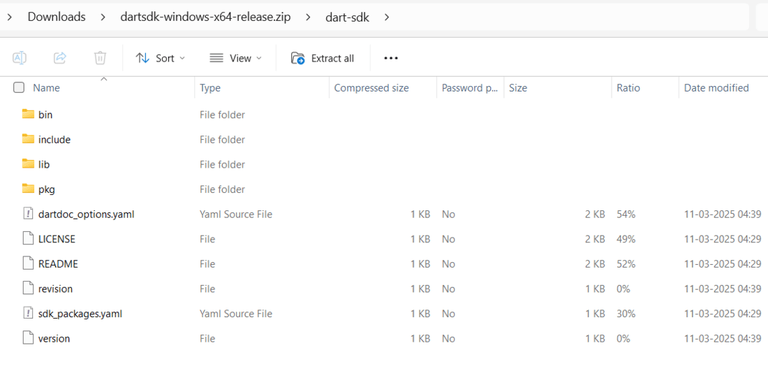
Step 3 : Running Dart.
Now open the bin folder and type "cmd" as given below:
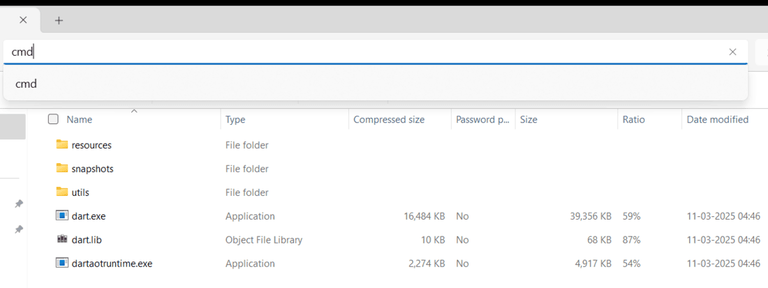
Command Prompt will open with our desired path of bin folder and now type "dart".

Now we are ready to use the dart through the bin folder but setting up the path in environment variables will ease our task of Step 3 and we can run the dart from anywhere in the file system using the command prompt.
Another Method to Install Dart SDK Installation in Windows
To install Dart in the window system we will be using Chocolatey.
Step 1 : To install Dart
C:\> choco install dart-sdkStep 2 : To Update Dart
C:\> choco upgrade dart-sdkSetting Path in Environment Variables
Setting up path in environment variables. Open Environment Variables from advanced system settings and add Path in System Variables as depicted in the image:
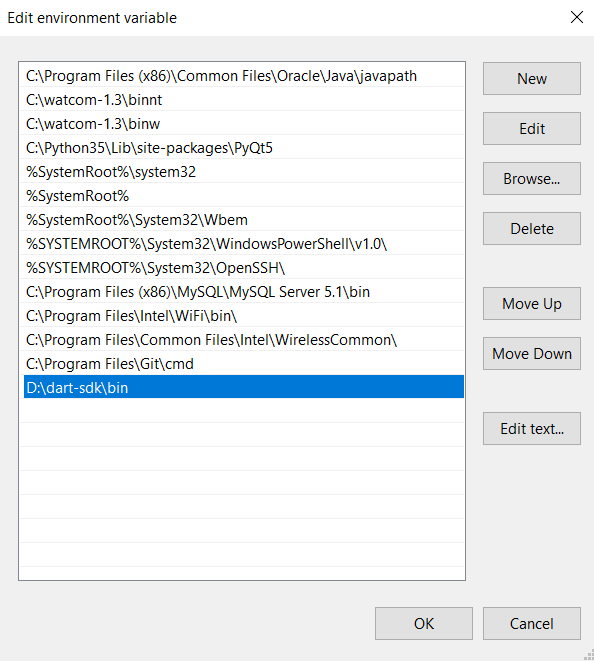
Now we are done to use Dart from anywhere in the file system.
Step 3 : Run Dart Using cmd
Install Dart in Linux
Terminal Commands are responsible for the Installation of Applications in Linux. So, there are some fixed set of commands which can be used to install. Let us check these types of commands which are mentioned below:
Step 1 : Update and Upgrade the apt
It is a prerequisite for installing any application. Commands to Upgrade and Update apt are mentioned below:
$ sudo apt-get update
$ sudo apt-get upgrade

// Few older version will face issues while installtion so use
$ sudo apt-get install apt-transport-https
Step 2 : Create a Dart Repository and Install GPG keys from Google
Create a Repository to store Dart and also install gpg keys from Google used to sign the Dart packages to your system's list of trusted keys.
$ sudo sh -c 'wget -qO- https://dl-ssl.google.com/linux/linux_signing_key.pub | apt-key add -'
$ sudo sh -c 'wget -qO- https://storage.googleapis.com/download.dartlang.org/linux/debian/dart_stable.list > /etc/apt/sources.list.d/dart_stable.list'
Step 3 : Install Dart
The final Step will be to install Dart in your Linux operated PC.
$ sudo apt-get update
$ sudo apt-get install dart
Setting the Path of Dart in Linux
Setting Path of Dart in Linux to execute the Dart Programs.
// Dart to your Path
$ export PATH="$PATH:/usr/lib/dart/bin"

// Apply Changes
$ source ~/.bashrc

// This command should display the installed Dart SDK version
$ dart --version
Install Dart in MacOs
We will install Dart in macOS using Homebrew.
Step 1 : Install Homebrew
Install Homebrew, and then run the following commands.
/bin/bash -c "$(curl -fsSL https://raw.githubusercontent.com/Homebrew/install/HEAD/install.sh)"Step 2 : Install Dart
Install Dart by running the commands mentioned below.
$ brew tap dart-lang/dart
$ brew install dart
Step 3 : Upgrade the new release of Dart
To upgrade when a new release of Dart is available:
$ brew upgrade dartStep 4 : Verify Dart Installation
$ dart --versionNote : Flutter developers have Dart bundled with the Flutter SDK, eliminating the need for a separate installation.
With Dart configured, developers can create high-performance applications across various platforms, utilizing its efficient syntax and strong ecosystem.