
The C preprocessor is a program that processes the source code before actual compilation begins. It handles special instructions called preprocessor directives, which guide the compiler on how to prepare the code.
- Preprocessor directives start with the # symbol
- They are executed before compilation
- They are used for macros, file inclusion, and conditional compilation
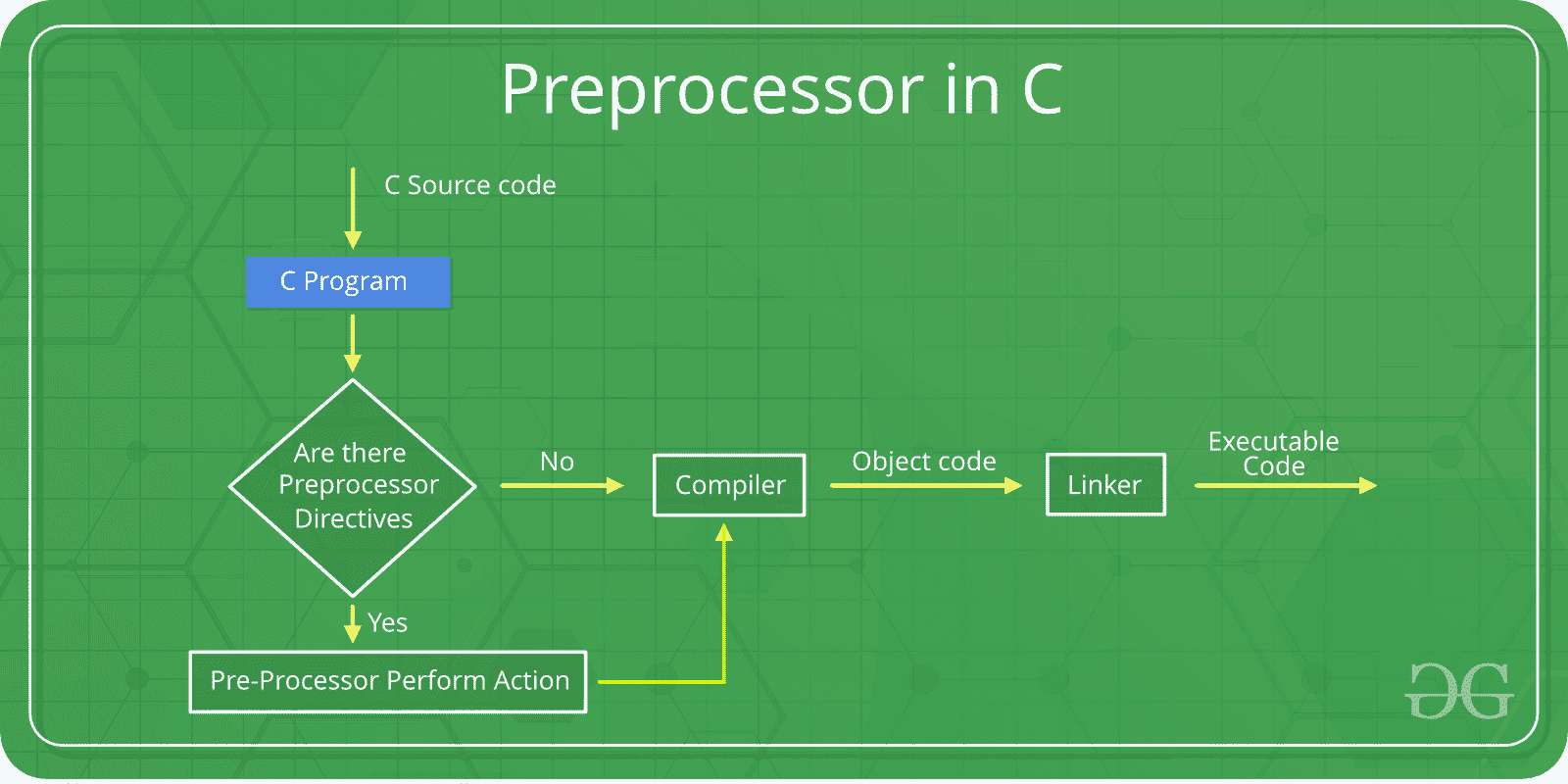
Preprocessor Directives in C
#define
The #define directive is used to define macros or symbolic constants. These values are replaced before compilation.
- Used to define constants and macros
- Improves code readability
- No memory allocation happens
#include <stdio.h>

#define PI 3.14159

int main()
{
    // Using the PI macro to calculate
    double r = 8.0;
    10double area = PI * r * r;

    printf("%f\n", a);
    return 0;
}
Output
201.061760
#include
The #include directive is used to include header files in a program before compilation.
- Allows use of library functions
- Supports reusable code
- Comes in two forms: < > and " "
Syntax
#include <filename>
#include "filename"
< >-> system header files" "-> user-defined header files
#include <stdio.h>

int main() {
    printf("Hello, Geek!\n");
    return 0;
}
Output
Hello, Geek!
Conditional Compilation Directives (#if, #elif, #else, #endif)
These directives work together to control which parts of the program get compiled based on certain conditions.
- If the condition after the #if is true, the lines after it will be compiled.
- If not, it checks the condition after associated #elif. If that's true, those lines will be compiled.
- If neither condition is true, the lines after #else will be compiled.
#include <stdio.h>

int main()
{
#define VALUE 2

// Check if VALUE is greater than 3
#if VALUE > 3
    printf("Value is greater than 3\n");

// Check if VALUE is 3
#elif VALUE == 3
    printf("Value is 3");

// If neither conditions are true, this
// block will execute
#else
    printf("Value is less than or equal to 2");
#endif

    return 0;
}
Output
Value is less than or equal to 2
Note: the entire structure of #if, #elif and #else chained directives ends with #endif.
#ifdef
The #ifdef (if defined) directive checks whether a macro is defined. If it is, the code within the #ifdef block is included in the program.
#include <stdio.h>
int main()
{

#define DEBUG

// Check if DEBUG is defined
#ifdef DEBUG
    printf("Debugging is enabled");
#endif

    return 0;
}
Output
Debugging is enabled
#ifndef
The #ifndef (if not defined) directive checks if a macro is not defined. If it is not defined, the code inside the #ifndef block is included.
#include <stdio.h>
int main()
{

// Check if DEBUG is not defined
#ifndef DEBUG
    printf("Debugging is not enabled");
#endif
    return 0;
}
Output
Debugging is not enabled
#line
The #line directive is used to change line number and file name for the compiler.
- Useful in generated code
- Helps in debugging
- Alters compiler reporting
#include <stdio.h>

// Define macro that prints current line number and filename
#define PrintLineNum printf("Line number is %d in file named %s\n", __LINE__, __FILE__)

int main()
{
    PrintLineNum;

    // Change line number to 20 and filename to "main.c"
    PrintLineNum;

// Change line number to 30 and filename to "noindex.c"
#line 30 "noindex.c"
    PrintLineNum;

    return 0;
}
Output
Line number is 5 in file named ./Solution.c
Line number is 20 in file named main.c
Line number is 30 in file named index.c
Line number that will be assigned to the next code line. The line numbers of successive lines will be increased one by one from this point on. "filename" - optional parameter that allows to redefine the file name that will be shown.
#error
The #error directive generates a compilation error with a custom message.
- tops compilation immediately
- used for enforcing conditions
#include <stdio.h>

#ifndef GeeksforGeeks

// Show error message
#error "GeeksforGeeks not found!"
#endif

int main()
{
    printf("Hello, GeeksforGeeks!\n");
    return 0;
}
Output
error: #error "GeeksforGeeks not found!"#pragma - Pragma Directive
The #pragma directive gives special instructions to the compiler.
- Compiler-specific behavior
- Used for optimizations and warnings
Commonly used pragma directives are:
- #pragma message: used at compile time to print custom messages.
- #pragma once: to guard the header files i.e the header file must be included only once.
- #pragma warning: to enable or disable the warnings.
#include <stdio.h>

// not defining gfg to trigger pragma message
// #define GeeksforGeeks

int main()
{
#ifndef GeeksforGeeks
#pragma message(" GfG is not defined.")
#endif
    printf("Hello geek!\n");
    return 0;
}
Output
#pragma message: GfG is not defined.Summary of Common Preprocessor Directives in C
| Preprocessor Directives | Description |
|---|---|
#define | Used to define a macro. |
#undef | Used to undefine a macro. |
#include | Used to include a file in the source code program. |
#ifdef | Used to include a section of code if a certain macro is defined by #define. |
#ifndef | Used to include a section of code if a certain macro is not defined by #define. |
#if | Check for the specified condition. |
#else | Alternate code that executes when #if fails. |
#endif | Used to mark the end of #if, #ifdef, and #ifndef. |
#error | Used to generate a compilation error message. |
#line | Used to modify line number and filename information. |
#pragma once | To make sure the header is included only once. |
#pragma message | Used for displaying a message during compilation. |