
An Amazon Machine Image (AMI) is a template containing the software configuration (operating system, application server, and applications) required to launch an Amazon EC2 instance. You cannot launch an EC2 instance without specifying one.
- Every EC2 instance, whether one or thousands, starts as a clone of the selected AMI.
- Every AMI packages a root volume template, launch permissions, and a block device mapping.
- AMIs exist in a single AWS Region and must be explicitly copied to be used in another.
- AMIs are created, registered, copied, and deregistered. Deregistering does not automatically delete the underlying EBS snapshot.
- AMIs come from Amazon, the AWS Marketplace, the community, or your own custom builds.

Core Components
- Root Volume Template: A snapshot of the root volume (typically EBS) containing the OS and all installed software.
- Launch Permissions: Controls which AWS accounts are authorized to use the AMI to launch instances.
- Block Device Mapping: Specifies which volumes (root and any additional storage) are attached to the instance at launch.
AMI Storage Types
The backing storage type is the most critical architectural distinction when selecting or creating an AMI.
| Feature | EBS-Backed AMI | Instance Store-Backed AMI |
|---|---|---|
| Boot Time | Fast (usually < 1 min); boots from a network snapshot. | Slow (minutes); must copy the image from S3 to the host. |
| Persistence | Persistent; data survives instance stop/start. | Ephemeral; data is lost if the instance stops or fails. |
| Stop/Start Support | Supported; you can "Stop" the instance to save costs. | Not supported; you can only Reboot or Terminate. |
| Root Volume Limit | Up to 64 TB (depending on volume type). | 10 GB for the AMI image bundle. |
| Data Durability | High; backed by EBS snapshots (replicated). | Low; tied to the physical hardware of the host. |
| Cost | Pay for the instance + EBS storage used. | Pay for the instance + S3 storage for the AMI. |
| Use Cases | Databases, production apps, long-running servers. | Caches, temp files, stateless distributed workloads. |
Note: Use EBS-Backed AMIs in almost all cases. Instance Store-backed AMIs are a legacy or niche option suited only for stateless, high-I/O workloads.
AMI Lifecycle
- Create: Launch an instance, configure it (install patches, application code), then create an image from it.
- Register: The AMI is registered with a unique ID (e.g.,
ami-12345678) in a specific AWS Region. - Copy: AMIs are Region-specific. To use an AMI created in
us-east-1withineu-west-1, you must explicitly copy it to the target Region. - Deregister: When an AMI is no longer needed, deregister it to stop it from being used to launch new instances.
Note: Deregistering an AMI does not delete the underlying EBS snapshot. You must delete the snapshot separately to stop incurring storage charges.
Types
- Amazon-Provided AMIs: Official, AWS-maintained images for Amazon Linux 2023, Ubuntu, Windows Server, and more.
- AWS Marketplace AMIs: Paid images provided by third-party vendors, such as pre-hardened CIS Benchmark images or application appliances like WordPress.
- Community AMIs: Images shared publicly by other AWS users. Use with caution and always verify the source, as they may contain malware or backdoors.
- Custom AMIs: Your own "Golden Images" that you build, harden, and maintain to meet internal standards.
Steps to Create Your Own AMI
Step 1: Launch an EC2 Instance
- Sign in to the AWS Management Console.
- Open the EC2 Dashboard.
- Click Launch Instance.
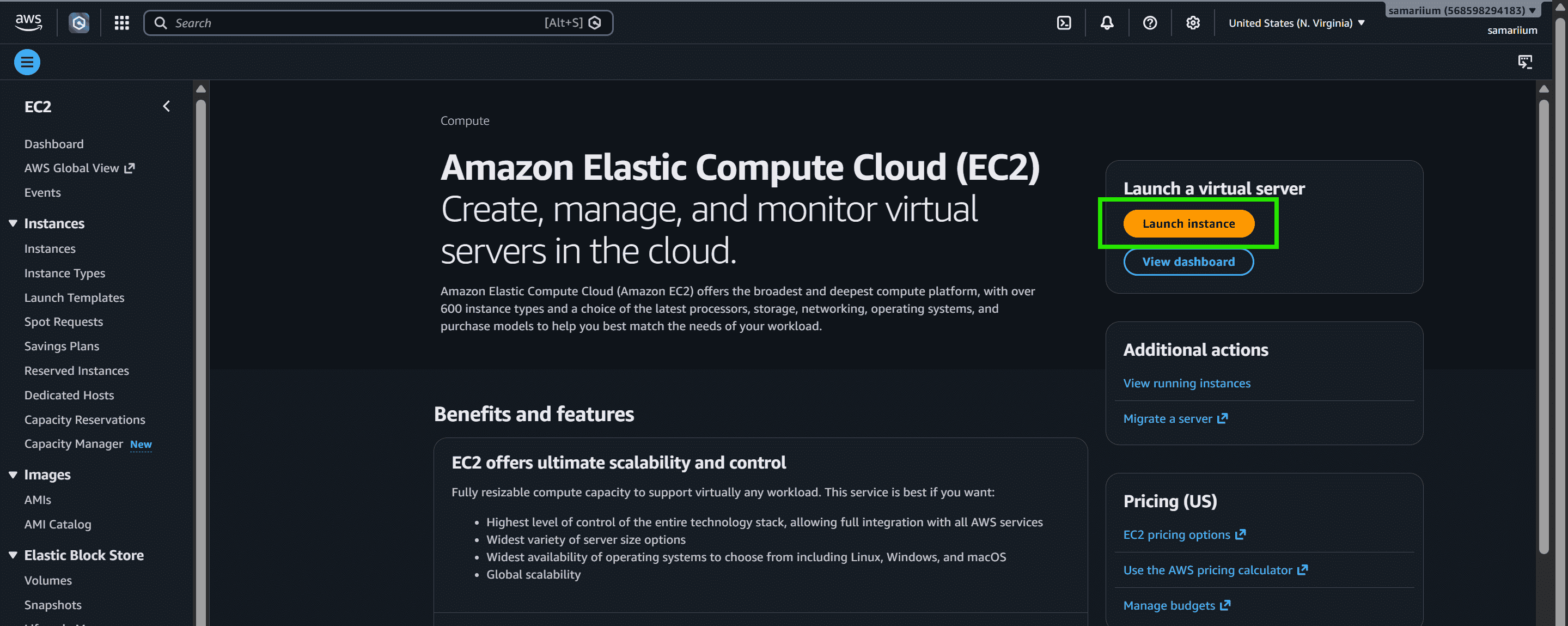
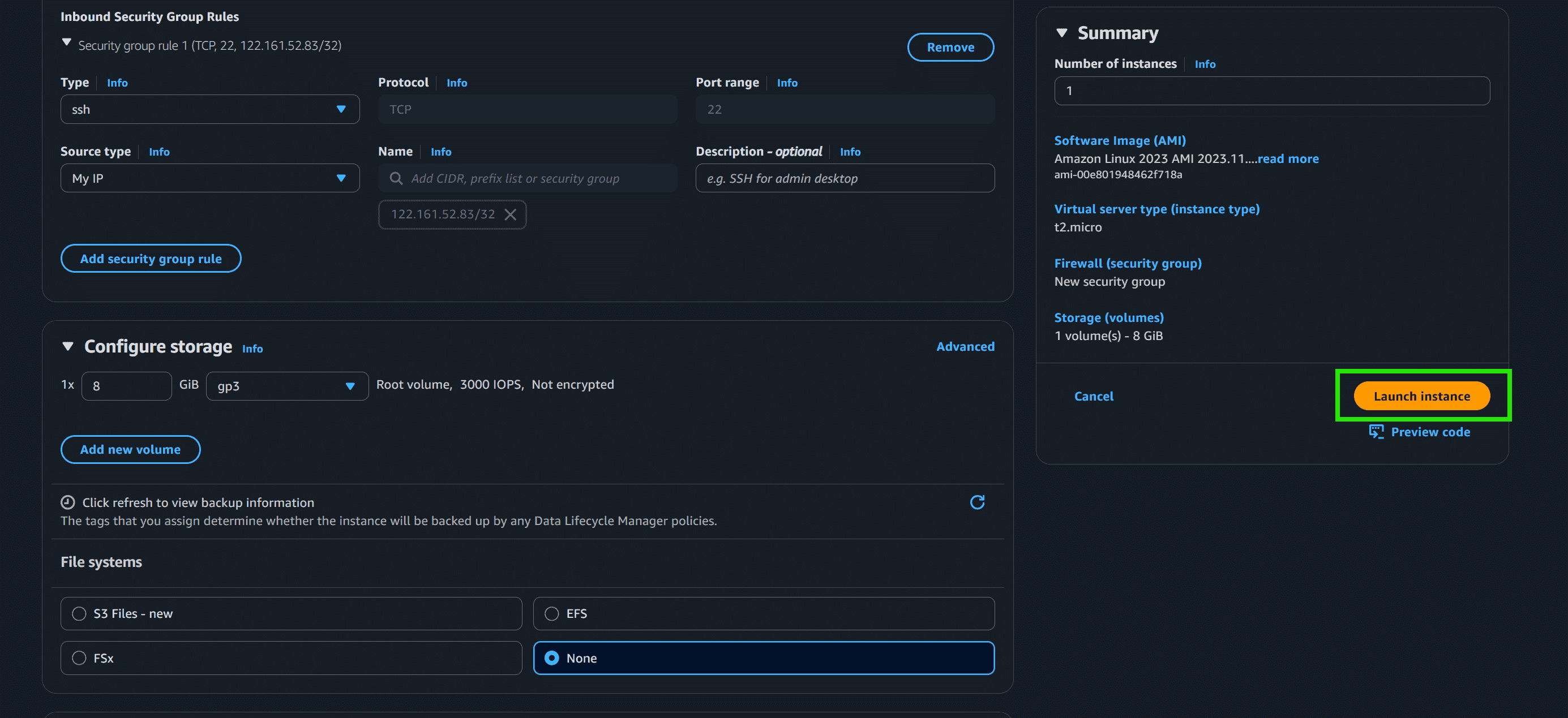
Step 2: Configure Instance
- Choose an Amazon Machine Image "Amazon Linux"
- Select Instance Type "t2.micro"
- Create and Download Key Pair
- Select create security group
- Add "Type: SSH" and "Source: My IP"
- Click on Launch instance
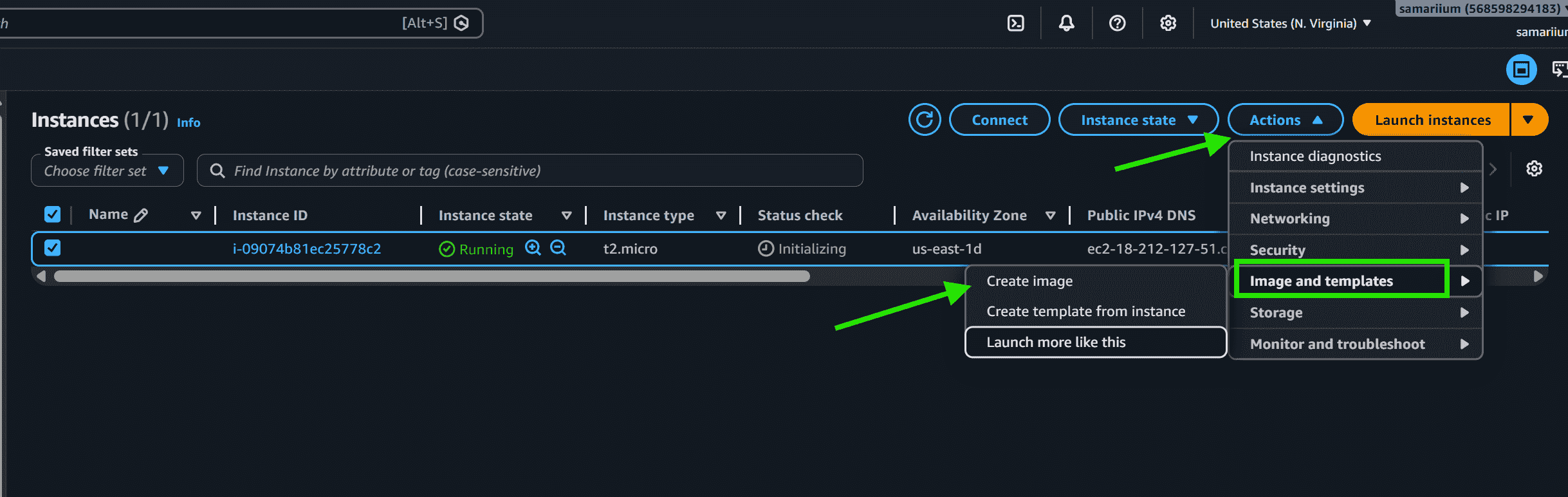
Step 3: After Instance Starts
- Select the running instance
- Click -> Actions -> Image and templates
- Click on create image
- Enter image name
- Click Create image
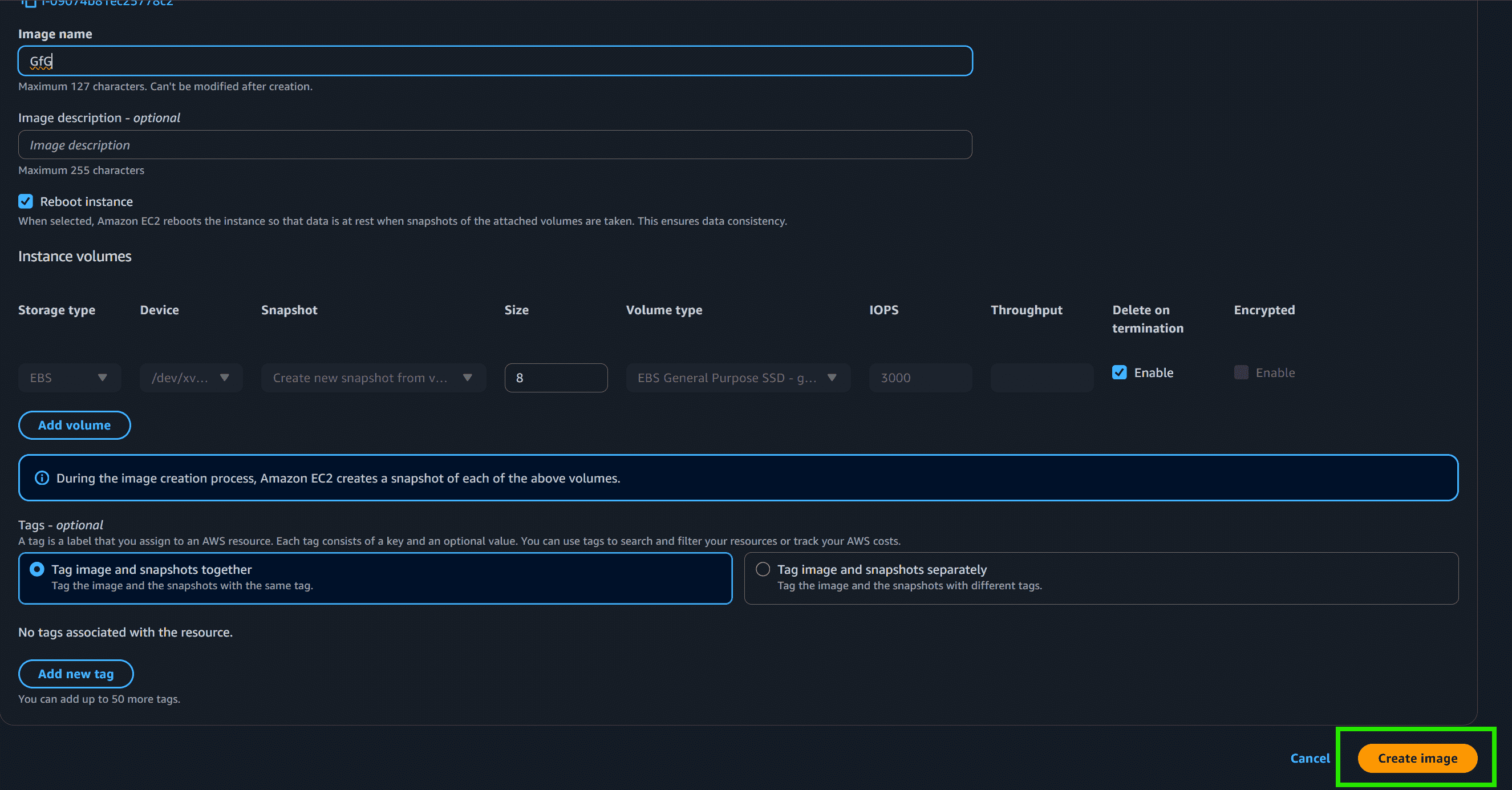
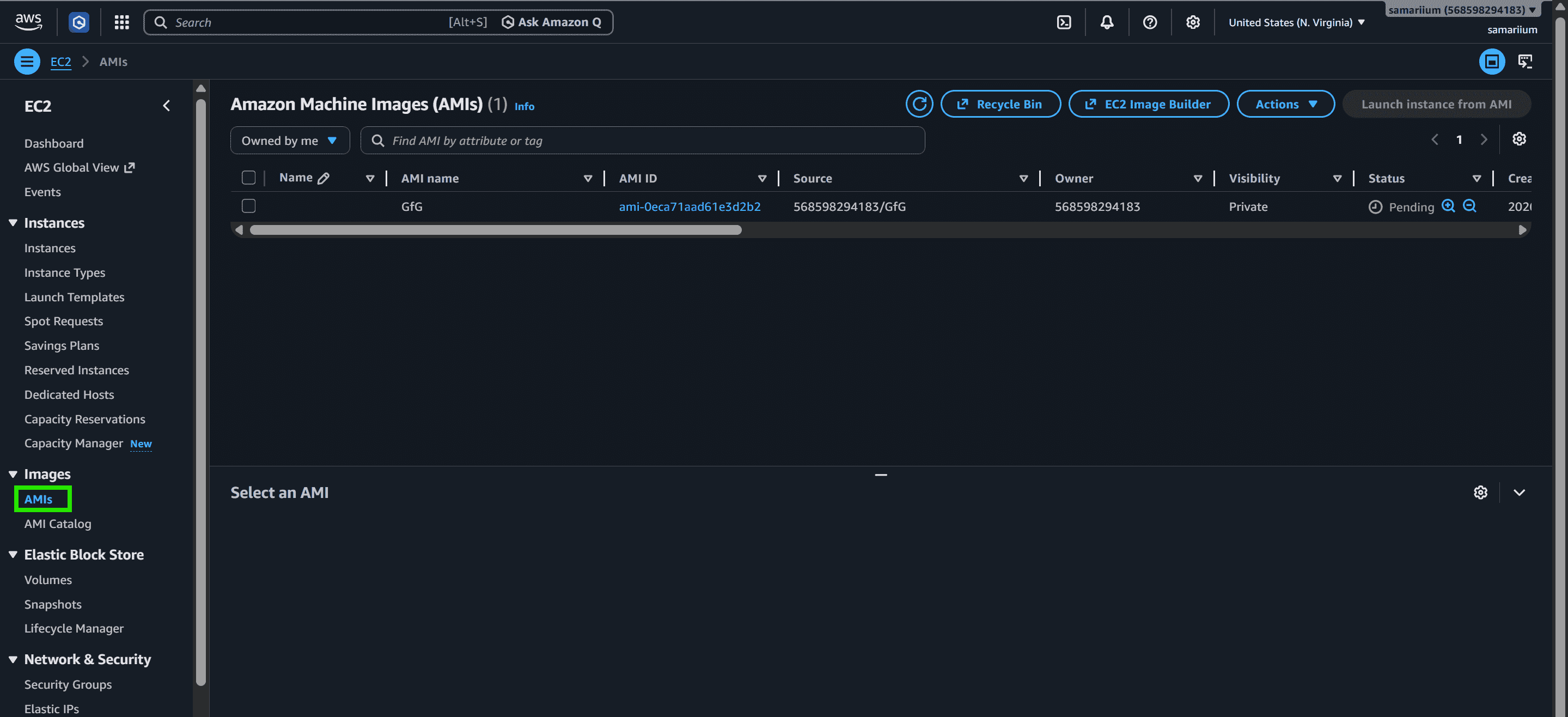
Step 4. Once the status changes to available, your custom AMI is ready to use for launching new instances.
Best Practices
- Do Not Bake Secrets: Never embed AWS access keys or database passwords in an AMI. Use IAM Roles and AWS Secrets Manager instead.
- Automate Builds: Avoid building AMIs manually. Use EC2 Image Builder or HashiCorp Packer to automate patching and image creation pipelines.
- Apply a Lifecycle Policy: Use Amazon Data Lifecycle Manager (DLM) to automatically deregister old AMIs and delete their associated snapshots, reducing unnecessary storage costs.
- Encrypt Your AMIs: Always encrypt AMIs at rest. Encrypted AMIs can be shared with other AWS accounts by granting them permission to the associated KMS key.