
Bootstrap 5 Tooltip is used to show some extra information to the user when the user hovers over the element. The Tooltip hide() method is used to hide a visible tooltip.
Syntax:
bootstrap.Tooltip.getInstance("#tooltip-ID").hide();Parameters: This method accepts a single parameter that holds the tooltip's id.
Return value: It returns to the caller before the hidden.bs.tooltip event of the tooltip triggers.
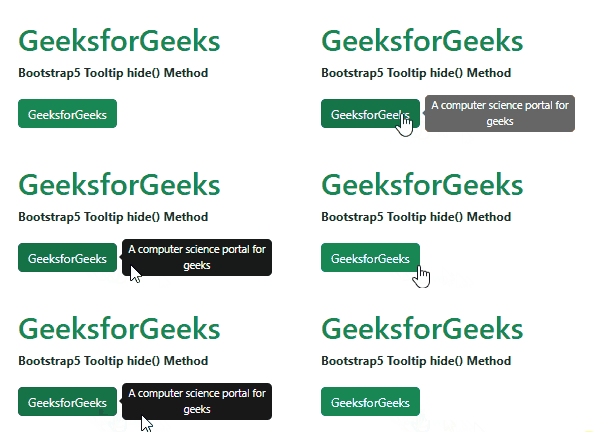
Example 1: In this example, we used the tooltip's hide() method to hide the tooltip 3 seconds after the button is clicked.
<!DOCTYPE html>
<html lang="en">

<head>
    <meta charset="UTF-8">
    <meta http-equiv="X-UA-Compatible" content="IE=edge">
    <meta name="viewport"
          content="width=device-width, initial-scale=1.0">
    <!-- Bootstrap CSS -->
    <link rel="stylesheet"
          href=
"https://cdn.jsdelivr.net/npm/bootstrap@5.2.2/dist/css/bootstrap.min.css" />

    <!-- Bootstrap Javascript -->
    <script src=
"https://cdn.jsdelivr.net/npm/@popperjs/core@2.11.6/dist/umd/popper.min.js">
    </script>
    <script src=
"https://cdn.jsdelivr.net/npm/bootstrap@5.2.2/dist/js/bootstrap.min.js">
    </script>
</head>

<body>
    <div class="container">
        <div class="mt-5">
            <h1 class="text-success">GeeksforGeeks</h1>
            <strong>Bootstrap5 Tooltip hide() Method</strong>
        </div>

        <button type="button" id="gfg"
                class="btn btn-success mt-4"
                data-bs-toggle="tooltip"
                data-bs-placement="right"
                onclick="hideTooltip()"
                data-bs-title="A computer science portal for geeks">
            GeeksforGeeks
        </button>
    </div>

    <script>
        // Enabling all the tooltips on the page.
        const tooltipElements =
                document.querySelectorAll('[data-bs-toggle="tooltip"]');
        const tooltips = [...tooltipElements].map(el => new bootstrap.Tooltip(el));

        // Using hide() method to hide the tooltip
        // 3 seconds after clicking the button
        function hideTooltip()
        {
            setTimeout(() => {
                bootstrap.Tooltip.getInstance('#gfg').hide();
            }, 3000);
        }
    </script>
</body>

</html>
Output:
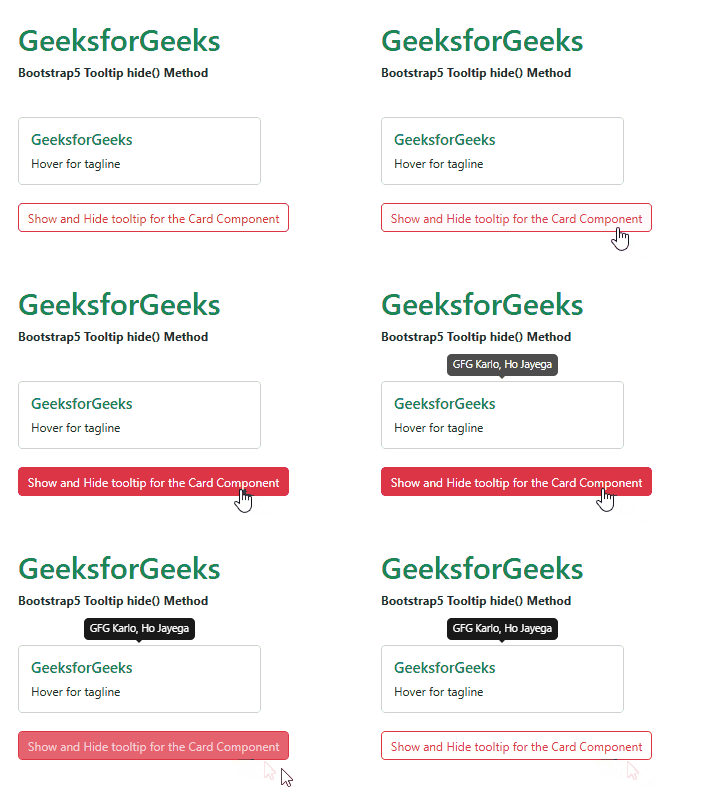
Example 2: In this article, we used a button with the show() and hide() methods of the tooltip to show a tooltip for 5 seconds.
<!DOCTYPE html>
<html lang="en">

<head>
    <meta charset="UTF-8">
    <meta http-equiv="X-UA-Compatible" content="IE=edge">
    <meta name="viewport"
          content="width=device-width, initial-scale=1.0">
    <!-- Bootstrap CSS -->
    <link rel="stylesheet"
          href=
"https://cdn.jsdelivr.net/npm/bootstrap@5.2.2/dist/css/bootstrap.min.css" />

    <!-- Bootstrap Javascript -->
    <script src=
"https://cdn.jsdelivr.net/npm/@popperjs/core@2.11.6/dist/umd/popper.min.js">
    </script>
    <script src=
"https://cdn.jsdelivr.net/npm/bootstrap@5.2.2/dist/js/bootstrap.min.js">
    </script>
</head>

<body>
    <div class="container">
        <div class="mt-5">
            <h1 class="text-success">GeeksforGeeks</h1>
            <strong>Bootstrap5 Tooltip hide() Method</strong>
        </div>

        <div id="gfg" class="card w-25 mt-5"
             data-bs-toggle="tooltip"
             data-bs-title="GFG Karlo, Ho Jayega">

            <div class="card-body">
                <h5 class="card-title text-success">
                    GeeksforGeeks
                </h5>
                <p class="card-text">
                    Hover for tagline
                </p>
            </div>
        </div>

        <button id="trigger" class="btn btn-outline-danger mt-4">
            Show and Hide tooltip for the Card Component
        </button>
    </div>

    <script>
        // Enabling all the tooltips on the page.
        const tooltipElements =
                document.querySelectorAll('[data-bs-toggle="tooltip"]');
        const tooltips =
                [...tooltipElements].map(el => new bootstrap.Tooltip(el));

        document.getElementById("trigger").addEventListener('click', () => {
            bootstrap.Tooltip.getInstance("#gfg").show();
            setTimeout(() => {
                bootstrap.Tooltip.getInstance("#gfg").hide();
            }, 5000);
        });
    </script>
</body>

</html>
Output:
Reference: https://getbootstrap.com/docs/5.0/components/tooltips/#enable