
Bootstrap 5 Toasts Stacking feature is used to wrap multiple toasts in a toast container which will increase the vertical spacing.
Toasts Stacking Classes: No special classes are used in Toasts Stacking, you just need to have knowledge of Bootstrap 5 Toasts.
Syntax:
<div class="toast-container">
     <div class="toast">
           <div class="toast-header">...</div>
          <div class="toast-body">...</div>
     </div>
     ...
</div>
Example 1: The following code demonstrates the Toasts Stacking feature using the Toasts Stacking Bootstrap 5 properties.
<!DOCTYPE html>
<html lang="en">
<head>
    <meta charset="utf-8">
    <meta name="viewport" content=
"width=device-width, initial-scale=1">
    <link href=
"https://cdn.jsdelivr.net/npm/bootstrap@5.0.2/dist/css/bootstrap.min.css"
        rel="stylesheet" integrity=
"sha384-EVSTQN3/azprG1Anm3QDgpJLIm9Nao0Yz1ztcQTwFspd3yD65VohhpuuCOmLASjC"
        crossorigin="anonymous">
    <link rel="stylesheet" href=
"https://maxcdn.bootstrapcdn.com/bootstrap/4.3.1/css/bootstrap.min.css">
    <script src=
"https://ajax.googleapis.com/ajax/libs/jquery/3.4.0/jquery.min.js">
    </script>
    <script src=
"https://maxcdn.bootstrapcdn.com/bootstrap/4.3.1/js/bootstrap.min.js">
    </script>
</head>
<body class="m-2">
    <h1 class="text-success">
        GeeksforGeeks
    </h1>
    <h2> Bootstrap 5 Toasts Stacking </h2>
    <button type="button"
        class="btn btn-primary" id="myBtn">
        Click Here
    </button>
    <div class="toast-container">
        <div class="toast">
            <div class="toast-header">
               Hi, welcome to
            </div>
            <div class="toast-body">
               GeeksforGeeks
            </div>
        </div>
        <div class="toast">
            <div class="toast-header">
               Bootrap 5
            </div>
            <div class="toast-body">
               Toast Stacking
            </div>
        </div>
    </div>
    <script>
         $(document).ready(function () {
             $('#myBtn').click(function () {
                 $('.toast').toast({
                     animation: false,
                     delay: 3000
                 });
                 $('.toast').toast('show');
             });
         });
    </script>
</body>
</html>
Output:

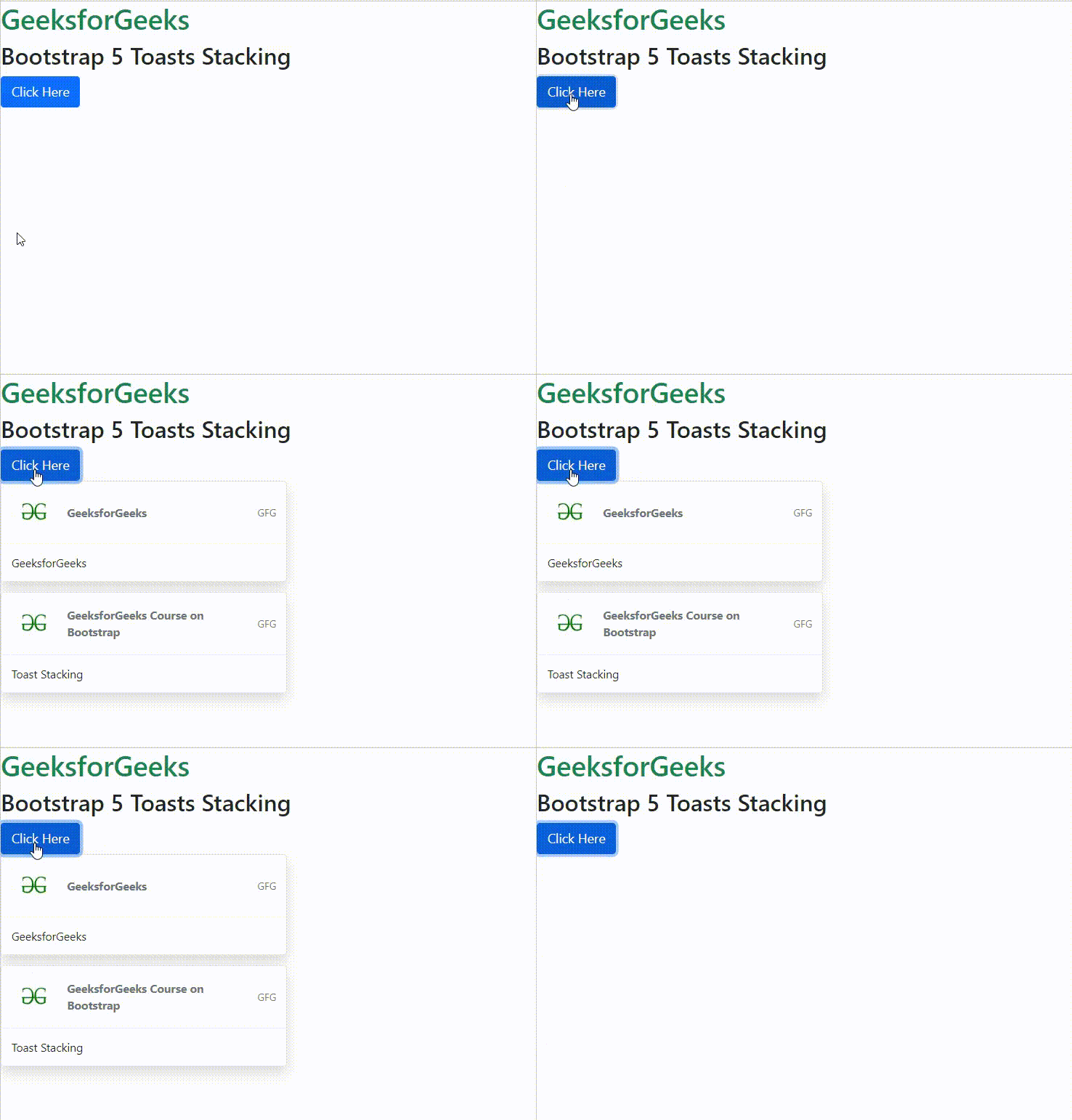
Example 2: The following code demonstrates the Toasts Stacking feature with logo and small text using the Toasts Stacking Bootstrap 5 properties.
<!DOCTYPE html>
<html lang="en">

<head>
    <meta charset="utf-8">
    <meta name="viewport" content=
"width=device-width, initial-scale=1">
    <link href=
"https://cdn.jsdelivr.net/npm/bootstrap@5.0.2/dist/css/bootstrap.min.css"
        rel="stylesheet" integrity=
"sha384-EVSTQN3/azprG1Anm3QDgpJLIm9Nao0Yz1ztcQTwFspd3yD65VohhpuuCOmLASjC"
        crossorigin="anonymous">
    <script src=
"https://ajax.googleapis.com/ajax/libs/jquery/3.4.0/jquery.min.js">
    </script>
    <script src=
"https://maxcdn.bootstrapcdn.com/bootstrap/4.3.1/js/bootstrap.min.js">
    </script>
</head>

<body class="m-2">
    <h1 class="text-success">
        GeeksforGeeks
    </h1>
    <h2> Bootstrap 5 Toasts Stacking </h2>
    <button type="button"
            class="btn btn-primary" id="myBtn">
        Click Here
    </button>
    <div class="toast-container">
        <div class="toast">
            <div class="toast-header">
                <img src=
"https://media.geeksforgeeks.org/wp-content/cdn-uploads/20200617163105/gfg-logo.png"
                    class="rounded me-2" alt="LOGO"
                    style="width:60px;">
                <strong class="me-auto">
                    GeeksforGeeks
                </strong>
                <small class="text-muted">
                    GFG
                </small>
            </div>
            <div class="toast-body">
                GeeksforGeeks
            </div>
        </div>
        <div class="toast">
            <div class="toast-header">
                <img src=
"https://media.geeksforgeeks.org/wp-content/cdn-uploads/20200617163105/gfg-logo.png"
                    class="rounded me-2"
                    alt="LOGO" style="width:60px;">
                <strong class="me-auto">
                    GeeksforGeeks Course on Bootstrap
                </strong>
                <small class="text-muted">GFG</small>
            </div>
            <div class="toast-body">
                Toast Stacking
            </div>
        </div>
    </div>
    <script>
        $(document).ready(function () {
            $('#myBtn').click(function () {
                $('.toast').toast({
                    animation: false,
                    delay: 3000
                });
                $('.toast').toast('show');
            });
        });
    </script>
</body>
</html>
Output:
Reference: https://getbootstrap.com/docs/5.1/components/toasts/#stacking