
Dropdowns are toggleable, contextual overlays for displaying lists of links and more. The .dropdown class is used to design the drop-down menu.
Using Bootstrap 5 dropdown menu alignment classes dropdown menu can be aligned in any direction like the end, start, drop start,dropUp, etc
- Dropdown Menu Alignment option: The dropdown menu is positioned 100% from the top and along the left side of its parent, by default. We can change its alignment to right, by adding a dropdown-menu-end class.
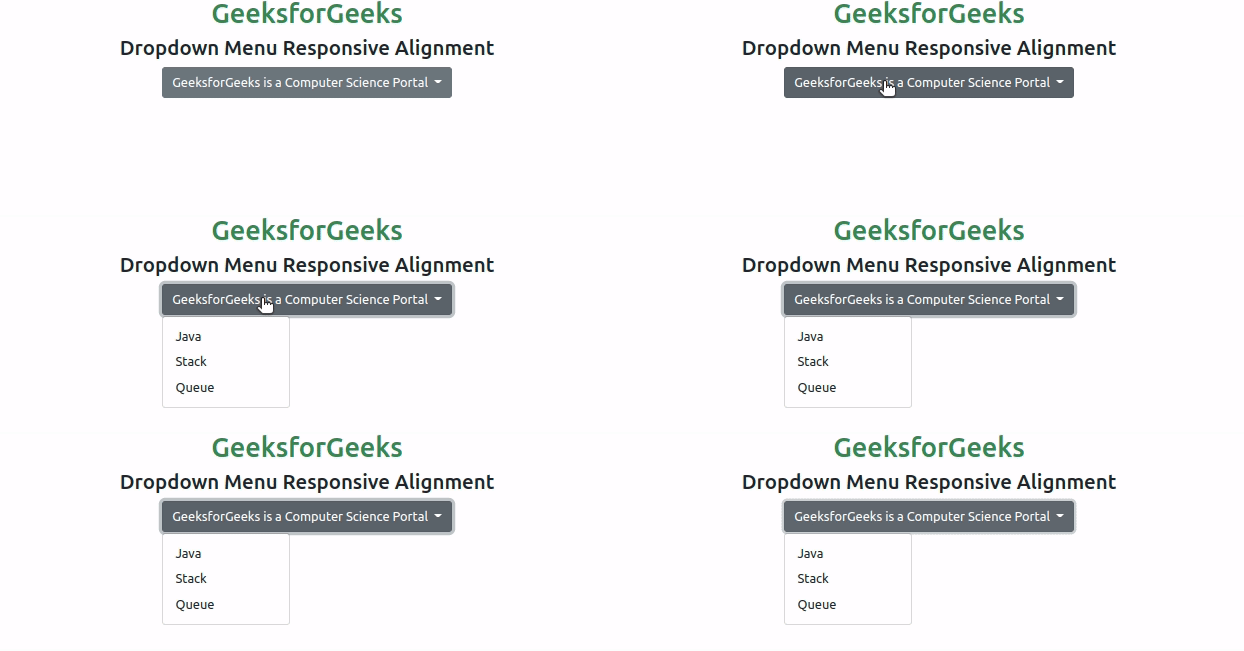
- Dropdown Menu Responsive Alignment: To utilize responsive alignment, we need to disable dynamic positioning by adding the data-bs display="static" attribute. Moreover, we need to add breakpoint-specific alignment class
Below examples illustrate the Bootstrap 5 Dropdowns Menu alignment:
Example 1: In this example, we will learn about Dropdown Menu Alignment options
<!DOCTYPE html>
<html>

<head>
    <link href=
"https://cdn.jsdelivr.net/npm/bootstrap@5.0.2/dist/css/bootstrap.min.css"
            rel="stylesheet"
            integrity=
"sha384-EVSTQN3/azprG1Anm3QDgpJLIm9Nao0Yz1ztcQTwFspd3yD65VohhpuuCOmLASjC"
            crossorigin="anonymous">
    <script src=
"https://cdn.jsdelivr.net/npm/bootstrap@5.0.2/dist/js/bootstrap.bundle.min.js"
            integrity=
"sha384-MrcW6ZMFYlzcLA8Nl+NtUVF0sA7MsXsP1UyJoMp4YLEuNSfAP+JcXn/tWtIaxVXM"
            crossorigin="anonymous">
    </script>
</head>

<body>
    <div class="text-center">
        <h1 class="text-success">
            GeeksforGeeks
        </h1>
        <h3>Dropdown Menu Alignment Options</h3>
    </div>
    <div class="btn-group ">
        <button type="button"
                class="btn-success dropdown-toggle dropdown-toggle-split"
                data-bs-toggle="dropdown">
            Select Course from GeeksforGeeks </button>
        <div class="dropdown-menu dropdown-menu-end ">
            <a class="dropdown-item" href="#">
                C Programming
            </a>
            <a class="dropdown-item" href="#">
                C++ Programming
            </a>
            <a class="dropdown-item" href="#">
                Java Programming
            </a>
        </div>
    </div>
    </div>
</body>

</html>
Output

Example 2: In this example, we will learn about Dropdown Menu Responsive Alignment.
<!DOCTYPE html>
<html>

<head>
    <link href=
"https://cdn.jsdelivr.net/npm/bootstrap@5.0.2/dist/css/bootstrap.min.css"
            rel="stylesheet"
            integrity=
"sha384-EVSTQN3/azprG1Anm3QDgpJLIm9Nao0Yz1ztcQTwFspd3yD65VohhpuuCOmLASjC"
            crossorigin="anonymous">
    <script src=
"https://cdn.jsdelivr.net/npm/bootstrap@5.0.2/dist/js/bootstrap.bundle.min.js"
            integrity=
"sha384-MrcW6ZMFYlzcLA8Nl+NtUVF0sA7MsXsP1UyJoMp4YLEuNSfAP+JcXn/tWtIaxVXM"
            crossorigin="anonymous">
    </script>
</head>

<body>
    <div class="text-center">
        <h1 class="text-success">
            GeeksforGeeks
        </h1>
        <h3>Dropdown Menu Responsive Alignment</h3>
        <div class="btn-group">
            <button type="button"
                    class="btn btn-secondary dropdown-toggle"
                    data-bs-toggle="dropdown"
                    data-bs-display="static">
                GeeksforGeeks is a Computer Science Portal
            </button>
            <ul class="dropdown-menu dropdown-menu-lg-end">
                <li><button class="dropdown-item"
                            type="button">
                    Java
                    </button>
                </li>
                <li><button class="dropdown-item"
                            type="button">
                    Stack
                    </button>
                </li>
                <li><button class="dropdown-item"
                            type="button">
                    Queue
                    </button>
                </li>
            </ul>
        </div>
    </div>
</body>

</html>
Output
References: https://getbootstrap.com/docs/5.0/components/dropdowns/#menu-alignment