
In this article, we will learn about the Bootstrap 5 Dropdowns events fired when interacting with the Bootstrap 5 dropdown. For example, these events are fired when an off-canvas element is toggled to be visible or hidden.
Bootstrap 5 dropdowns are dropdown overlay menus that can be used to display a list of items or content when triggered with a target element, which is often a button.
Bootstrap 5 Dropdowns events:
- show.bs.dropdown: It is fired when the show instance method of the dropdown is called.
- shown.bs.dropdown: It is fired when the dropdown is completely visible to the user after all the CSS transitions are done.
- hide.bs.dropdown: It is fired when the hide instance method of the dropdown is called.
- hidden.bs.dropdown: It is fired when the dropdown is completely hidden from the user after all the CSS transitions are done.
Syntax:
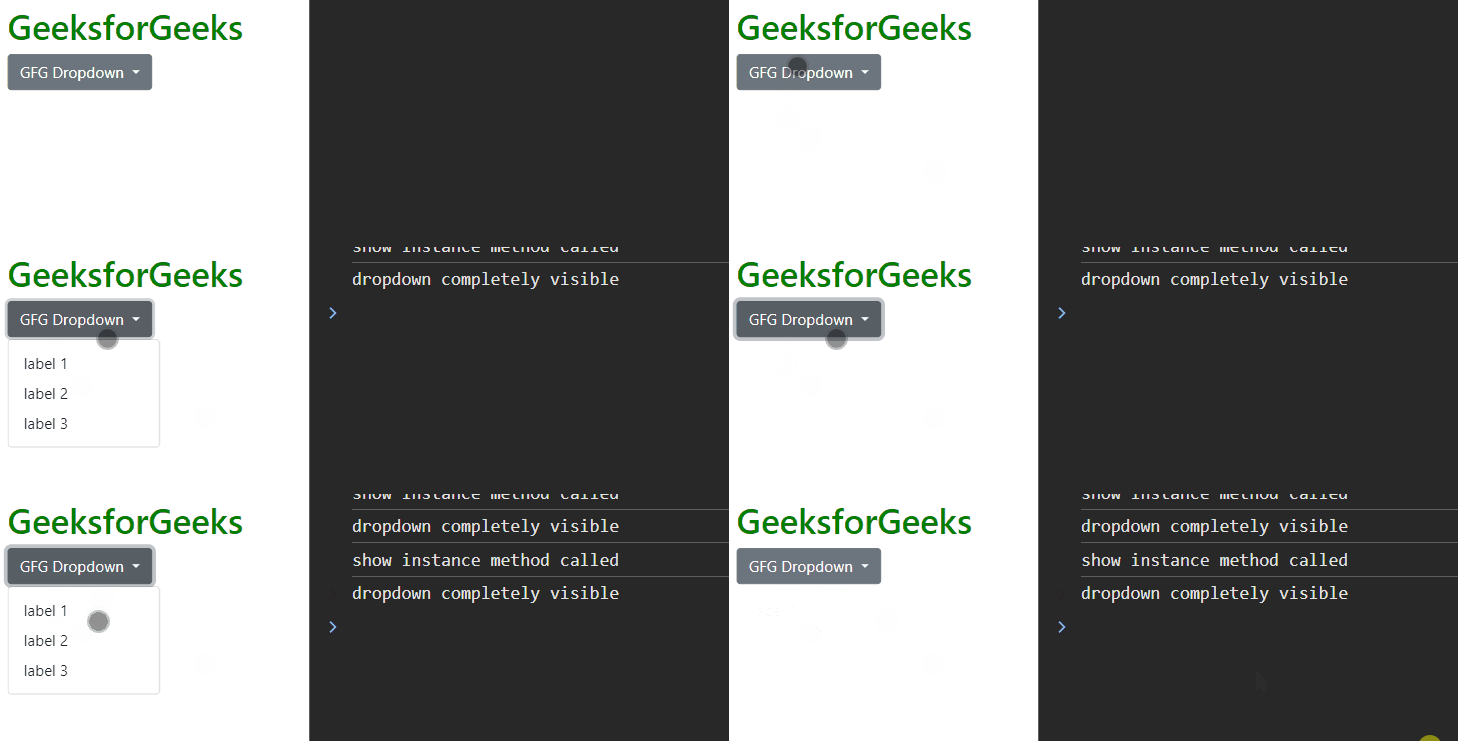
dropdownsEl.addEventListener(dropdowns_event, callbackFunction);Example 1: In this example, we will listen for the dropdown events that get fired when the dropdown is toggled to be visible.
<!DOCTYPE html>
<html lang="en">

<head>
    <link href=
"https://cdn.jsdelivr.net/npm/bootstrap@5.0.2/dist/css/bootstrap.min.css"
        rel="stylesheet" integrity=
"sha384-EVSTQN3/azprG1Anm3QDgpJLIm9Nao0Yz1ztcQTwFspd3yD65VohhpuuCOmLASjC"
        crossorigin="anonymous">
    <script src=
"https://cdn.jsdelivr.net/npm/bootstrap@5.0.2/dist/js/bootstrap.bundle.min.js"
            integrity=
"sha384-MrcW6ZMFYlzcLA8Nl+NtUVF0sA7MsXsP1UyJoMp4YLEuNSfAP+JcXn/tWtIaxVXM"
            crossorigin="anonymous">
    </script>
</head>

<body class="m-2">
    <h1 style="color:green">GeeksforGeeks</h1>
    <div class="dropdown">
        <button class="btn btn-secondary dropdown-toggle"
                id="dropdown" type="button"
                id="dropdownMenuButton1"
                data-bs-toggle="dropdown"
                aria-expanded="false">
            GFG Dropdown
        </button>
        <ul class="dropdown-menu"
            aria-labelledby="dropdownMenuButton1">
            <li><a class="dropdown-item" href="#">
                label 1
                </a>
            </li>
            <li><a class="dropdown-item" href="#">
                label 2
                </a>
            </li>
            <li><a class="dropdown-item" href="#">
                label 3
                </a>
            </li>
        </ul>
    </div>

    <script>
        const btn = document.getElementById('btn')
        const dropdownPr = document.getElementsByClassName('dropdown')[0]

        dropdownPr.addEventListener('show.bs.dropdown', () => {
            console.log('show instance method called');
        })

        dropdownPr.addEventListener('shown.bs.dropdown', () => {
            console.log('dropdown completely visible');
        })
    </script>
</body>

</html>
Output:
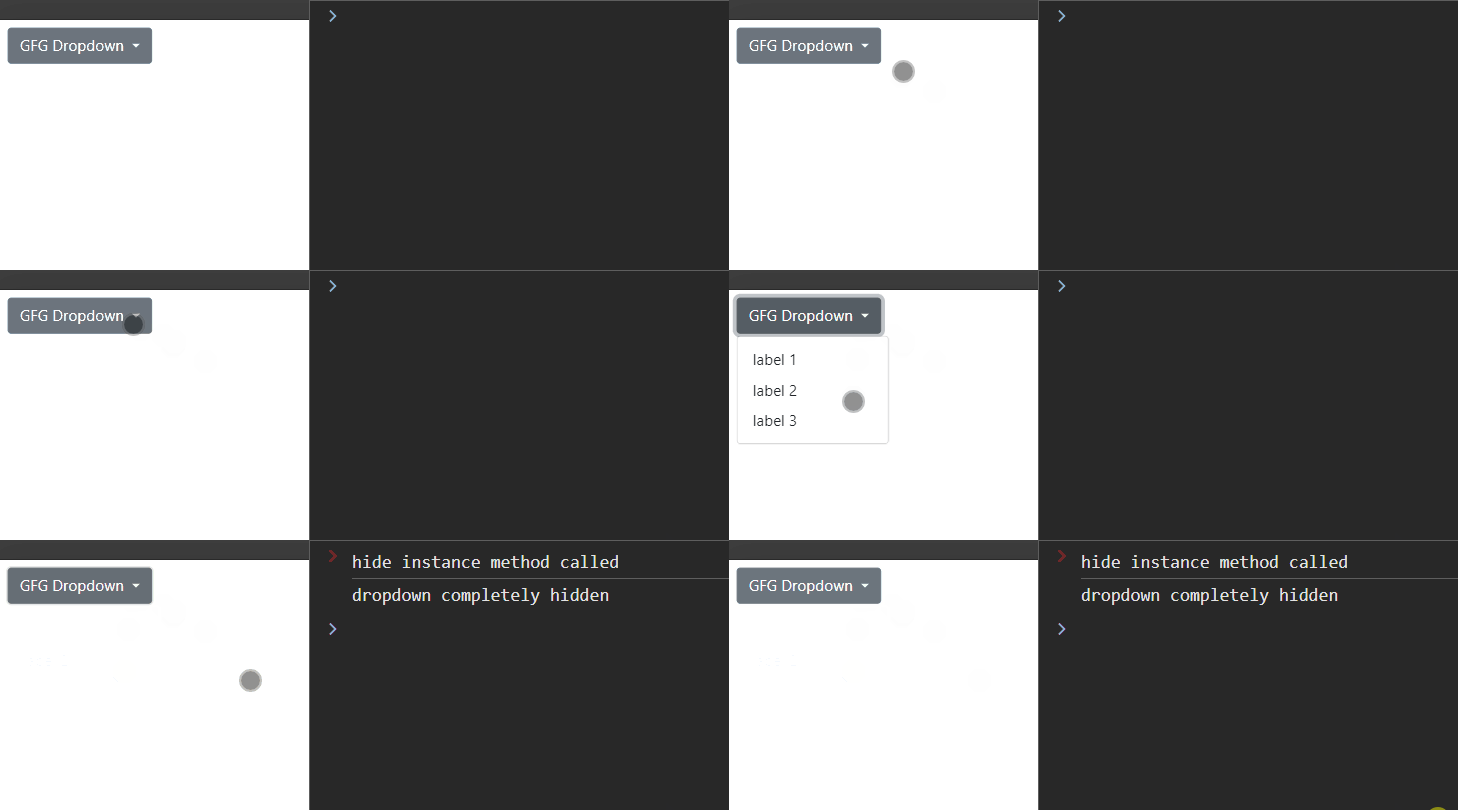
Example 2: In this example, we will listen for the dropdown events that get fired when the dropdown is toggled to be hidden.
<!DOCTYPE html>
<html lang="en">

<head>
    <link href=
"https://cdn.jsdelivr.net/npm/bootstrap@5.0.2/dist/css/bootstrap.min.css"
        rel="stylesheet" integrity=
"sha384-EVSTQN3/azprG1Anm3QDgpJLIm9Nao0Yz1ztcQTwFspd3yD65VohhpuuCOmLASjC"
        crossorigin="anonymous">
    <script src=
"https://cdn.jsdelivr.net/npm/bootstrap@5.0.2/dist/js/bootstrap.bundle.min.js"
        integrity=
"sha384-MrcW6ZMFYlzcLA8Nl+NtUVF0sA7MsXsP1UyJoMp4YLEuNSfAP+JcXn/tWtIaxVXM"
        crossorigin="anonymous">
    </script>
</head>

<body class="m-2">
    <div class="dropdown">
        <button class="btn btn-secondary dropdown-toggle"
                id="dropdown" type="button"
                id="dropdownMenuButton1"
                data-bs-toggle="dropdown"
                aria-expanded="false">
            GFG Dropdown
        </button>
        <ul class="dropdown-menu"
            aria-labelledby="dropdownMenuButton1">
            <li>
                <a class="dropdown-item" href="#">
                    label 1
                </a>
            </li>
            <li>
                <a class="dropdown-item" href="#">
                    label 2
                </a>
            </li>
            <li>
                <a class="dropdown-item" href="#">
                    label 3
                </a>
            </li>
        </ul>
    </div>

    <script>
        const btn = document.getElementById('btn')
        const dropdownPr = document.getElementsByClassName('dropdown')[0]

        dropdownPr.addEventListener('hide.bs.dropdown', () => {
            console.log('hide instance method called');
        })

        dropdownPr.addEventListener('hidden.bs.dropdown', () => {
            console.log('dropdown completely hidden');
        })
    </script>
</body>

</html>
Output:
Reference: https://getbootstrap.com/docs/5.0/components/dropdowns/#events