
Bootstrap 5 Alerts SASS can be used to change the default values provided for the alert by customizing the SCSS file.
SASS variables of Alerts:
- $alert-padding-y: This variable provides the top and bottom padding of the alert. By default, it is 1rem.
- $alert-padding-x: This variable provides the left and right padding of the alert. By default, it is 1rem.
- $alert-margin-bottom: This variable provides the bottom margin of the alert. By default, it is 1rem.
- $alert-border-radius: This variable provides the border radius of the alert. By default, it is 0.375rem.
- $alert-link-font-weight: This variable provides the font weight of the alert link. By default, it is 700.
- $alert-border-width: This variable provides the border width of the alert. By default, it is 1px.
- $alert-bg-scale: This variable provides the contrast of the background color of the alert. By default, it is -80%
- $alert-border-scale: This variable provides the contrast of the border of the alert. By default, it is -70%
- $alert-color-scale: This variable provides the contrast of the text color in the alert. By default, it is 40%.
- $alert-dismissible-padding-r: This variable provides the right padding of the alert which can be dismissed. By default, it is 3rem
SASS Variant Mixin of Alerts:
- alert-variant: This mixin 'alert-variant' of alert is used in combination with the $theme-colors variable to create contextual modifier classes for alerts.
SASS Loop of Alerts:
- @each: @each loop of alerts is used along with the variant mixin 'alert-variant' to generate contextual modifier classes for modifying the alert background color, border color, and alert text color of the alerts.
Steps to override SCSS of BootStrap:
Step 1: Install bootstrap using the following command:
npm i bootstrap
Step 2: Create your custom CSS file and write the variable you want to override. Then include the bootstrap SCSS file using import.
$class_to_override: values;
@import "node_modules/bootstrap/scss/bootstrap"
Step 3: Convert the file to CSS using a live server extension.
Step 4: Include the converted SCSS file to your HTML after the link tag of Bootstrap CSS
Project Structure: The custom SCSS file name is “custom.scss” and "custom.css" is the converted file

Syntax:
$variable:value;

@import "./node_modules/bootstrap/scss/bootstrap"
Example 1: In this example, making use of some of the above variables is shown.
<!DOCTYPE html>
<html lang="en">
<head>
    <meta charset="UTF-8">
    <meta name="viewport" content=
"width=device-width, initial-scale=1.0">
    <title>Bootstrap 5 Alerts SASS</title>
    <link href=
"https://cdn.jsdelivr.net/npm/bootstrap@5.2.3/dist/css/bootstrap.min.css"
         rel="stylesheet">

   <script src=
"https://cdn.jsdelivr.net/npm/bootstrap@5.0.2/dist/js/bootstrap.bundle.min.js"
        integrity=
"sha384-MrcW6ZMFYlzcLA8Nl+NtUVF0sA7MsXsP1UyJoMp4YLEuNSfAP+JcXn/tWtIaxVXM"
        crossorigin="anonymous">
    </script>
</head>

<body class="text-center">
    <h1 class="text-success">GeeksforGeeks</h1>
    <div class="container" style="width: 500px;">
        <div class="alert alert-success">
            Welcome to GeeksforGeeks
        </div>
        <div class="alert alert-success">
            <h3>Welcome to GeeksforGeeks</h3>
        </div>
        <div class="alert alert-success">
            Welcome to <a href="#" class="alert-link">
                GeeksforGeeks</a>
        </div>
    </div>
</body>
</html>
custom.scss
$alert-padding-y:2rem;
$alert-link-font-weight:900;
$alert-color-scale:-70%;
@import "./node_modules/bootstrap/scss/bootstrap"
custom.css
.alert {
    --bs-alert-bg: transparent;
    --bs-alert-padding-x: 1rem;
    --bs-alert-padding-y: 2rem;
    --bs-alert-margin-bottom: 1rem;
    --bs-alert-color: inherit;
    --bs-alert-border-color: transparent;
    --bs-alert-border: 1px solid
        var(--bs-alert-border-color);
    --bs-alert-border-radius: 0.375rem;
    position: relative;
    padding: var(--bs-alert-padding-y)
        var(--bs-alert-padding-x);
    margin-bottom: var(--bs-alert-margin-bottom);
    color: var(--bs-alert-color);
    background-color: var(--bs-alert-bg);
    border: var(--bs-alert-border);
    border-radius: var(--bs-alert-border-radius);
}

.alert-link {
    font-weight: 900;
}

.alert-success {
    --bs-alert-color: #0d442a;
    --bs-alert-bg: #d1e7dd;
    --bs-alert-border-color: #badbcc;
}
Output:

Example 2: In this example, the following code demonstrates the use of some of the above variables
<!DOCTYPE html>
<html lang="en">
<head>
    <meta charset="UTF-8">
    <meta name="viewport" content=
"width=device-width, initial-scale=1.0">
    <title>Bootstrap 5 Alerts SASS</title>
    <link href=
"https://cdn.jsdelivr.net/npm/bootstrap@5.2.3/dist/css/bootstrap.min.css"
    rel="stylesheet">
    <link rel="stylesheet" href="./custom.css">
    <script src=
"https://cdn.jsdelivr.net/npm/bootstrap@5.0.2/dist/js/bootstrap.bundle.min.js"
        integrity=
"sha384-MrcW6ZMFYlzcLA8Nl+NtUVF0sA7MsXsP1UyJoMp4YLEuNSfAP+JcXn/tWtIaxVXM"
        crossorigin="anonymous">
    </script>
</head>
<body class="text-center">
    <h1 class="text-success">GeeksforGeeks</h1>
    <div class="container" style="width: 500px;">
        <div class="alert alert-success">
            Welcome to GeeksforGeeks
        </div>
        <div class="alert alert-success">
            <h3>Welcome to GeeksforGeeks</h3>
        </div>
        <div class="alert alert-success">
            Welcome to <a href="#" class="alert-link">
            GeeksforGeeks</a>
        </div>
    </div>
</body>
</html>
custom.scss
$alert-bg-scale:30%;
$alert-border-radius:2rem;
@import "./node_modules/bootstrap/scss/bootstrap"
custom.css
.alert {
    --bs-alert-bg: transparent;
    --bs-alert-padding-x: 1rem;
    --bs-alert-padding-y: 1rem;
    --bs-alert-margin-bottom: 1rem;
    --bs-alert-color: inherit;
    --bs-alert-border-color: transparent;
    --bs-alert-border: 1px solid
        var(--bs-alert-border-color);
    --bs-alert-border-radius: 2rem;
    position: relative;
    padding: var(--bs-alert-padding-y)
        var(--bs-alert-padding-x);
    margin-bottom: var(--bs-alert-margin-bottom);
    color: var(--bs-alert-color);
    background-color: var(--bs-alert-bg);
    border: var(--bs-alert-border);
    border-radius: var(--bs-alert-border-radius);
}

.alert-success {
    --bs-alert-color: #a3cfbb;
    --bs-alert-bg: #125f3b;
    --bs-alert-border-color: #badbcc;
}

.alert-success .alert-link {
    color: #82a696;
}
Output:

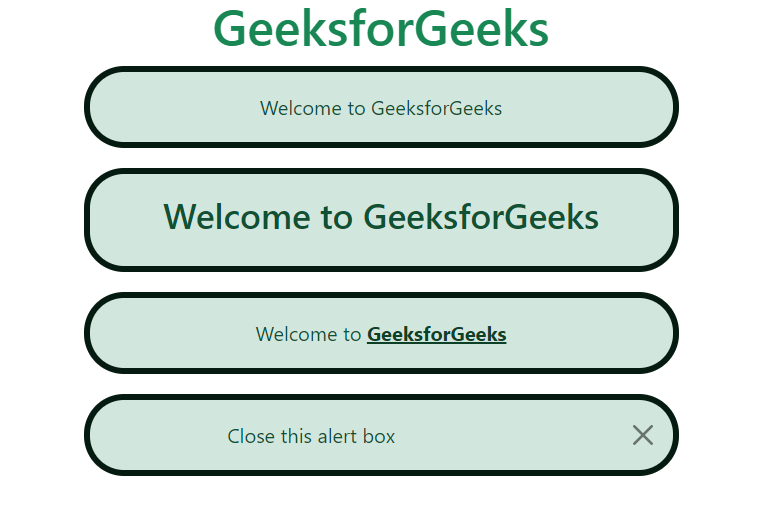
Example 3: In this example, the following code demonstrates making use of some of the above variables.
<!DOCTYPE html>
<html lang="en">
<head>
    <meta charset="UTF-8">
    <meta name="viewport" content=
"width=device-width, initial-scale=1.0">
    <title>Bootstrap 5 Alerts SASS</title>
    <link href=
"https://cdn.jsdelivr.net/npm/bootstrap@5.2.3/dist/css/bootstrap.min.css"
    rel="stylesheet">
    <link rel="stylesheet" href="custom.css">
    <script src=
"https://cdn.jsdelivr.net/npm/bootstrap@5.0.2/dist/js/bootstrap.bundle.min.js"
        integrity=
"sha384-MrcW6ZMFYlzcLA8Nl+NtUVF0sA7MsXsP1UyJoMp4YLEuNSfAP+JcXn/tWtIaxVXM"
        crossorigin="anonymous">
    </script>

</head>
<body class="text-center">
    <h1 class="text-success">GeeksforGeeks</h1>
    <div class="container" style="width: 500px;">
        <div class="alert alert-success">
            Welcome to GeeksforGeeks
        </div>
        <div class="alert alert-success">
            <h3>Welcome to GeeksforGeeks</h3>
        </div>
        <div class="alert alert-success">
            Welcome to <a href="#" class="alert-link">
              GeeksforGeeks</a>
        </div>
        <div class="alert alert-success alert-dismissible">
            <button type="button" class="btn-close"
            data-bs-dismiss="alert"></button>
            Close this alert box
        </div>
    </div>
</body>
</html>
custom.scss
$alert-border-scale:80%;
$alert-border-radius:2rem;
$alert-border-width:5px;
$alert-dismissible-padding-r:8rem;
@import "./node_modules/bootstrap/scss/bootstrap"
custom.css
.alert {
    --bs-alert-bg: transparent;
    --bs-alert-padding-x: 1rem;
    --bs-alert-padding-y: 1rem;
    --bs-alert-margin-bottom: 1rem;
    --bs-alert-color: inherit;
    --bs-alert-border-color: transparent;
    --bs-alert-border: 5px solid
        var(--bs-alert-border-color);
    --bs-alert-border-radius: 2rem;
    position: relative;
    padding: var(--bs-alert-padding-y)
        var(--bs-alert-padding-x);
    margin-bottom: var(--bs-alert-margin-bottom);
    color: var(--bs-alert-color);
    background-color: var(--bs-alert-bg);
    border: var(--bs-alert-border);
    border-radius: var(--bs-alert-border-radius);
}

.alert-dismissible {
    padding-right: 8rem;
}

.alert-dismissible .btn-close {
    position: absolute;
    top: 0;
    right: 0;
    z-index: 2;
    padding: 1.25rem 1rem;
}

.alert-success {
    --bs-alert-color: #0f5132;
    --bs-alert-bg: #d1e7dd;
    --bs-alert-border-color: #051b11;
}
Output:
Reference: https://getbootstrap.com/docs/5.0/components/alerts/#sass