
Secure coding is the practice of designing and developing software that is secure by default where security is built into every layer, not added as an afterthought.
The goal is resilience:
- Reducing the likelihood that vulnerabilities become exploitable and minimizing impact if they do.
- Secure coding combines adversarial thinking (anticipating attacker behavior) with repeatable engineering practices to create robust systems.
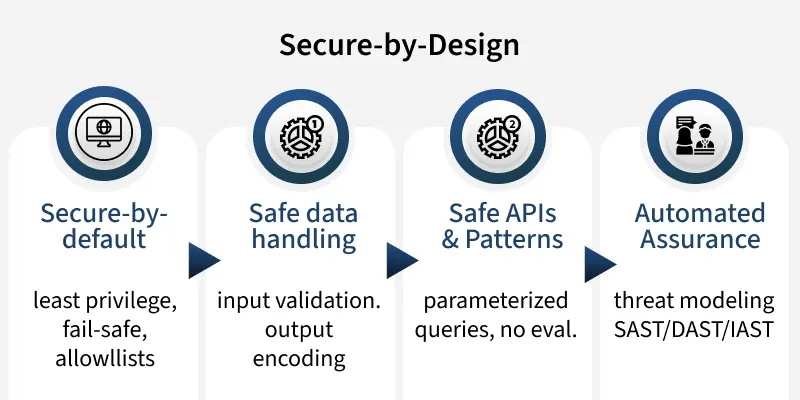
Importance of Secure Coding
Modern applications constantly interact with untrusted input, user data, APIs, third-party services. If this input is handled unsafely, it can lead to:
- Data breaches and sensitive information leaks
- Remote code execution
- Unauthorized system access
- Full application compromise
Example: Unsafe interpolation of user input into queries or commands can allow attackers to inject malicious code. Secure coding prevents this by validating, constraining and safely handling all inputs.
A (bad) Python snippet:
# BAD: Evaluates arbitrary input

secret = "MY PASSWORD"
user_value = input("Please enter number of geeks: ")
print(eval(user_value))  # attacker can type 'secret' or 'dir()'
Safer versions parse and constrain input:
# GOOD: Parse and validate, no code execution
raw = input("Please enter number of geeks: ")
try:
    n = int(raw)                      # strict type
    assert 0 <= n <= 10000            # bounds check
    print(f"There are {n} geeks here, chanting Geeks rock!")
except (ValueError, AssertionError):
    print("Invalid input.")
Core Principles of Secure Coding
These principles should act as a pre-merge checklist for every code change:
1. Secure Defaults
- Deny access by default
- Use explicit allowlists for inputs, hosts and permissions
2. Least Privilege
- Grant only the minimum required access
- Limit permissions for users, services, tokens and infrastructure
3. Validate Input, Encode Output
- Never trust external input
- Validat against strict rules (type, format, range)
- Normaliz into a consistent structure
- Encod correctly for its output context (HTML, SQL, OS, JSON etc.)
4. Prefer Safe APIs
- Use frameworks and APIs that eliminate unsafe patterns
- Use parameterized queries instead of string concatenation
- Avoid unsafe DOM manipulation (prefer textContent over innerHTML)
- Use templating engines with auto-escaping
5. No Secrets in Code
- Store credentials in secure systems (Vault, KMS, environment variables)
- Rotate and scope keys regularly
6. Dependency Security
- Pin versions and track dependencies
- Scan for known vulnerabilities (CVEs)
- Verify package integrity
7. Automate Security Checks
- Integrate SAST, SCA, DAST and secrets scanning into CI/CD pipelines
8. Defense-in-Depth
- Use layered protections (e.g., validation + CSP for XSS)
9. Fail Safely
- Return generic errors
- Avoid exposing system details
- Default to safe states during failures
10. Secure Logging
- Avoid logging secrets or sensitive data
- Include request/correlation IDs for traceability
Secure Coding for Web Applications
Web applications are a primary target for attackers. A secure approach must address frontend, backend and infrastructure layers.
1. Cross-Site Scripting (XSS) & Clickjacking
XSS (Cross-Site Scripting) allows attackers to inject and execute malicious JavaScript in a user’s browser, potentially compromising user sessions and sensitive data. Clickjacking tricks users into clicking hidden or disguised elements, often by layering a transparent iframe over legitimate UI components.
- Session hijacking
- Data theft
- User impersonation
- Hidden UI interaction via iframe overlays
Prevention in Django:
Auto-Escaping (Default Protection): Django templates escape content by default:
{{ comment }}   # Safe
{{ comment|safe }}  # Dangerous (avoid unless sanitized)
Security Settings:
SECURE_SSL_REDIRECT = True
SECURE_HSTS_SECONDS = 31536000
SECURE_HSTS_INCLUDE_SUBDOMAINS = True
SECURE_HSTS_PRELOAD = True

SESSION_COOKIE_SECURE = True
SESSION_COOKIE_SAMESITE = 'Lax'
CSRF_COOKIE_SECURE = True

X_FRAME_OPTIONS = "DENY"
SECURE_CONTENT_TYPE_NOSNIFF = True
SECURE_REFERRER_POLICY = "no-referrer"
If you need to set per-response headers:
from django.http import HttpResponse

def page(request):
    resp = HttpResponse("...")
    # Clickjacking: deny framing; CSP is the modern control
    resp["X-Frame-Options"] = "DENY"
    resp["Content-Security-Policy"] = "default-src 'self'; frame-ancestors 'none';"
    resp["X-Content-Type-Options"] = "nosniff"
    return resp
Frontend Security Practices:
Frontend security focuses on safe DOM handling and avoiding unsafe JavaScript execution.
- Use textContent instead of innerHTML
- Avoid inline JavaScript
- Sanitize all user-generated content before rendering
Content Security Policy (CSP):
CSP restricts what the browser is allowed to load and execute, reducing injection risks.
default-src 'self';
script-src 'self';
object-src 'none';
base-uri 'self';
frame-ancestors 'none';
- Avoid unsafe-inline
- Use nonces or hashes
- Deploy in report-only mode before enforcing
2. Injection Attacks & Data Safety
Injection vulnerabilities occur when untrusted input is interpreted as code or commands. The goal is to ensure all external input is safely handled and never directly executed.
SQL Injection Prevention:
Always use parameterized queries so user input is treated as data, not executable SQL. Modern ORMs like Django ORM and SQLAlchemy handle this by default.
- Use parameterized queries instead of string concatenation
- Avoid raw SQL where possible
cursor.execute("SELECT * FROM users WHERE id = %s", (user_id,))NoSQL Injection:
NoSQL databases can also be manipulated through unsafe inputs.
- Enforce strict schemas
- Allowlist accepted fields
- Block operator injection (e.g., $where in MongoDB)
Command Injection: Never build shell commands using raw user input.
- Avoid shell interpolation
- Use argument-based execution (subprocess.run)
# Unsafe
os.system(f"convert {user_path} out.png")

# Safe
subprocess.run(["convert", user_path, "out.png"], check=True)
Deserialization Risks: Unsafe deserialization can lead to remote code execution.
- Never use pickle.loads() on untrusted data
- Use yaml.safe_load() instead of yaml.load()
- Prefer JSON with schema validation (Pydantic, jsonschema)
3. Authentication, Authorization & Sessions
This layer ensures that only verified users can access resources and that their permissions are strictly enforced across sessions and requests.
Authentication: Confirms user identity and protects login mechanisms.
- Use MFA (TOTP or WebAuthn) for sensitive actions
- Store passwords using Argon2, bcrypt or scrypt
Session Security:
- Secure, HttpOnly, SameSite cookies
- Rotate session IDs after login or privilege changes
JWT Best Practices:
- Keep tokens short-lived
- Store in HttpOnly cookies (not localStorage)
- Implement rotation and revocation
- Avoid storing sensitive data inside tokens
Authorization:
- Enforce server-side checks for every request
- Use RBAC or ABAC models
- Never rely on frontend-only restrictions
4. CSRF, CORS and Caching
CSRF:
- Use your framework’s CSRF middleware and per-form tokens.
- Avoid cross-site credentialed requests unless required.
- For APIs, consider SameSite cookies + double-submit or Origin checks.
CORS (cross-origin resource sharing):
- Allowlist specific origins; avoid * with credentials.
- Understand preflight: set only the headers you need (e.g., Access-Control-Allow-Headers, -Methods, -Credentials).
- Prefer server-side authorization over broad CORS relaxations.
Caching:
For sensitive Data:
Cache-Control: no-store, max-age=0
Pragma: no-cache
Expires: 0
- Use Vary: Authorization when responses differ per user
- Cache only safe, public assets
5. Hardening a Node/Express API
A production-grade API must defend against common web threats such as injection, abuse and misconfiguration while maintaining performance and reliability.
Key risks include:
- XSS and injection attacks
- Clickjacking
- CSRF (with cookies)
- Brute-force attacks
- Parameter pollution
- DoS attacks
Best Practices:
- Use secure headers (Helmet middleware)
- Validate and sanitize all inputs
- Implement rate limiting
- Use strong authentication controls
- Apply request timeouts
- Log securely and consistently
For session-based authentication:
- Use secure cookies
- Store sessions in Redis or another persistent store
- Enable CSRF protection
// server.js
import express from "express";
import helmet from "helmet";
import rateLimit from "express-rate-limit";
import cors from "cors";
import hpp from "hpp";
import mongoSanitize from "express-mongo-sanitize";
import cookieParser from "cookie-parser";
import morgan from "morgan";
import { z } from "zod";

// --------- 0) App & env ----------
const app = express();
const PROD = process.env.NODE_ENV === "production";
const PORT = process.env.PORT || 3000;

// Trust reverse proxy (needed for secure cookies, real client IPs, rate limit accuracy)
app.set("trust proxy", 1);

// --------- 1) Logging ----------
app.use(morgan(PROD ? "combined" : "dev"));

// --------- 2) Security headers ----------
app.use(
  helmet({
    // Add a CSP once you know your asset map; example below is strict but common:
    contentSecurityPolicy: {
      useDefaults: true,
      directives: {
        "default-src": ["'self'"],
        "img-src": ["'self'", "data:"],
        "object-src": ["'none'"],
        "base-uri": ["'self'"],
        "frame-ancestors": ["'none'"],
        // Optional, if you want to upgrade http resources automatically:
        "upgrade-insecure-requests": []
      }
    },
    referrerPolicy: { policy: "no-referrer" },
    crossOriginEmbedderPolicy: PROD ? true : false, // loosen for local dev if needed
  })
);

// Hide framework signature (tiny info leak)
app.disable("x-powered-by");

// --------- 3) Body parsing & size limits ----------
app.use(express.json({ limit: "10kb" }));
app.use(express.urlencoded({ extended: false, limit: "10kb" }));
app.use(cookieParser());

// --------- 4) Input hardening ----------
app.use(hpp());                 // prevent HTTP Parameter Pollution ?a=1&a=2
app.use(mongoSanitize());       // strips $ and . from input to block NoSQL operator injection

// --------- 5) CORS (allow-list only) ----------
const allowlist = (process.env.CORS_ORIGINS || "").split(",").filter(Boolean);
// Example: CORS_ORIGINS=https://app.example.com,https://admin.example.com
const corsOptions = {
  origin(origin, cb) {
    // Allow server-to-server (no origin) and allow-listed origins
    if (!origin || allowlist.includes(origin)) return cb(null, true);
    return cb(new Error("Not allowed by CORS"));
  },
  credentials: true, // only set true if you use cookies across origins
};
app.use(cors(corsOptions));

// --------- 6) HTTPS redirect in production (optional but recommended) ----------
if (PROD) {
  app.use((req, res, next) => {
    if (req.secure || req.headers["x-forwarded-proto"] === "https") return next();
    return res.redirect(301, "https://" + req.headers.host + req.originalUrl);
  });
}

// --------- 7) Rate limiting ----------
const globalLimiter = rateLimit({
  windowMs: 15 * 60 * 1000,
  max: 300,              // global budget; tune for your app
  standardHeaders: true,
  legacyHeaders: false,
});
app.use(globalLimiter);

// Tighter limits for auth endpoints (brute-force guard)
const authLimiter = rateLimit({
  windowMs: 15 * 60 * 1000,
  max: 20,
  message: "Too many attempts, please try again later.",
  standardHeaders: true,
  legacyHeaders: false,
});

// --------- 8) Example: validated routes ----------
// Schema with zod
const loginSchema = z.object({
  email: z.string().email(),
  password: z.string().min(8).max(72),
});

// Small validator helper
const validate =
  (schema) =>
  (req, res, next) => {
    const body = schema.safeParse(req.body);
    if (!body.success) return res.status(400).json({ error: "Invalid input" });
    req.validated = body.data;
    next();
  };

app.post("/auth/login", authLimiter, validate(loginSchema), async (req, res) => {
  const { email, password } = req.validated;
  // TODO: look up user, verify password with bcrypt/argon2, issue JWT or set session cookie
  return res.json({ ok: true });
});

// Example: returning safe text (avoid HTML injection)
app.get("/profile", (req, res) => {
  const profile = { name: "Ada Lovelace", bio: "First programmer." };
  res.json(profile); // JSON is safe by default; never interpolate user HTML unescaped
});

// --------- 9) Centralized error handler ----------
app.use((err, req, res, _next) => {
  const status = err.status || 500;
  if (!PROD) {
    console.error(err);
    return res.status(status).json({ error: err.message, stack: err.stack });
  }
  return res.status(status).json({ error: status === 500 ? "Internal Server Error" : err.message });
});

// --------- 10) Start server ----------
app.listen(PORT, () => {
  console.log(`API listening on :${PORT} (${PROD ? "prod" : "dev"})`);
});
If you use sessions + cookies (stateful auth):
- Add this (and a durable session store like Redis). Use CSRF tokens for cookie-based auth.
import session from "express-session";
import RedisStorePkg from "connect-redis";
import csrf from "csurf";
import { createClient as createRedisClient } from "redis";

const RedisStore = RedisStorePkg(session);
const redis = createRedisClient({ url: process.env.REDIS_URL });
await redis.connect();

app.use(
  session({
    store: new RedisStore({ client: redis }),
    secret: process.env.SESSION_SECRET,  // keep outside source control
    resave: false,
    saveUninitialized: false,
    cookie: {
      httpOnly: true,
      sameSite: "lax",
      secure: PROD,          // requires HTTPS when true
      maxAge: 1000 * 60 * 60 // 1 hour
    }
  })
);

// CSRF tokens for cookie-authenticated forms/API
app.use(csrf());
app.get("/csrf-token", (req, res) => res.json({ csrfToken: req.csrfToken() }));