OAuth2 with JWT (JSON Web Token) is a widely used authentication mechanism in modern Spring Boot applications. OAuth2 provides secure authorization for APIs, while JWT enables stateless token-based authentication between client and server. Together, they form a robust and scalable security solution.
OAuth2
OAuth2 (Open Authorization 2.0) is an authorization framework that enables applications to access user resources on another service securely without sharing credentials.
It issues access tokens to clients after successful authentication.
Key Roles:
- Resource Owner: The user granting access.
- Client: The application requesting access.
- Authorization Server: Authenticates the user and issues tokens.
- Resource Server: Hosts the protected resources and validates access tokens.
JWT
JWT (JSON Web Token) is a compact and stateless token format used for securely transmitting information between parties.
It contains three parts: Header, Payload, and Signature.
Structure:
Header.Payload.Signature
Key Properties:
- Encoded in Base64
- Self-contained (stores user roles, expiration, etc.)
- Signed using a secret key or private key
How OAuth2 Works with JWT in Spring Boot
When combined, OAuth2 and JWT handle both authentication and authorization:
- The user logs in with valid credentials.
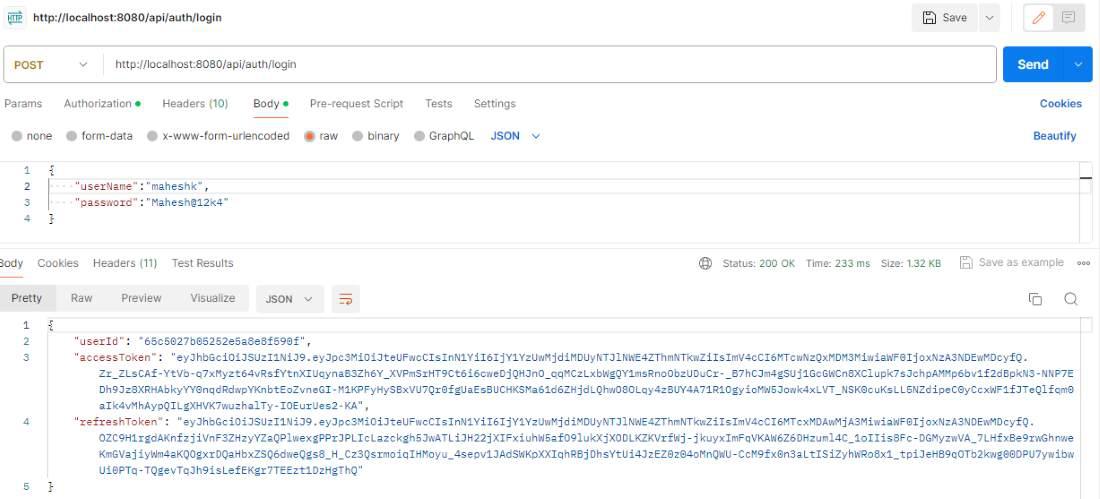
- The Authorization Server validates them and generates a JWT.
- The client stores the JWT.
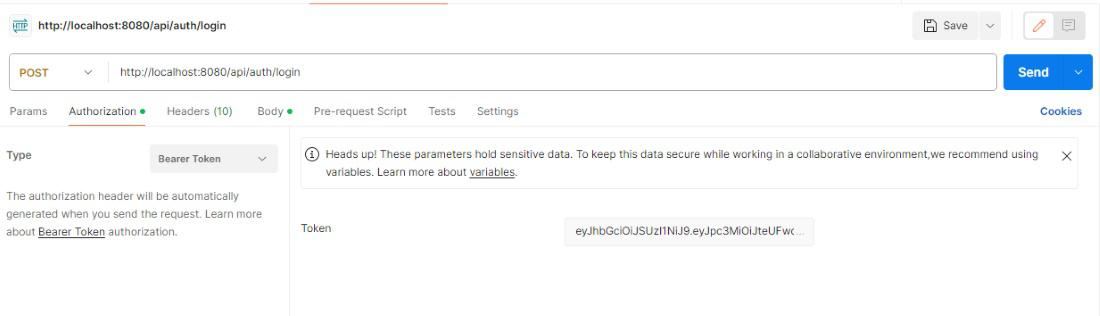
- For each request, the JWT is sent in the HTTP Authorization header.
- The Resource Server validates the token before granting access.
Example Project:
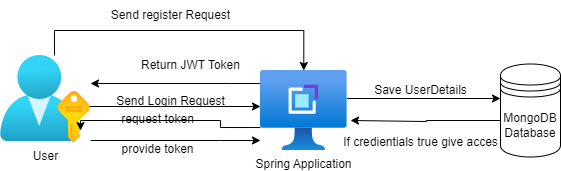
In this project, we will develop the register API, login API's, and token generator.
- Once the user registers, username and password details are stored in the MongoDB database.
- Passwords can store encoded forms, and at the same time, they can generate JWT.
- Hence, users can login and access the database, but they need to have user credentials along with a JWT token.
- Once the credentials and tokens are matched, they can log into the database.
Project Implementation
Step 1. Create Project
Create a new Spring Boot project using Spring Initializr:
- Project: Maven
- Language: Java
- Spring Boot Version: 3.3.4
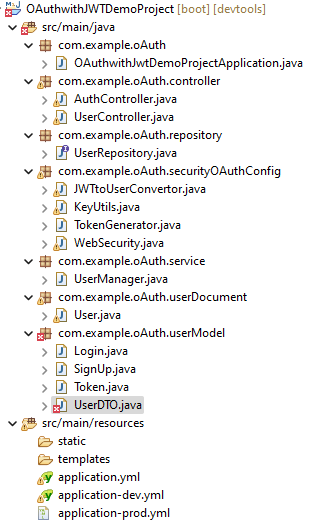
Project Structure:
Step 2. Add dependencies
Add the following dependencies in the pom.xml file:
<dependencies>
<dependency>
<groupId>org.springframework.boot</groupId>
<artifactId>spring-boot-starter-security</artifactId>
</dependency>
<dependency>
<groupId>org.springframework.boot</groupId>
<artifactId>spring-boot-starter-web</artifactId>
</dependency>
<dependency>
<groupId>org.springframework.boot</groupId>
<artifactId>spring-boot-starter-oauth2-resource-server</artifactId>
</dependency>
<dependency>
<groupId>org.springframework.security</groupId>
<artifactId>spring-security-oauth2-authorization-server</artifactId>
<version>1.3.0</version>
</dependency>
<dependency>
<groupId>org.springframework.boot</groupId>
<artifactId>spring-boot-starter-data-jpa</artifactId>
</dependency>
<dependency>
<groupId>com.h2database</groupId>
<artifactId>h2</artifactId>
<scope>runtime</scope>
</dependency>
<dependency>
<groupId>org.projectlombok</groupId>
<artifactId>lombok</artifactId>
<optional>true</optional>
</dependency>
</dependencies>
Step 3. Configure application.properties
spring.application.name=spring-oauth2-jwt-demo
# H2 Database
spring.datasource.url=jdbc:h2:mem:testdb
spring.datasource.driver-class-name=org.h2.Driver
spring.datasource.username=sa
spring.datasource.password=
spring.jpa.hibernate.ddl-auto=create-drop
spring.h2.console.enabled=true
# JWT Configuration
jwt.secret=MyJwtSecretKey12345
jwt.expiration=3600000
server.port=8080
Step 4. Entity Class
Create a User entity to store credentials.
package com.gfg.oauth2jwt.entity;

import jakarta.persistence.*;
import lombok.Getter;
import lombok.Setter;

@Entity
@Getter
@Setter
public class User {
    @Id
    @GeneratedValue(strategy = GenerationType.IDENTITY)
    private Long id;

    private String username;
    private String password;
    private String role;
}
Step 5. Repository Layer
package com.gfg.oauth2jwt.repository;

import com.gfg.oauth2jwt.entity.User;
import org.springframework.data.jpa.repository.JpaRepository;

public interface UserRepository extends JpaRepository<User, Long> {
    User findByUsername(String username);
}
Step 6. Service Layer
Create a service implementing UserDetailsService for authentication.
package com.gfg.oauth2jwt.service;

import com.gfg.oauth2jwt.entity.User;
import com.gfg.oauth2jwt.repository.UserRepository;
import org.springframework.security.core.userdetails.*;
import org.springframework.stereotype.Service;

@Service
public class CustomUserDetailsService implements UserDetailsService {

    private final UserRepository repo;

    public CustomUserDetailsService(UserRepository repo) {
        this.repo = repo;
    }

    @Override
    public UserDetails loadUserByUsername(String username) {
        User user = repo.findByUsername(username);
        if (user == null) throw new UsernameNotFoundException("User not found");
        return org.springframework.security.core.userdetails.User
                .withUsername(user.getUsername())
                .password("{noop}" + user.getPassword())
                .roles(user.getRole())
                .build();
    }
}
Step 7. JWT Utility Class
Create a utility for token generation and validation.
package com.gfg.oauth2jwt.util;

import io.jsonwebtoken.*;
import org.springframework.beans.factory.annotation.Value;
import org.springframework.stereotype.Component;
import java.util.*;

@Component
public class JwtUtil {

    @Value("${jwt.secret}")
    private String secret;

    @Value("${jwt.expiration}")
    private long expiration;

    public String generateToken(String username) {
        return Jwts.builder()
                .setSubject(username)
                .setIssuedAt(new Date())
                .setExpiration(new Date(System.currentTimeMillis() + expiration))
                .signWith(SignatureAlgorithm.HS256, secret)
                .compact();
    }

    public String extractUsername(String token) {
        return Jwts.parser().setSigningKey(secret)
                .parseClaimsJws(token)
                .getBody().getSubject();
    }

    public boolean validateToken(String token, String username) {
        return username.equals(extractUsername(token)) && !isTokenExpired(token);
    }

    private boolean isTokenExpired(String token) {
        return Jwts.parser().setSigningKey(secret)
                .parseClaimsJws(token)
                .getBody().getExpiration().before(new Date());
    }
}
Step 8. Security Configuration
Use Spring Boot 3.x style SecurityFilterChain configuration.
package com.gfg.oauth2jwt.config;

import com.gfg.oauth2jwt.service.CustomUserDetailsService;
import org.springframework.context.annotation.*;
import org.springframework.security.authentication.*;
import org.springframework.security.config.annotation.web.builders.HttpSecurity;
import org.springframework.security.config.annotation.web.configuration.EnableWebSecurity;
import org.springframework.security.config.http.SessionCreationPolicy;
import org.springframework.security.web.SecurityFilterChain;

@Configuration
@EnableWebSecurity
public class SecurityConfig {

    private final CustomUserDetailsService userDetailsService;

    public SecurityConfig(CustomUserDetailsService userDetailsService) {
        this.userDetailsService = userDetailsService;
    }

    @Bean
    public AuthenticationManager authenticationManager(HttpSecurity http) throws Exception {
        return http.getSharedObject(AuthenticationManagerBuilder.class)
                .userDetailsService(userDetailsService)
                .and()
                .build();
    }

    @Bean
    public SecurityFilterChain filterChain(HttpSecurity http) throws Exception {
        return http.csrf(csrf -> csrf.disable())
                .authorizeHttpRequests(auth -> auth
                        .requestMatchers("/auth/login").permitAll()
                        .anyRequest().authenticated())
                .sessionManagement(session -> session.sessionCreationPolicy(SessionCreationPolicy.STATELESS))
                .build();
    }
}
Step 9. Controller Layer
Expose a login endpoint to generate tokens and a secured API.
package com.gfg.oauth2jwt.controller;

import com.gfg.oauth2jwt.service.CustomUserDetailsService;
import com.gfg.oauth2jwt.util.JwtUtil;
import org.springframework.security.authentication.*;
import org.springframework.security.core.userdetails.UserDetails;
import org.springframework.web.bind.annotation.*;

@RestController
@RequestMapping("/auth")
public class AuthController {

    private final AuthenticationManager authenticationManager;
    private final CustomUserDetailsService userDetailsService;
    private final JwtUtil jwtUtil;

    public AuthController(AuthenticationManager authenticationManager,
                          CustomUserDetailsService userDetailsService,
                          JwtUtil jwtUtil) {
        this.authenticationManager = authenticationManager;
        this.userDetailsService = userDetailsService;
        this.jwtUtil = jwtUtil;
    }

    @PostMapping("/login")
    public String login(@RequestParam String username, @RequestParam String password) {
        authenticationManager.authenticate(new UsernamePasswordAuthenticationToken(username, password));
        UserDetails user = userDetailsService.loadUserByUsername(username);
        return jwtUtil.generateToken(user.getUsername());
    }

    @GetMapping("/secure")
    public String secureEndpoint() {
        return "Access granted to secured resource";
    }
}
Step 10. Run and Test
- Run the application.
- Access H2 console at http://localhost:8080/h2-console.
- Insert a test user:
INSERT INTO USER (username, password, role) VALUES ('user1', 'password', 'USER');
- Generate a token:
POST /auth/login?username=user1&password=password
Response: JWT token string
- Access secured endpoint:
GET /api/auth/login
Header: Authorization: Bearer <token>